We are happy to confirm that XMA have been named an Apple Authorised Education Specialist (AAES), one of just eight organisations awarded the status by Apple in the UK.
As an AAES, we have been officially recognised as an expert provider of Apple solutions to the education sector. With over 30 years’ experience as a Public Sector Reseller, we have provided endless value to our education customers, aiming to empower educators to work better through the use of technology
To find out more about the XMA Apple partnership and how we deliver these services to our education customers, visit our Apple in Education page here
5 Questions answered on distance learning
With the majority of students across the country now learning from home its evident that teaching from home requires a different approach to teaching from school. Join us as we answer 5 useful questions that teachers have been asking with Google tutorials on how to enhance this new learning experience.
How do I make lessons accessible to all?
Students can use voice typing to enter, edit and format text in Docs and slides, all with out a keyboard- Tutorial
Teach your students to use assistive technology in G Suite, like voice typing and braille support- Tutorial
Explore the range of accessibility features on Chromebooks- Tutorial
Students can enable subtitles on Hangout Meet- Tutorial
How do I keep students engaged?
Encourage discussions by having students post questions and comments in Google Classroom- Tutorial
Arrange 1:1 time in Google calendar and allow students to book time in for individuals or small group sessions- Tutorial
Demonstrate concepts using Jamboard or have students collaborate on brain storming activities- Tutorial
Utilise guardian notifications in Google Classroom to provide regular email summaries- Tutorial
How do I teach remotely with video calls?
Use Hangouts Meet to create video calls and invite the entire classroom- Tutorial
Use audience Q&A in Google slides to get real time questions from your class- Tutorial
Livestream your lessons and create a calendar invite for the whole class- Tutorial
How do I teach remotely without video calls?
Use Google Classroom to set assignments, encourage collaboration and support communications with students- Tutorial
Create a class website for your students to host lesson information, videos and more- Tutorial
Create an online quiz for your class in Google forms- Tutorial
Provide your students real time feedback in Google Docs using the comment feature- Tutorial
How best can I keep in touch with other teachers?
Stay connected with virtual coffee break events in Google calendar and invite others via Hangout Meet- Tutorial
Use Hangout chat to stay connected with colleagues via instant messaging- Tutorial
If you’ve got resources to share, do so via Google Drive- Tutorial
Share all staff updates using Google groups to keep all teachers informed- Tutorial
For more information on the tools needed to support your school with distance learning contact our team of education experts: schools@xma.co.uk
Lenovo X1 Carbon: The perfect device for remote working?
Lenovo X1 Carbon: Reinventing Portability.
We set a task for our Corporate Account Manger Ben Davies to switch his old machine for a shiny, new Lenovo X1 Carbon Device. Ben told us more about his role, what he needs from a device, and how he got on with the X1 Carbon. Could this be the perfect device for remote working? Let’s find out…
Ben Davies
“I’m a customer focused Corporate Account Manager for XMA. The most important part of my role is ensuring my clients get the best standard products and services they require.
For my job I need a light and powerful machine. When I am at home or in the office, I have multiple business applications, large databases and spreadsheets open at any one time. I need all of these to run seamlessly to ensure I can work efficiently for my clients. When I am working externally, such as visiting my clients, I need a device that looks professional, whilst being able to handle long periods of presenting, for this, the X1 Carbon ticks all the boxes. It is lightweight, powerful and looks slick. A highlight has been the battery life, this is great for remote working.
Here are my top 3 findings:
1: Mobility. The mobility of this device is fantastic due to it being extremely light and with a fantastic battery life.
2: Performance. The performance of this device is great, I’m a lazy user and want Teams, Outlook and numerous other business applications open all the time. Thanks to the performance of the X1 Carbon, I have been able to use these all together consistently.
3: Design. When meeting with my clients, I am often asked about this device due to its slick design – it has opened up some great conversations! I have had some horrendous looking devices in the past and it doesn’t set the right tone in front of customers. The X1’s finish gives me a head start.”
Hopefully Bens experience helps guide your decision-making process when searching for the best device for your remote workers. Here is some more information on the Lenovo X1 Carbon:
ThinkPad X1 Carbon: Carbon-tough yet ultra-light.
Key features:
Wherever the road takes you.
The X1 Carbon Gen 7 is 6% thinner than its predecessor at only 14.9mm thin, weighing only 1.09kg. This lightweight device reinvents portability. This device delivers high performance with the 18-hour long battery life, enabling productivity on the go.
Small product, huge power.
The Lenovo X1 Carbon is powered by 8th Gen Intel® Core™ processors and up to 16GB memory. The PCIe solid-state drive (SSD) delivers fast performance, to boost productivity.
Built for life’s extremes.
Like all ThinkPad Laptops, the X1 Carbon Gen 7 is tested against 12 military-grade requirements and over 200 quality checks to ensure it will run in extreme conditions.
A laptop as well-connected as you.
X1 Carbon Gen 7 keeps you online, even without Wi-Fi when you choose the optional LTE-A card and the WWAN technology.
Secure your data.
The X1 Carbon keeps your business data and privacy safe with the comprehensive suite of ThinkShield security features such as ThinkShutter and Fingerprint login. The discrete Trusted Platform Module (dTPM) encrypts data and works in conjunction with Windows 10 Pro security.
For your eyes only.
As part of the ThinkSheild security, there are a combination of hardware and software options available to work together to ensure what’s on your display is for your eyes only, such as PrivacyGuard and PrivacyAlert.
Say “hello” to a secure, simple, cloud-ready future
Modernise with the latest versions of Windows Server on HPE Gen10 and benefit from improved security, greater efficiency, and access to the cloud.
Windows Server 2008 went end-of-support January 14th, 2020.
Windows Server 2008 is an operating system produced by Microsoft. In the past, if you had a problem with your server, either you, your IT partner, or your software vendor had the ability to reach out to Microsoft to get:
Technical support
Help troubleshooting issues
Patches or updates
Microsoft will no longer provide this support.
If your business runs software on the Windows Server 2008 operating system, neither you, nor your IT vendors, IT service providers, or custom/third-party software application developers will be able to contact Microsoft for help even if the issue originates in Windows Server 2008.
Upgrade to Windows Server 2019 today with Windows Server on HPE Gen10
The Benefits
In addition to cybercrime protection, new systems are significantly more efficient. With Windows Server 2008, virtual machines consume so much CPU and memory that only a small number of VMs can run on each physical server. With modern Windows Server technology, it’s possible to run hundreds or thousands of containers on each server. Fewer servers = lower costs and less complexity.
Old servers play a large role in rising IT costs because they drive up the #1 cost issue for most data centers: software license and support fees. Moving to the latest HPE Gen10 servers will help control this significant expense. Since most software is licensed according to the number of processor cores:
Microsoft will offer extended security updates for customers who migrate their legacy applications to the Azure cloud and run them on virtual machines. Is that the best solution for you?
Migrating your entire legacy environment to run in virtual machines in the public cloud still leaves you with outdated applications on an OS that loses support as soon as you leave Azure. And VMs in the cloud require extensive ongoing management for many of the features that are automated in cloud-based applications, including configuration sizing, securing, patching, and maintaining. A migration of Windows Server 2008 to VMs in the cloud is a short-term fix that will need to be resolved for your business to truly benefit and move forward.
The better alternative
When a legacy Windows Server 2008 environment is modernised on HPE Gen10 Servers with a current version of Windows Server, you get the added security against cybercrime, the efficiency of cost-saving technologies, and the benefits of a hybrid cloud platform. Exciting HPE products like Synergy, SimpliVity, and the Apollo System for AI and Deep Learning provide powerful tools so that you can successfully address the IT challenges that were never imagined back in 2008. It’s time to move forward.
Contact us today to find out more about which solution is best for your business
XMA’s Guide to Getting started with Microsoft Teams
With more and more of us needing to work from home, we wanted to collate some resources and share some links to items that should help organisations and end users get started quickly!
Definitely check out the ‘Remote Work Checklist’ from Microsoft. We found the most important one was setting up your workspace… even if you’ve got an orthopaedic mattress you can’t ‘Work from Bed’ for 3 weeks [if not longer]! Also get that video on! Turning the video on your Teams call can really makes a difference as it ensures all members stay focused and always good to get some human interaction and also prevents working in your pyjamas!
Teams hints and tricks
Watch the Welcome Video to get an overview of ‘What is Teams?’
XMA and Spongy Elephant have partnered to share £FREE training modules that can enable you to use Microsoft’s remote learning/working tools more effectively.
Create the perfect Team from the start and add members in a variety of ways
Understand the Microsoft Teams interface and how to use powerful features like commands
Discover how conferencing works in Teams with Teams virtual meetings
Learn how to minimise the “noise” of notifications and alerts to limit distractions
Here you can learn how to make your meetings engaging, productive and effective.
Use Teams for your entire meeting experience, including:
Sending agendas and setting context before the meeting, creating momentum
Sharing live applications and taking meeting notes, keeping attendees engaged during the meeting
Posting files and action items after the meeting, ensuring timely follow-through
Record your meeting, making it easy for those who couldn’t attend to get caught up
Keep important meetings at your fingertips by pinning them for easy access
Assess which audio and video devices are best for your meeting needs
If you have any questions or need any help with Microsoft Teams please contact our CSP Business Manager, James.Thorogood@xma.co.uk or call our sales team on 0115 846 4000
Technology is transforming the healthcare industry
Technology is transforming the healthcare industry. It is now possible to provide a better experience to your patients and practitioners by modernising your healthcare environment with modern technology.
Widespread adoption of emerging technologies is changing the way medicine works; however, future-proofing hospitals remains a concern. Healthcare providers often face the challenge to cope with more patients, adapt to new technologies and provide smart facilities & services. To meet this concern, healthcare providers need modern systems. They require robust infrastructure solutions to improve efficiency & help the clinicians advance the quality of patient care. With HPE’s ultimate infrastructure solution, HPE Synergy, healthcare leaders can deliver a superior Virtual Client Compute experience that allows medical providers to enjoy higher availability of GPU intensive applications.
Healthcare providers can now access the ultimate flexibility to maintain a variety of workloads on a single platform, as well as scale to meet greater demand during seasons of increased usage. HPE Synergy has been thoroughly designed to compose and recompose assets in a matter of minutes—enabling new levels of speed and efficiency.
HPE Synergy provides a foundation of innovative security features that goes beyond perimeter protection—arming your systems to prevent, detect, and recover from threats. You can enjoy a seamless, consistent experience across devices, even as caregivers move to different rooms within a facility. With Synergy, we can virtualise the OEM applications and the delivery of the GPUs to the applications.
Coupled with HPE Pointnext services, Proactive care support provides both reactive and proactive service elements for your synergy devices and systems and helping you focus on your key priorities. Designed to help reduce problems from occurring and giving you a rapid response when they do occur. With HPE proactive care, you will get enhanced call experience with an assigned Technical Support Specialist who manages your case from start to finish and rapid access to technical experts to help resolve issues quickly. Proactive issue prevention with tailored reports for firmware/software revision management, proactive scan (health check), and incident trend reports. This will Free up IT teams from day to day maintenance and helps your team to protectively manage firmware/software revisions and other aspects of system health.
The Healthcare industry needs an infrastructure that is flexible enough to maintain a variety of workloads and scale with the seasons of increased usage. Moving to composable architecture can provide healthcare leaders with the ultimate flexibility to allocate a variety of workloads on a single platform and recompose those assets in minutes. Together with a streamlined management interface, healthcare providers can now also enjoy a greatly simplified management experience.
We’re passionate about delivering an outstanding customer experience and are trusted by some of the largest Public Sector organisations in the UK. With Government initiatives such as the NHS Infrastructure Maturity Model (NIMM) continuing to drive transformation across IT infrastructure, we align our knowledge and experience to deliver sustainable solutions which address the need for good governance.
As a long-term supplier to the NHS and an accredited supplier under the Crown Commercial Service, we recognise the potential to use technology to create efficiencies and improvements to patient care across all GP practices, CCGs, CSUs and local health economies. By combining our understanding of the NHS IT market, IT partner alliances and our national service and delivery model, we help organisations make the shift towards digitised healthcare.
Covid-19 – Partner Updates
Like all businesses, XMA are concerned about the recent Covid-19 outbreak.
After the announcement by the Prime minister on 12th March we are continuing to follow government advice closely and are primarily focused on ensuring the safety of our staff, customers and suppliers.
The company has a business continuity plan in the event of any significant disruption and will endeavour to keep as near to normal levels of service if a period of quarantine is imposed by the government. Clearly, if our warehouses are closed, this will be more disruptive. We will post updates regularly on our website as the situation alters.
We work with a number of technology partners as do our customers and have consolidated links to our partners Covid-19 messaging in one location. Many of them working to assist their customers where they can with their relevant technologies in areas such as “how-to” webinars, providing software at no or reduced cost – mainly around remote working as well as general updates on their business during this time.
Please see below links to our Vendor Partner updates:
If you have any questions or concerns around your Infrastructure, please get in touch with your XMA Account Manager or contact us on the form below.
To read our response to the COVID-19, please read here
Webinar: Preparing your school for remote teaching and learning
The COVID-19 crisis has startled us all.
We cannot plan for, or stop a crisis, but we can manage the outcomes in a considered and structured way. We have seen grand escalations in recent weeks from around the globe which has prepared us for the possibility of remote working; as mentioned in our live webinar, UK schools have been forced to close for an unknown amount of time.
What impact does this have on your school/college, your staff, and your students? What do you plan on doing to keep in the loop with your community?
Although it may feel like the situation is out of our hands and there is a lot going on, we still have complete control over what we choose to deliver to our communities and how we can progress with a smart strategy moving forward.
Media interference is powering through industries at a high rate, some with conflicting messages which can cause confusion and uncertainty, but we aim to guide you through this time of remote teaching and learning with our expertise in future-piercing technology and our positive perspective on how processes can continue, granted not as normal, but as a new experience…
Listen to our webinar around preparing schools for remote teaching and learning with XMA.
Discussion points:
Microsoft – Sumit Tank
How to create a live and on demand classroom environment
The vast array of services we offer to help in your digitized learning transformation
Solutions Architect – Tobias Stronge
The partnership process – a 4 level process when planning for remote teaching
Building a proactive model
Final words of…
Device distribution
Supply chain
Cloud technology
Using website to communicate with parents
Free productivity suite
Keep in the loop for more information and other webinars in our Education Series and be sure to follow us on Linkedin and Twitter for updates.
At this time when we are challenged, communication is key to keep morale and team spirit high. Technology allows us to communicate and remote teaching and learning provides a huge space of opportunity for us to explore new ways of delivering learning continuity. If we work together, we should be able to continue to communicate with those around us positively.
If you have any further questions then please do send them over in an email to schools@xma.co.uk or give us a call on 01727 201 820.
Let’s continue to discuss and share the great technology we know and love, with your teaching team and students. We will be here to support you.
Accessibility: The Dark Mode Rises
1 Minute Read (1MR)
The days of straining eyes, sensitive retinas and stretched out arms are over…
Hello Darkness, our new friend.
We are using our screens more now than ever (and multiple versions at once), whether it is on our desktop or mobile, we are engaging with hours and hours worth of scanning, typing, watching and re-reading, but what impact is this having on our spherical vision artists (commonly referred to as our eyes)?
Difficulty focusing, headaches, eye discomfort, blurred vision and insomnia caused by the suppression of the secretion of melatonin (the hormone needed for sleep) are all symptoms of overexposure to the clinical and strikingly bright white backgrounds that digitally lay before us.
Although we are aware of the ‘consequences’, we are a technology driven and obsessed circle – will we stop using our screens to protect our eyes? Most likely not. But what can we do to ease the strain and protect our lenses? Unless you would like to invest in a pair of yellow tinted spectacles, the next best thing for us is… dark mode.
In recent weeks, a modern redesign launched last week on Whatsapp with glare elimination – accommodating savvy users for those late night messages and addictive group chat contributions (extra effective with the orange tinge of night mode). Some users were automatically updated to this, although some users need to manually switch. If you haven’t had the chance to switch, try it out and see if it could work for you.
Why choose dark mode?
It is more relaxing for your eyes
Prolongs your devices battery life
It looks cool
How has Google Chrome modernised this trend of interface modification? And we ask, how often do you check out the available themes on Chrome?
Go to Settings > Appearance > Themes.
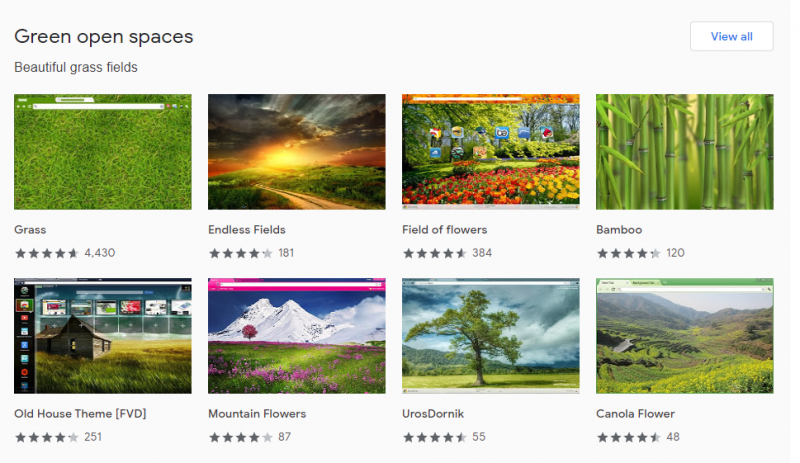
Here you will have the chance to change your browser settings to a vibe that suits yours. On the Chrome Web Store there is a large and heterogeneous collection of ultra modern layouts with sleek and stylish tabs and colours including: Dark and Black, Space Exploration, Minimalist, Enchanting Places, Superhero Sketches, Pink Party, and Doodle & Friends.
Take a look at the Green Spaces category preview below. Feeling refreshed? Mix it up and inspire.
Guide your eyes through the web with a touch of design…
How can Microsoft help with Covid-19?
We all know that technology is going to play a pivotal role in reducing the impact of COVID-19 on people and organisations, including helping them stay productive at work when they’re not able to be there in person. However, lots of businesses, as well as education and public sector organisations, are not geared to sudden mass home working.
For our customers at XMA I wanted to update you as to how you can work remotely without sacrificing collaboration, productivity or security.
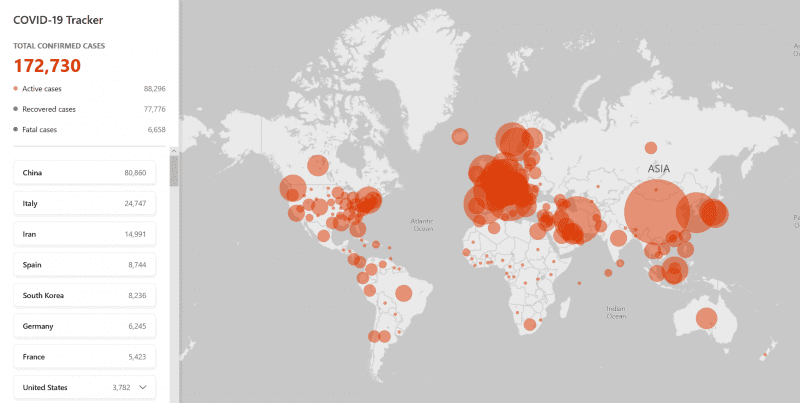
Microsoft launched an interactive map that allows visitors to click on the country to see the specific number of cases of COVID-19 based on data from the World Health Organization (WHO); the US Centers for Disease Control and Prevention (CDC); and the European Centre for Disease Prevention and Control (ECDC).
Whilst it is scary to see this data outlined on a heatmap, I’m pleased to report that this website is not the only way that Microsoft are supporting in the COVID-19 crisis.
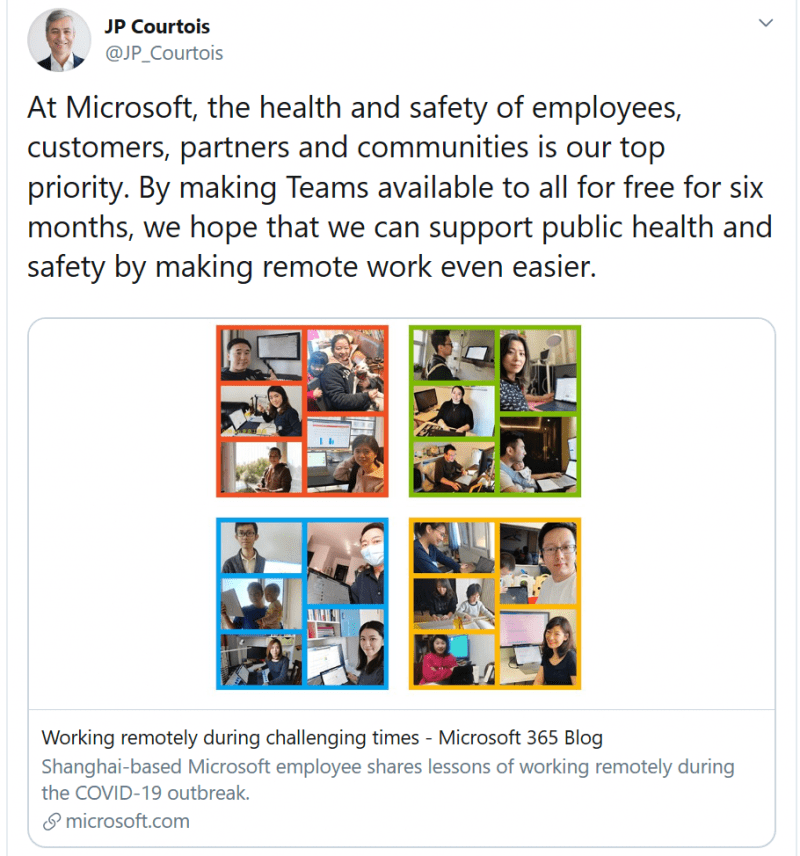
JP Courtois [Microsoft’s executive vice president and president of Microsoft global sales, marketing and operations] announced that Microsoft are making their paid for collaboration tool, Microsoft Teams, free for six months to help organisations deal with the demand of end users needing to work from home.
The Teams trial is part of a new Office 365 trial for enterprises (Office 365 E1) which includes full meeting, collaboration and workflow capabilities.
Microsoft rolled out a new update on March 10 which lifted restrictions on how many users can be part of a team in the free version of Teams. The newly released features include being able to set up Office on personal devices such as phones and tablets; 1TB of cloud storage; enterprise video-sharing service; and being able host online video conferences.
For me the key obvious benefits of this are the online meetings, increased file storage and Office Suite on a personal device.
You will be able to host online meetings with audio, HD video, and web conferencing. Even being able to present ‘Broadcast meetings’ which will allow up to 10,000 people join with just a web browser. This can be done on almost any device – perfect for large, companywide, conferences or events.
With OneDrive for Business each user has 1 TB of personal cloud storage that can be accessed from anywhere, on any device. This means that you can securely save the documents that you work on at home and share with others inside and outside your organization, whilst being in control of who can see and edit each file. You could then sync these documents when you get back into your place of work with your local drives.
Installing the native Office suite of products such as Word, Excel and PowerPoint will enable most workers to continue being productive especially if their own organisation can not afford to provide them with company owned hardware or the licences.
At XMA we were already regularly seeing the benefits of Teams but now with imposed travel reductions it is becoming a go to solution. Being well verse in the Microsoft Eco-structure internally as well as via our consultants, if you require any assistance on getting your trial setup, please let us know and we are of course happy to help.
In addition to this extended 6 month trial there are also specific ways that Azure AD can help enable remote access to work resources.
At XMA we want to help our customers in this time of need. So any support you require from your Account Manager, please let them know. For the more specific items I have covered here today, please feel free to reach out and contact me directly.
In summary stay safe, travel less, collaborate more.





 Monitoring by Hotjar