

Global Component Shortage Bulletin: Providing regular updates on global component availability and supply chain conditions. Learn more.

Archive

Boost Your Bottom Line With Windows 11 – How Upgrading Can Increase Your ROI

Businesses are constantly seeking ways to optimise their operations and maximise their return on investment (ROI). While technology investments are often viewed as necessary expenses, they also hold the potential to significantly improve efficiency, productivity, and overall profitability. A recent study conducted by Forrester highlights how upgrading to Windows 11 can lead to substantial financial benefits for organisations. 

The Forrester Study: Key Findings 

The Forrester study examined the potential ROI that organisations can realise by deploying Windows 11 devices. The research involved in-depth interviews with IT decision-makers and end-users across various industries, along with financial analysis to quantify the benefits and costs associated with the upgrade. 

The study found that organisations deploying Windows 11 devices can experience significant improvements in several key areas, including: 

  • Enhanced Security: Windows 11’s robust security features, such as hardware-based isolation, secure boot, and advanced threat protection, help reduce the risk of cyberattacks and data breaches. This translates to cost savings by minimising downtime, preventing data loss, and avoiding regulatory fines. 
  • Improved Productivity: Windows 11’s streamlined interface, intuitive navigation, and enhanced multitasking capabilities enable employees to work more efficiently and complete tasks faster. This can lead to increased output, improved collaboration, and accelerated project timelines. 
  • Streamlined IT Management: Windows 11’s simplified deployment, configuration, and management tools reduce the burden on IT staff, freeing up time for strategic initiatives. Additionally, the platform’s improved compatibility and support for modern hardware can lead to cost savings on maintenance and upgrades. 
  • Enhanced Employee Experience: Windows 11’s modern design, improved performance, and focus on user well-being contribute to a more positive and engaging work environment. This can boost employee morale, reduce turnover, and improve overall productivity. 

Calculate Your Potential Savings 

The financial benefits of upgrading to Windows 11 can be substantial. The Forrester study found that organisations can achieve a three-year ROI of 250% and recoup their investment in just six months. To help businesses understand their potential savings, Microsoft has developed a Windows 11 Devices Calculator. By inputting a few key data points about your organisation, you can generate a customised report that estimates the financial impact of upgrading to Windows 11. 

Try the calculator now: Windows 11 Devices Calculator (totaleconomicimpact.com) 

Capitalise on your Savings with XMA 

Upgrading to a new operating system can seem daunting, but XMA is here to support you every step of the way. Our Windows 11 solutions and services ensures you realise the full benefits of Windows 11 without the headaches of managing a complex IT project. Here’s how we can help: 

  • Windows 11 Readiness Assessment: We’ll evaluate your existing infrastructure to identify any compatibility issues and recommend the most suitable devices for your needs. 
  • Device Procurement: Leverage our extensive network of suppliers to get the best deals on the latest hardware. 
  • Rollout and Deployment: Our experienced engineers will handle the entire deployment process, minimising disruption to your business. 
  • Hardware Management as a Service (HMaaS): We’ll proactively manage your devices, ensuring they’re always up-to-date and performing optimally. 

With XMA, you can focus on your core business while we take care of the technology. 

Turning a Necessity into an Investment 

Upgrading to Windows 11 is not simply a technology refresh; it’s a strategic investment that can deliver significant financial benefits. The Forrester study provides compelling evidence that organisations can increase their ROI by deploying Windows 11 devices. From enhanced security and improved productivity to streamlined IT management and an enhanced employee experience, the advantages are clear. 

Take the next step and see how Windows 11 can boost your bottom line. Try the Windows 11 Devices Calculator today!  Windows 11 Devices Calculator (totaleconomicimpact.com) 

Contact XMA for a free consultation on how you can make the most of your Windows 11 investment. Windows 11 Readiness (office365.com) 

Sector-Specific: Windows 11 in Education

Welcome to Sector-Specific, a series of articles about how Windows 11 is poised to help different job roles within the public sector. Today, we’re focusing on the industry that has a wide net in terms of IT needs: Education

Windows 11 is designed to provide students, educators, and IT staff with innovative features and enhanced security, all working in tandem to create an efficient yet enjoyable learning experience.  

But time is of the essence. Support for Windows 10 is ending on October 15, 2025, meaning no further security updates or technical assistance will be provided. This leaves educational institutions that haven’t upgraded vulnerable to cyberattacks and compatibility issues. The transition to Windows 11 is not just an upgrade; it’s a necessity for the safety and efficiency of your institute’s digital environment.

But with 100s of potential devices needing upgrading to your specific needs, where do you even begin? XMA’s comprehensive suite of services, including Windows 11 readiness assessments, device selection and procurement, and hardware management as a service, provides a complete roadmap to make your transition smooth, secure, and cost-effective.

How Windows 11 Transforms the Classroom Experience

Let’s take a closer look at how Windows 11 caters to the unique needs of everyone in the educational environment:

For the Engaged Student: Windows 11’s speed and responsiveness ensure projects and presentations run smoothly, without frustrating crashes or delays. Integrated collaboration features like OneDrive and Teams, make group work simple. And for creative students, Windows 11’s compatibility with a wide range of creative software means they can work best with the apps they love.

For the Innovative Educator: Windows 11 and Microsoft Teams for Education combine to create a dynamic hybrid classroom, fostering communication and simplifying assignments. Built-in accessibility features ensure all students can fully participate, while the intuitive interface allows educators to focus on teaching, not troubleshooting. With Copilot, educators can draft lesson plans, quizzes, and emails in a fraction of the time, allowing them to focus on more impactful tasks.

For the Pragmatic IT Staff: XMA’s expertise and Windows 11’s deployment tools makes managing devices hassle-free. Advanced security features protect sensitive student data, and compatibility with existing software minimises disruptions. Plus, our cost-effective solutions help you maximise your budget. Copilot can assist IT staff in troubleshooting issues and finding solutions quickly, reducing downtime and increasing efficiency.

XMA’s Windows 11 Roadmap: Your Path to a Secure Future

Here’s how XMA partners with your school to ensure a successful Windows 11 implementation:

  1. Windows 11 Readiness Assessment (6-8 Weeks): We assess your existing infrastructure, identifying any potential compatibility issues or areas for improvement.  
  2. Device Selection and Procurement (4-8 Weeks): Our experts guide you through selecting the right devices for your specific needs and budget.
  3. Testing and Deployment (16+ Weeks): After rigorous testing of app compatibility, IT infrastructure, and pilot programs, we roll out the upgrade across the organisation.
  4. Hardware Management as a Service (Ongoing) from first deployment): We handle ongoing device management, updates, and maintenance, freeing up your IT staff to focus on strategic initiatives.  

Act Now to Protect Your Institute’s Digital Future

The clock is ticking. With the end of Windows 10 support looming, the time to upgrade to Windows 11 is now. Contact XMA today for a free consultation and let us help you make a smooth, secure, and cost-effective transition.

Are you ready to start your Windows 11 journey? Visit us at Windows 11 | XMA or book a free consultation at Windows 11 Readiness (office365.com)

Enhancing Cyber Resilience in 2024: 5 Key Trends & Strategies for Business Transformation

In the ever-evolving digital landscape of 2024, cyber resilience is more than a technical concern – it’s a core business strategy. As threats grow more sophisticated, organisations must adapt to safeguard operations and data. XMA, in collaboration with Commvault, highlights the 5 critical trends and best practices shaping cyber resilience.

1: The Changing Face of Cybersecurity Leadership

The days of cybersecurity being solely an IT issue are over. Today, CEOs and board members are taking a more active role.

• Executive Involvement: Top-level executives are now directly involved in cybersecurity initiatives. This means they’re not just approving budgets but guiding strategic decisions and ensuring regulatory compliance. Boards that holistically understand cyber resilience are better equipped for the future.
• Strategic Decision-Making: Cybersecurity is no longer just about preventing breaches; it’s about aligning security strategies with broader business goals. Leadership plays a crucial role in this alignment.

“Security is about mindset, first and foremost, so it is vital that an organisation’s leadership team lead by example. As such, obtaining buy-in from the board and from line-of-business leaders is vital for a CISO to be effective.”
– Scott Wright, Head of Pre-Sales, XMA

2: Breaking Down Silos & The Power of Collaboration

• ITOps & SecOps Convergence: To effectively combat threats, it’s essential to break down the traditional barriers between IT operations (ITOps) and security operations (SecOps). This convergence allows for the sharing of threat intelligence and a more unified defence strategy.
• Shared Intelligence: When teams work together, threats can be detected earlier and responded to faster. This collaborative approach strengthens the overall security posture.

3: Harnessing AI & Automation for Defence

• Efficiency & Risk Mitigation: Artificial intelligence (AI) and automation are becoming indispensable tools in cyber resilience. They streamline threat detection and response, analyse vast amounts of data for anomalies, and automate routine tasks, freeing up human analysts for more complex challenges.
• The Balancing Act: While AI is a powerful ally, it’s crucial to recognise that cybercriminals are also using it. Organisations must develop balanced strategies that leverage AI’s benefits while mitigating its potential misuse.

“With AI-based tools for generating phishing emails and other attacks, AI-based defences are essential to combat the sharply rising numbers of never seen before attacks. The traditional
“try and match to a list of known malicious” approach is no longer fit for purpose. Some cybersecurity vendors embraced this years ago and are offering mature products capable of making highly reliable determinations on zero-day threats.”
-Scott Wright, Head of Pre-Sales, XMA

4: The Evolving Cybersecurity Skills Landscape

• Integrating Skills: The demand for professionals who can bridge the gap between AI and cybersecurity is on the rise. This integration is key to building robust defences against emerging threats.
• Continuous Learning: Cybersecurity is not a static field. Organisations must invest in continuous education and training to keep their teams equipped to handle the ever-changing threat landscape.

5: Testing, Clean Rooms, and Holistic Risk Management

• Regular Testing & Clean Rooms: Frequent testing of cyber defences, including the use of clean rooms (controlled environments for secure data recovery), is essential to ensure preparedness and the robustness of an organisation’s defences.
• Holistic Risk Management: Understanding digital risks is not just about technical vulnerabilities. It requires a comprehensive approach that integrates cybersecurity into every aspect of business operations.

“Incident response exercises are a crucial part of readiness testing. These exercises can range from a half-day for a small group to a week-long exercise involving representatives from all areas of the organisation. There are always great lessons learned!” Scott Wright, Head of Pre-Sales, XMA

Commvault: The Solution for Cyber Resilience
Commvault’s comprehensive solutions help organisations build a resilient digital infrastructure. By embracing the trends and strategies like the ones above, businesses can achieve greater continuity and security in the face of evolving threats.

Ready to Strengthen Your Cyber Resilience?

Bertha Park High School: Building Technology into Educational Foundations

A School with a Mission

In 2019, as a new school serving a new community, Bertha Park High School in Perth, Scotland, wasn’t content with simply opening its doors – it aimed to rethink the place of technology in education. Driven by the belief in its capacity to unlock the potential of its students, the school embarked on a mission to find the perfect tools to empower students and teachers alike.

A Vision Without Concessions

Bertha Park’s Headteacher, Stuart Clyde, didn’t settle for compromises. He looked for technology that was more than just functional; it needed to spark creativity, invite collaboration, and bridge the gap between the classroom and the ever-evolving workplaces of tomorrow. User-friendliness and accessibility weren’t just buzzwords – they were fundamental to driving learning every day.

“We are creating a school fit for the 21st Century, so that our students have the most up-to-date and relevant experience that prepares them for the modern-day workplace. To achieve that, we have created a digitally immersive learning environment. We want technology not merely to compliment what we do, but to be built-in to the very DNA of the school.


– Stuart Clyde, Headmaster, Bertha Park

XMA and Bertha Park, fuelled by iPad and Microsoft 365

Building on a strong, well-established relationship with XMA, Bertha Park took the first steps on their edtech journey. XMA’s mission was clear – provide stella procurement, training, and consultancy services. XMA’s guidance gave them the space to explore the art of the possible, ultimately landing on the winning combination of Apple iPads and Microsoft 365. Microsoft 365 offered the familiarity students would need in the workforce, while the iPad burst with creative power, endless versatility, and inclusive tools designed to level the playing field and bridge the digital divide.

An excellent example of this is Microsoft OneNote. Already a versatile piece of
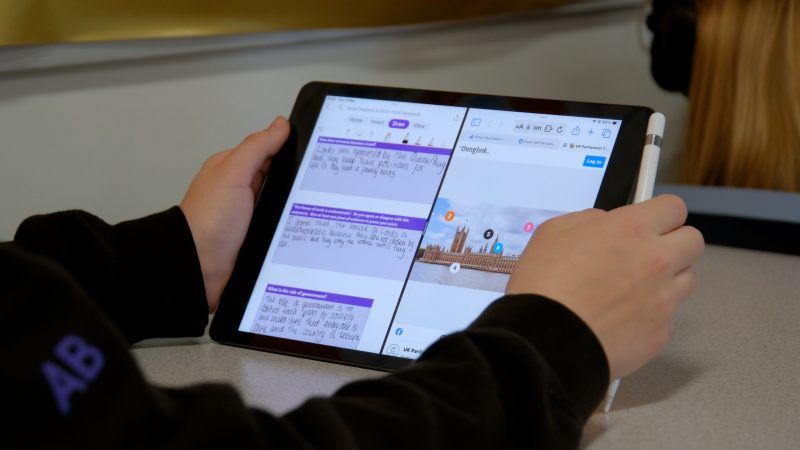
note-taking software, when paired with the Apple Pencil and the iPad camera, it becomes a truly digital jotter – a canvas to capture learning across a whole school day.

“Perth & Kinross and the team behind Bertha Park took great care in defining what they wanted learning and teaching to look like. They understood that utilising the best iPad and Microsoft could offer would give students and teachers the broadest opportunities to shape learning in meaningful, relevant and engaging ways.”
– Michael Conlon, Education Transformation Consultant, XMA

Touchscreen-Friendly Interface:
The entire Office suite (Word, Excel, PowerPoint, etc.) is redesigned to work effortlessly with the iPad touchscreen. Menus, toolbars, and navigation are intuitive for finger-based input.

Apple Pencil Support:
Take handwritten notes, annotate documents, and draw with precision in Word, OneNote, and PowerPoint, leveraging the pressure sensitivity of the Apple Pencil.

Accessibility:
The visionary set of accessibility features built into the iPad is boosted by Microsoft tools for inclusion, like Immersive Reader, that work across its suite of applications.


Apple Pencil Support


Touchscreen-Friendly Interface


Accessibility

Training began in May 2019, with XMA Education Transformation Consultant, Michael Conlon providing guidance on how to maximise both the use of iPad and Microsoft 365 Apps. Teachers weren’t simply asked to rewrite previous lesson plans and reuse old templates; they were inspired to reimagine lessons, weaving iPad capabilities and Microsoft’s software into the very foundation of their teaching styles. As the countdown to the end of school holidays was ticking down, the initial iPad rollout was a key milestone, putting 250 devices – each paired with an Apple Pencil – into the hands of students ready to learn.

“Planning for learning using iPads is completely different, but so much better. My lessons naturally include research opportunities and alternative work options for pupils, allowing me to better meet their needs. Having iPads available helps me to build in both support for those who need it to achieve highly, and for those who require further challenge. It is common for me to ask pupils to work collaboratively on tasks using shared documents, live response apps on the whiteboard or even in the collaboration space on Microsoft OneNote. Retrieval practice and AiFL are so easy to build into every lesson. Put simply – I can’t imagine teaching without iPads in the hands of every pupil – it is truly transformational and worth every minute of extra effort to learn these new skills.”
– Educator, Bertha Park

Bertha Park was Prepared for the Unexpected

The true test of Bertha Park’s bold vision came with the unprecedented challenge of the COVID-19 pandemic. Yet, they didn’t just weather the storm; they thrived. Because technology was already ingrained in their learning model, the transition to remote instruction was seamless.

“Having the school’s learning organised around the Microsoft Office 365 suite was crucial in establishing our remote learning model. The students were able to transfer almost seamlessly into this way of working as it was already the way we did things. It has allowed us to have a legacy of facilitating working out of school that we still utilise today.”
– Educator, Bertha Park

This resilience has fuelled Bertha Park’s rise to the pinnacle of educational innovation. Their commitment has earned them the rare dual distinction of being both a Microsoft Flagship School and an Apple Distinguished School – the first in the UK to hold both titles.

A Long-Lasting Partnership

XMA is more than just a technology provider for Bertha Park High School; we are partners in progress. Together, we continue to push the boundaries of what modern education can be. Bertha Park’s story is proof that when schools embrace technology, students and teachers gain the skills and confidence to shape it.

“Using my iPad has allowed me to present my work in unique and different ways. I feel I have developed my skills in using film and media to demonstrate what I have learned. I have discovered that working this way is one my greatest passions, so I now know that this is what I want to do as a career.”
– Robert Jack, S4 Pupil, Bertha Park

Fuelling Your Business with Data: The HPE ProLiant Gen11 Advantage

In the fast-paced digital landscape of today, your business relies on data like never before. It’s the fuel that powers innovation, customer satisfaction, operational efficiency, and ultimately, your bottom line. But to truly capitalise on your data’s potential, you need a server infrastructure that’s as powerful, secure, and adaptable as your ambitions. This is where the revolutionary HPE ProLiant Gen11 servers step in, reshaping how businesses interact with their data.

HPE ProLiant Gen11: The Cornerstone of Your Data-Driven Future

HPE ProLiant Gen11 servers aren’t just a hardware upgrade; they represent a paradigm shift in data management. Engineered to thrive in any environment – whether at the edge, in the cloud, or at the heart of your data centre – HPE ProLiant Gen11 servers deliver an unmatched combination of performance, security, scalability, and efficiency.

• Performance Beyond Compare: Harness the power of cutting-edge processors, lightning-fast memory, and expanded storage capacity to ensure your data is always accessible, responsive, and ready to fuel your business decisions. 

• Security That’s Built to Last: In an era of escalating cyber threats, HPE ProLiant Gen11 servers stand as a fortress for your valuable information. With enhanced security features seamlessly integrated into the silicon itself, your data is protected at its core, offering peace of mind like never before. 

• Scalability That Adapts to Your Needs: Your business is constantly evolving, and your data infrastructure needs to keep pace. HPE ProLiant Gen11 servers offer unparalleled scalability, allowing you to effortlessly expand your capacity as your data demands grow, ensuring your systems can handle any challenge that comes your way.

• Efficiency That Boosts Your Bottom Line: HPE ProLiant Gen11 servers aren’t just powerful, they’re smart. Their advanced design maximises resource utilisation and minimises energy consumption, resulting in a significant reduction in your total cost of ownership. 

• Flexibility to Fit Your Unique Vision: Every business is different, with its own set of requirements and goals. HPE ProLiant Gen11 servers support a wide range of operating systems, hypervisors, and applications, giving you the freedom to choose the perfect combination that aligns with your unique vision.

Redefining AI Inference at the Edge and in the Data Centre

XMA are trailblazers in AI solutions, and HPE ProLiant Gen11 servers are poised to revolutionise the world of AI inference. Whether you’re deploying AI at the edge for real-time insights or harnessing the power of your data centre for large-scale analysis, HPE ProLiant Gen11 servers deliver:

• Unmatched GPU Density: Ultra-scalable architecture with up to 33% more GPU density allows you to tackle the most demanding AI workloads with ease, pushing the boundaries of what’s possible. 

Efficiency and Economic Advantage: Experience a significant reduction in total cost of ownership (TCO) while accelerating your AI initiatives and achieving faster time-to-insight.

• Right-Sizing and On-Demand Capacity: Start with the capacity you need today and effortlessly scale up on-site as your AI workloads evolve. No more overprovisioning or worrying about hitting capacity limits.

Your Data. Your Future. Our Expertise.

Ready to embark on a journey of data-driven transformation? XMA is your trusted partner in unlocking the full potential of HPE ProLiant Gen11 servers. We offer seamless deployment, unwavering security, and guaranteed compliance, all at prices that defy industry standards. No matter your sector or size, we’ll tailor a solution that’s perfect for you, ensuring your data works harder for your business.

Don’t let your data’s potential remain untapped.

Contact XMA today to discover how HPE ProLiant Gen11 servers can revolutionise your business, driving an increased ROI.

Windows 11: A Journey of Evolution and Transformation

The launch of Windows 11 in 2021 marked a new era in computing, promising a modern interface, enhanced security, and a responsive user experience. As a Microsoft partner, XMA has been at the forefront of assisting businesses in navigating this transition, and we’ve observed a remarkable evolution in Windows 11 since its debut.

Initial Hesitation and Adoption Challenges
While Windows 11 offered significant improvements, its adoption rates had been gradual. Strict hardware requirements and the comfortable familiarity of Windows 10 initially slowed the upgrade process. However, over time, the true potential of Windows 11 began to emerge.

Windows 11 Ages like a Fine Wine
As Windows 11 matured, Microsoft released several updates addressing initial concerns and introducing innovative features. These enhancements resonated with both users and businesses, gradually shifting the perception of Windows 11 from a minor upgrade to a powerful, versatile operating system.

Empowering Users with AI
One of the most significant breakthroughs in Windows 11’s evolution is the introduction of AI-powered Copilot. This intelligent assistant revolutionises productivity by super-powering Microsoft 365 apps. For example, a user can ask Copilot to generate a PowerPoint deck from an Excel spreadsheet, highlighting the 3 largest data trends. Then they can ask Copilot to fill the deck with visuals, all from one prompt.

As a channel partner, XMA has witnessed the transformative impact of Copilot on organisations, enabling them to achieve new levels of efficiency and innovation. According to Computer Weekly, Buckinghamshire Council has deployed Copilot for Microsoft 365 to improve operational efficiency. By using Copilot, Buckinghamshire Council’s business support coordinator, Greta Belgrove, said “It has saved up to 90 minutes a day. It makes generating actions from a meeting very quick, but we’re still working on making the most of it in Excel.”

Strengthening Security and Bolstering Management
Windows 11’s robust security features have also played a crucial role in driving adoption. In Windows 11, hardware and software work together to help protect you and your information. Microsoft Defender has matured over time, with enhanced protection against cyber threats and streamlined management tools, businesses can confidently embrace Windows 11, knowing their data and systems are secure.

Are you ready to start your Windows 11 journey? Visit us at Windows 11 | XMA or book a free consultation at Windows 11 Readiness (office365.com)

XMA Achieves Adobe Gold Reseller Status

We are thrilled to announce that XMA has been awarded the prestigious Adobe Gold Reseller status. This achievement is a testament to our unwavering commitment to providing our customers with the best possible solutions and services. Thanks to our strong partnership with Adobe, we are now able to offer an even wider range of benefits, including exclusive access to deal registration.

What Does This Mean for Our Customers?

As an Adobe Gold Reseller, we have the unique opportunity to ensure that our customers receive the most competitive pricing and terms available. This means you can rest assured that you are getting the best possible value when you purchase Adobe products through XMA.

In addition to deal registration, our Gold Reseller status gives us access to a wealth of resources and expertise from Adobe. This enables us to stay at the forefront of industry trends and provide our customers with the most up-to-date solutions and support.

Our Commitment to Customer Success

At XMA, we understand that every customer has unique needs and challenges. That’s why we are committed to working closely with you to develop bespoke solutions that meet your specific requirements.

Contact us today to learn more about how we can help you achieve your business goals with Adobe products.

Windows 11 Upgrade: Why Your Time To Upgrade Is Running Out Fast

With the October 2025 end-of-support deadline for Windows 10 looming, it may seem like there’s plenty of time to plan your company’s upgrade to Windows 11. However, the reality for mid-sized businesses is that a successful transition requires careful planning and execution, and the timeline might be tighter than you think.

The 440-Day Journey to Windows 11

A typical Windows 11 upgrade for a mid-sized company can take approximately 440 days, or over a year. This includes:
• Stakeholder Buy-In: Gaining approval from key decision-makers can take 6-8 weeks.
• Hardware Assessment: Evaluating device compatibility and planning for replacements can take another 6-8 weeks.
• Deployment Planning: Finalising the upgrade strategy takes 4-8 weeks.
• Testing: Rigorous testing of app compatibility, IT infrastructure, and pilot programs takes 6-40 weeks.
• Broad Deployment: Rolling out the upgrade across the organisation, including new device provisioning and software installation, can take 10-104 weeks.
This is a best-case scenario. In reality, the process can easily extend to 600 days or more due to unforeseen challenges such as budget constraints, device shortages, application compatibility issues, or migration complications.

Why Starting Now Is Crucial

Delaying the planning process can lead to rushed decision-making, increased risk of downtime, and potential security vulnerabilities as Windows 10 support ends. By starting now, your company can:
• Mitigate Risk: Identify and address potential issues early on, ensuring a smoother transition.
• Optimise Budget: Proactive planning allows for better resource allocation and cost control.
• Minimise Disruption: A phased rollout approach minimises impact on productivity.
• Ensure Security: Stay ahead of the curve by adopting the latest security features of Windows 11.

XMA: Your Partner for a Seamless Windows 11 Upgrade

XMA understands the complexities of transitioning to Windows 11. We offer a comprehensive solution that streamlines the entire process, minimising disruption to your business and ensuring a smooth transition.

Our Windows 11 Upgrade Solution Includes:

• Windows 11 Readiness Assessment: A detailed roadmap tailored to your specific needs, including compatibility analysis, risk mitigation strategies, budget optimisation, and phased rollout planning.

• Strategic Device Selection: Expert guidance on choosing the right devices for your organisation, considering factors like performance, security, and budget.

• Streamlined Procurement: Simplified device procurement with tailored recommendations and efficient
ordering processes.

• Hardware Management as a Service (HMaaS): Comprehensive device lifecycle management, proactive support, security and compliance, and data & device recovery protection to reduce your IT workload.

Don’t wait until it’s too late. Contact XMA today to start your
Windows 11 journey and future-proof your business.

How the Snowflake Breach Exposes Shadow IT Dangers and Critical Need for Multi-Factor Authentication

The recent cyberattacks targeting over 160 Snowflake customers, including major organisations like Santander and Ticketmaster, have sent shockwaves through the cybersecurity landscape. These breaches, perpetrated by a financially motivated threat actor tracked as UNC5537, have not only exposed vulnerabilities in Snowflake’s customers’ security protocols but also highlighted the broader risks associated with shadow IT and the urgent need for multi-factor authentication (MFA).

Shadow IT: Users are an organisation’s cyber security Achilles’ heel

Shadow IT, the use of unauthorised technology or software within an organisation, often without the knowledge or approval of IT departments, has emerged as a significant cybersecurity risk factor. In the Snowflake breach, the infostealer malware used to steal credentials was found on personal computers belonging to third-party contractors. These devices, often used for both work and personal tasks, provided a vulnerable entry point for the attackers.

The consequences of unmonitored shadow IT practices extend far beyond the Snowflake incident. When employees or contractors use unsanctioned devices or software, they expose the organisation to a range of threats, including malware infections, data breaches, and compliance violations. The lack of visibility and control around shadow IT assets makes it difficult for security teams to detect and respond to potential threats promptly.

MFA: A Vital Line of Defence

The Snowflake breach has also highlighted the critical importance of multi-factor authentication (MFA). MFA adds an extra layer of security by requiring users to provide multiple forms of verification, such as a password and a unique code sent to their mobile device, to access sensitive systems and data.

In the Snowflake incident, the absence of MFA on the compromised accounts allowed threat actors to easily gain unauthorised access using stolen credentials. This underscores the fact that passwords alone are no longer sufficient to protect sensitive information. MFA significantly increases the difficulty for attackers to compromise accounts and data.

What does this mean for organisations going forward?

The Snowflake breach serves as a stark reminder that strong cybersecurity hygiene, including the adoption of MFA and stringent management of shadow IT risks, is crucial for protecting sensitive data. Organisations must take a proactive approach to cybersecurity, implementing comprehensive security measures, educating employees and contractors about the risks of shadow IT, and regularly reviewing and updating their security policies and procedures.

XMA: Your Trusted Partner in Cybersecurity

At XMA, we specialise in supporting our customers cyber security resilience by offering a comprehensive range of services to help organisations enhance their security posture and mitigate the risks associated with shadow IT and inadequate authentication practices.
XMA’s Cyber Security Assessment Services are designed to identify vulnerabilities across your digital landscape, providing actionable insights to strengthen your defences. Our 24/7 Threat Detection and Protection services, trusted by government and law enforcement agencies, offer reliable and comprehensive protection against evolving cyber threats.

The Way Forward

The Snowflake breach is a wake-up call for organisations of all sizes. It underscores the urgent need to address the growing risks associated with shadow IT and the critical importance of implementing robust security measures, including MFA. By partnering with cybersecurity experts like XMA, organisations can take proactive steps to protect their sensitive data and mitigate the ever-evolving threat landscape.

Contact Adam Little, XMA’s Security Lead at adam.little@xma.co.uk to learn more about how we can help you strengthen your cybersecurity defences and safeguard your organisation’s future.

iPad Deployment Strategies for Education: Which is Right for Your School?

As an Apple Authorised Education Specialist, we understand the unique challenges and opportunities schools and Multi-Academy Trusts (MATs) face when integrating technology into the classroom.

The iPad, with its powerful capabilities and intuitive design, is a game-changer for education. But how do you deploy iPads in a way that maximises learning outcomes and fits your budget?

Let’s explore three key iPad deployment strategies:

Which Deployment Strategy is Right for You?

The ideal iPad deployment strategy depends on your school’s unique goals, budget, and

curriculum. Consider these questions:

• What are your primary educational objectives?

• What is your budget for technology?

• How comfortable are your teachers with integrating technology into their lessons?

Contact us today to learn more about how iPad deployment can
transform education in your school

iPad and Mac in education results. Available at:
https://www.apple.com/uk/education/docs/ipad-in-education-results.pdf (Accessed: 04 June 2024).

Fill in the Form to Download the Case Study

Fill in the Form to Download the Case Study

Fill in the Form to Download the Case Study

Skip to content
Monitoring by Hotjar Monitoring by Hotjar