Global Component Shortage Bulletin: Providing regular updates on global component availability and supply chain conditions. Learn more.

Archive

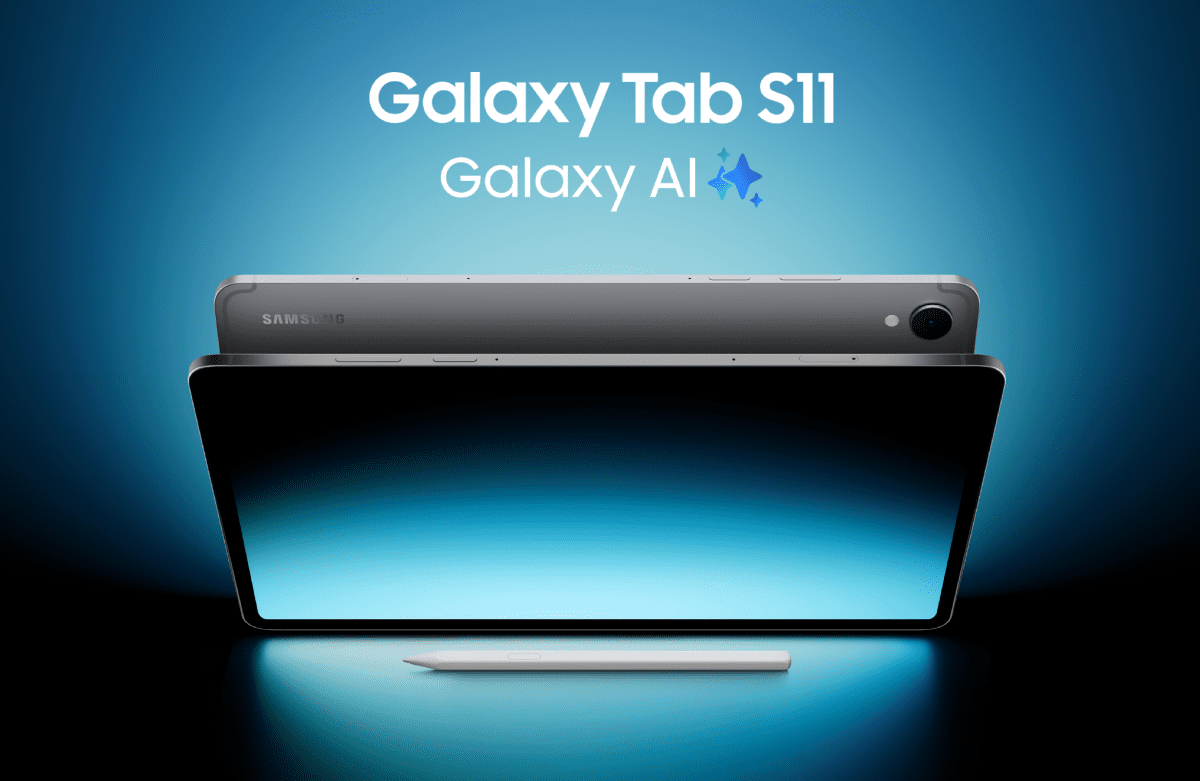
A Tale of Two Users: How the Samsung Galaxy Tab S11 Works for Sarah the Consultant and Gary the IT Manager

In any modern UK organisation, technology is a tango for two: the user who demands performance and flexibility, and the IT department that requires security and control. It’s a difficult balance to strike. A device that is powerful but unmanageable creates security risks, while a locked-down device can obstruct productivity. 

Let’s follow a typical workday for Sarah, a Senior Consultant, and Gary, her IT Operations Manager, to see how the new Samsung Galaxy Tab S11 Series is designed to meet their very different, but equally important, needs. 


Sarah’s Perspective: A Day of Uninterrupted Productivity 

For Sarah, her work device is the primary tool for her job. She needs it to be a seamless extension of her workflow, whether she’s in the office, on a train, or at a client site. 

8:15 AM: The Commute 
Sarah’s day starts on a crowded train into London. The Galaxy Tab S11 Ultra is ideal for this. It is the thinnest and lightest Galaxy Tab to date, so it doesn’t add bulk to her bag. The Armour Aluminium chassis and IP68 dust and water resistance give her confidence that it can handle the occasional knock or splash of a daily commute. The bright Dynamic AMOLED 2X display lets her clearly review client documents, even with the morning glare from the window. 

9:30 AM: The Client Workshop 
In her first client workshop, Sarah’s focus needs to be on the people in the room, not on taking notes. Using Transcript Assist, her Tab S11 creates automatic meeting minutes, freeing her to lead the discussion. When she needs to highlight a key point on the presentation, the redesigned hexagonal S Pen provides a comfortable, precise way to make annotations directly onto the screen. 

11:00 AM: Deep Work at the Desk 
Back at a hot desk, Sarah needs to switch from presenting to producing. She connects the Tab S11 to an external monitor, and Samsung DeX mode provides a full, PC-like desktop experience. She can have multiple windows open (a spreadsheet, a report, and her email) and drag and drop content between them. The MediaTek Dimensity 9400+ processor provides the performance to run these applications without any slowdown. 

3:00 PM: Afternoon Collaboration 
A large project file needs to be sent to a colleague across the office. Sarah uses Quick Share to transfer the file wirelessly to their device in seconds. After a full day of use, the Tab S11 Ultra’s large 11,600 mAh battery still has plenty of charge, so she isn’t looking for a power outlet before heading home. 


Gary’s Perspective: A Fleet Under Control 

While Sarah is working, Gary is responsible for the security and management of all 500 tablets like hers. For him, a device’s value is measured by its security, manageability, and total cost of ownership. 

Deployment and Onboarding 
When the company decided on the Tab S11, Gary’s first thought was about deployment. Using Knox Suite, the process was simple. Knox Mobile Enrolment allowed his team to configure all the devices with the company’s security policies and required applications before the employees even opened the boxes. This reduced setup time from hours per device to minutes. 

Security and Compliance 
For Gary, security is the highest priority. The Galaxy Tab S11 Series is built on the government-trusted Samsung Knox security platform, which gives him peace of mind. 

  • Hardware-Level Protection: Knox Vault is a physically isolated, hardware-based security system. It protects the company’s most sensitive data (like passwords and digital certificates) from attack by operating independently of the main processor and OS. 
  • Access Control: A fingerprint scanner ensures that only Sarah can access her device. Through Knox Manage, Gary can remotely lock or wipe the tablet if it’s ever lost or stolen, protecting corporate data. 

Fleet Management and Support 
Gary’s goal is to prevent IT problems, not just fix them. The Knox platform provides the tools he needs for proactive management. 

  • Controlled Updates: With Knox E-FOTA, Gary’s team can test and schedule OS updates across the entire fleet, ensuring that a patch doesn’t cause issues with critical business applications. 
  • Proactive Monitoring: Knox Asset Intelligence gives him a dashboard view of the entire fleet’s health. He can identify devices with degrading battery performance or storage issues and address them before they impact Sarah’s workday. 
  • Reduced TCO: The tablet’s 5G model supports both a physical SIM and an eSIM. Gary can provision a corporate data plan on the eSIM, allowing employees to use the physical slot for a personal SIM. This allows one device to serve both work and personal roles, reducing the number of devices his team needs to support. 


A Strategic Asset for Both Sarah and Gary 

The Samsung Galaxy Tab S11 Series successfully serves two different but critical roles. For Sarah, it is a powerful, portable tool that adapts to her varied workday. For Gary, it is a secure and efficient platform that he can deploy, manage, and protect at scale. 

This turns a simple tablet purchase into a strategic asset designed for the operational realities of the modern UK workplace. 

To learn more about the Samsung Galaxy Tab S11 Series and to arrange a demonstration, contact your XMA account manager or email enquiries@xma.co.uk today. 

Don’t Let Legacy Applications Block Your Windows 11 Migration

The October 14, 2025, end-of-support date for Windows 10 is compelling organisations to plan their migration to Windows 11. The move is a critical step towards stronger security and improved productivity. However, one of the most common and significant concerns delaying these upgrades is the uncertainty around legacy applications.

For many organisations, business-critical software (such as older accounting platforms, bespoke CRM systems, or other line-of-business applications) is the operational backbone. The fear that this essential software will not work after an operating system upgrade is a primary reason for delaying the transition, creating a roadblock to modernisation.

The Compatibility Challenge

While Microsoft data shows that 99.7% of applications are compatible with Windows 11, the remaining fraction often includes the custom-built or legacy systems that are most integral to an organisation’s operations. Delaying an OS upgrade to protect these applications creates long-term risk. Without purchasing Extended Security Updates (ESU), organisations will no longer receive security updates, leaving them vulnerable to security risks. Read more about this here: The Hidden Risks and Rising Costs of Relying on Windows 10 Extended Security Updates (ESU) | XMA

A major worry for any business is whether essential software will work after an upgrade. Simply hoping for the best is not a viable strategy. A structured approach is required to test and validate these applications to ensure they do not hinder your migration to Windows 11.

How XMA Mitigates Application Risk

At XMA, we address the challenge of legacy applications head-on. Our services are designed to help you find proactive solutions that mitigate issues with legacy applications, ensuring they do not stand in the way of a secure and seamless migration.

Our approach includes:

  • Windows 11 Application Analysis: We accelerate your application analysis by effectively consolidating and standardising your application estate, ensuring a consistent and secure service delivery. We rationalise your software landscape by focusing on proactive management, license consolidation, and service efficiency. By utilising crowd-sourced application compatibility data, enhanced by a Confidence Score, we help you make informed decisions with greater confidence.
  • Secure Legacy Applications: Containerise your applications to securely run legacy applications on your modern device estate. Containers provide a secure way to run legacy applications by blocking inbound traffic and reducing potential vulnerabilities, helping you achieve Cyber Essentials Plus. Run any application without modification on Any OS. Anywhere.
  • Application Lifecycle Management: Obtain low touch deployment of applications and updates to Windows (and macOS) Apps through a powerful automation engine. Gain a unified, dynamic, adaptive, and contextual workspace for organisations and users. Automatically keep all applications updated and patched in real time, and cut application packaging and testing time by as much as 90%.

Legacy applications are a valid concern, but they should not be a barrier to modernising your IT estate. By taking a proactive and structured approach, you can ensure your essential software continues to support your operations on a secure, modern platform.

Contact an XMA consultant today at enquiries@xma.co.uk to build a migration plan that addresses your specific application compatibility needs.

Share with your network
WhatsApp
X
LinkedIn

Access Before Success: 5 Reasons One-to-One Devices Are No Longer Optional

Picture of Michael Conlon

Michael Conlon

Former teacher, school leader, and survivor of many education reforms. Now an Education Transformation Consultant, Michael specialises in turning big tech promises into actual classroom wins.

As an Education Transformation Consultant with over 25 years in teaching and leadership, I’ve seen more “next big things” in education than I can count. But one shift is different: ensuring every learner has access to their own device – properly secured and managed, but their own. This isn’t about shiny tin or staff and pupil attraction and retention – it’s about equity, opportunity, and founded on an understanding that the world of work and future learning is a fundamentally different place.

Here’s why one-to-one programs matter now more than ever:

  1. Equity is not optional
    Without universal access, we create a two-tier system: those who can participate in digital learning, and those who can’t. A personal device is today’s textbook—it’s the baseline for fairness. I’m not suggesting every minute of every lesson – far from it but that it is there, whenever and wherever you need it.
  2. Technology removes barriers, it doesn’t create them
    From tools like Immersive Reader to AI-powered learning accelerators, devices open doors for learners with different needs. Access allows every student—whether struggling or thriving—to engage on equal footing, with aids that help overcome learning challenges.


  3. Skills for tomorrow are built today
    Digital fluency is no longer a “nice to have.” It’s a prerequisite for almost every career. Students who lack consistent access risk being unprepared—not because they lack potential, but because they are under-resourced.
  4. Inclusion is powerful (and visible)
    When every child has a device, every voice can be heard. Quiet students can contribute online, collaboration happens seamlessly, and learning can extend beyond the four walls of the classroom.


  5. It’s about futures, not gadgets
    This isn’t about handing out laptops and tablets. It’s about dignity, opportunity, and ensuring that when AI, quantum computing, and the next wave of innovation comes we don’t widen the attainment gap. The future is coming fast for our country and our economy. Let’s demonstrate we are future facing.

Final Thought

We need to consider that one-to-one access isn’t a luxury—it’s the foundation of modern learning, from an age and stage when the journey with digital makes most sense. If we fail to provide it, we’re not just denying students devices; we’re closing doors.

Simplifying Your Endpoint Strategy: A Guide to Chromebooks for UK Businesses

Managing endpoints across an entire organisation is a primary function of any IT department. For many, it’s a continuous cycle of patching vulnerabilities, deploying software, and managing high device costs. This is particularly true for businesses supporting a mix of office-based, remote, and frontline workers who all have different needs. A modern device strategy must be secure, cost-effective, and reduce the operational strain on IT. 

This is where ASUS Chromebooks present a strong business case. By operating on Google’s ChromeOS, these devices are built from the ground up for a cloud-first world, offering a direct answer to many traditional endpoint challenges. 


Security and Management by Default 

Instead of relying on third-party security software, ChromeOS has security built into its core. Every application runs in its own isolated ‘sandbox’, meaning threats are contained and cannot impact the wider system. With verified boot and automatic updates that run in the background, devices are always running the latest, most secure version of the OS without user intervention or IT downtime. 

For your IT team, management is handled through the cloud-based Google Admin Console. This allows for zero-touch enrolment, where devices are configured automatically out of the box, and provides your team with the tools to enforce policies and deploy applications to the entire fleet remotely. For organisations that need deeper controls, Chromebook Plus Enterprise unlocks advanced security and management capabilities. 


A Device for Every Role 

Of course, the hardware needs to be right for the user. In our new guide, we detail the specifications of the latest ASUS Chromebook business range to help you match the right device to the right role. 

The guide covers the full spectrum: from the durable and cost-effective ASUS Chromebook Flip CX1 for frontline tasks, to the highly portable CM30 Detachable for mobile workers, and the powerful ExpertBook CX54 Chromebook Plus Enterprise for executives who need premium performance. 


Beyond the Device: Full Lifecycle Management from XMA 

Procuring the hardware is just the first step. To get the full value from your investment, you need a plan for deployment, in-life support, and eventual retirement. Our guide also outlines how XMA’s services complete the picture. We provide: 

  • Device Management as a Service (DMaaS): We handle the logistics and management of your Chromebook fleet, freeing up your IT team. 
  • Flexible Leasing: Acquire the hardware you need without the upfront capital expenditure. 
  • Support and Break-Fix: Minimise downtime with rapid, reliable repair and replacement services. 

To get a detailed breakdown of the ASUS Chromebook range and understand how a managed service from XMA can reduce your total cost of ownership, download our guide today. 

260-Mile Challenge: Pushing the Limits for The Brain Tumour Charity

Last month, XMA’s Rob Harper and Ben Knights took on a 260-mile Nottingham-St Albans-Nottingham charity bike challenge for the second time, aiming to beat last year’s 24-hour finish and raise vital funds for a cause that is very important to us. 


A Cause Close to Home 

This year, all funds raised are for The Brain Tumour Charity, the world’s leading brain tumour charity and the largest dedicated funder of research into brain tumours globally. This cause is particularly significant for the XMA team, as a member of our Nottingham team is currently recovering from treatment. 


And We’re Off! 

The ride began at XMA Nottingham at 06:00, with the goal of reaching St Albans by mid-afternoon, refuelling, and immediately starting the return leg. We caught up with one of the riders, Ben Knight, for his report on how the challenge unfolded. 


A Strong Start 

“With the dust settling, it’s time to reflect on the highs and the lows of putting yourself on the absolute limit for a good cause,” Ben begins. 

“This year’s event was at risk before we even left. With Rob having multiple wrist operations and me pulling both calf muscles a month out, it was doubtful we were going to make the start line. Nevertheless, with lots of bike modifications, we made it and got off to a flying start, arriving at St Albans 45 minutes ahead of last year and still feeling relatively fresh.” 

The welcome at the halfway point provided a much-needed boost. “A big thank you to all that came to meet us at reception,” says Ben. “The speaker playing ‘Eye of the Tiger’ was a brilliant touch and the warm macaroni cheese was an even better one!” 


Hitting the Wall 

“After a slightly longer pit stop than planned, we got back on the road and made excellent progress until we hit an absolute brick wall around the 200-mile mark. The wheels quickly fell off.” 

“With fatigue rapidly enveloping our bodies and minds, our speed dissipated. We started faffing and stopping more, and even resorted to power napping on the side of the road. We were waiting for the sunrise which gave us such a lift last year, only to find that, although the sun came, the energy boost did not. We were left to slog it out.” 

To make a difficult situation worse, a critical equipment failure struck just miles from the end. “My rear derailleur cable snapped and left me to ride with basically no gears – something that was not welcome after 16 hours in the saddle!” 


Triumphant Return 

At approximately 07:30, after 18 hours, 52 minutes and 12 seconds in the saddle, Ben and Rob arrived back at XMA Nottingham. They were, in Ben’s words, “battered and bruised but ultimately triumphant at achieving our goal.” 


A Heartfelt Thank You 

“We would like to extend our heartfelt thanks to everyone who was able to donate. With money tight for many, your support is genuinely appreciated. We also thank our marketing team for their support, and XMA for agreeing to match the funds raised by the team.” 

Donations will remain open until the end of September. If you would like to contribute, please use the link below. 

When It Comes To Windows 10 End-of-Support: Don’t Replace, Refresh Your Device Strategy

When It Comes To Windows 10 End-of-Support: Don’t Replace, Refresh Your Device Strategy

The final day of support for Windows 10, October 14, 2025, is now just weeks away. For many organisations, the initial reaction is to focus on the operating system upgrade itself. However, the move to Windows 11 presents a more fundamental challenge that an OS update alone cannot solve: hardware compatibility.

A significant portion of existing device estates simply do not meet the hardware requirements for Windows 11. This reality is forcing a difficult and often unplanned conversation about a large-scale device replacement. For many, this will feel like a reactive and expensive problem.

But it doesn’t have to be. This deadline should not trigger a panic-buy. Instead, it should be the catalyst for a more strategic, data-driven approach to your entire device estate. It’s time to move from a reactive replacement cycle to a SMART Device Refresh.

The Cost of Inaction and Unplanned Refresh Cycles

Organisations still running on Windows 10 after the deadline will be required to purchase Extended Security Updates (ESUs) for every non-compliant device to avoid exposure to cyber threats. This is a significant financial drain with no return on investment. The cost escalates dramatically, doubling in the second year and doubling again in the third, creating a recurring budget item spent only to maintain an obsolete OS.

Furthermore, many organisations are already caught in a cycle of reacting to device failures and budget availability rather than making informed, data-driven refresh decisions. This approach often leads to overspending on devices that are not suited to user needs, while leaving other areas with inadequate technology that hinders productivity and impacts employee morale.

A Strategic Approach: The XMA SMART Device Refresh

XMA’s SMART Device Refresh service provides a structured, data-driven plan to navigate the Windows 11 transition and optimise your entire device estate for the long term. We help you balance performance, user experience, and cost-efficiency.

Our approach is built on providing actionable insights to make smarter investment decisions. We help you avoid overspending and extend device lifecycles where appropriate, without compromising on security.

How We Help:

  1. Insightful Hardware Assessment: Our first step is a fast-track assessment of your entire hardware estate. We identify which devices are compatible with Windows 11, which ones are not, and which can be redeployed to other roles extending their useful life. This gives you a clear, data-driven baseline for your migration plan, as well as a more sustainable approach to your IT assets.
  2. Data-Driven Procurement: For devices that require replacement, we provide a streamlined procurement service. Our advice is based on a deep understanding of user needs, ensuring you invest in hardware that is powerful enough for the job but affordable enough for your budget. For example, we use insights on application usage to ensure a designer gets the right GPU and a data analyst gets the right CPU, avoiding unnecessary expense while improving productivity.
  3. Flexible Procurement and Lifecycle Management: We understand the pressure on capital budgets. We offer flexible procurement options through public sector frameworks, including financing and as-a-service models that can shift expenditure from CapEx to a predictable operational cost. For a complete solution, our Device Management as a Service (DMaaS) can handle the entire device lifecycle, from procurement and deployment to ongoing support and secure disposal, reducing the burden on your internal IT team.

The Windows 10 end-of-support deadline is a chance to break the reactive cycle of device management and implement a cost-effective, long-term plan that aligns with your organisation’s goals.

Don’t pay the price for delay. Contact XMA today at enquiries@xma.co.uk to build a SMART device refresh strategy for your transition to Windows 11.

Share with your network
WhatsApp
X
LinkedIn

New Laptops for Less Than a Latte? The Smarter Formula for Public Sector IT

For anyone trying to make their IT budget add up, the equation is already difficult. Now, add a new, urgent variable: the end of Windows 10 support in October 2025. It’s a massive deadline breathing down our necks, and it comes just as public sector budgets are feeling the squeeze more than ever. So, the big question is, how on earth do you modernise your tech without breaking the bank? 

For years, the go-to move for public sector organisations has been to buy a mountain of new PCs, a huge capital spend that makes the finance team wince and ties up cash for years in kit that starts losing value the moment it’s unboxed. It’s time to ask: is that really the smartest play anymore? 

It’s time for a recalculation. It’s time to find a smarter formula for funding Public Sector IT. 


Give Yourself Some Breathing Room 

Shift that huge, one-off cost into a predictable, manageable monthly payment. That’s the simple magic of leasing. Instead of a massive Capital Expenditure (CapEx) hit, you move to a simple Operational Expenditure (OpEx) model. 

This means you’re not locking away a fortune in depreciating assets. You have the financial agility to invest in other things your organisation desperately needs, all while knowing your tech costs are fixed, with no nasty surprises. 

Perspective Makes Perfect 

For example, imagine trying to balance the budget at a school. We all know textbooks don’t come cheap. So, what if you could get a brand-new, AI-ready Surface device for a student for less than you’re already spending on books that are out of date the second you buy them? It’s a bit of a no-brainer. 

Our Surface leasing plans (partnering with CF Corporate) start from just £5.95 a week. When you see it like that, giving every worker access to top-tier technology doesn’t seem like a dream, it seems like a sensible, strategic decision. You could likely equip an employee with a new device for less than the weekly bill for coffee and biscuits in the staff room. 


Solving for X(MA): Adding an Expert to Your Equation 

At XMA, we have a proven theorem for making Public Sector IT work. We are on all the right public sector frameworks, like the Crown Commercial Service (CCS), so you know you’re in safe hands. XMA are also one of the UK’s only Surface Authorised Surface Providers (ASP). 

But what does being an ASP actually mean for your organisation? It means peace of mind, plain and simple. When a device inevitably gets dropped or damaged, it means: 

  • Your data stays safe. Forget shipping devices to unknown locations. Repairs happen in our own secure, in-house facilities under strict protocols that safeguard sensitive student and staff data.  
  • You get back to teaching, faster. Our efficient, return-to-base repair service minimises workplace disruption. Certified Microsoft technicians get devices diagnosed, fixed, and back in action quickly.  
  • No warranty headaches. We only use authentic Microsoft parts for repairs, so your device’s full warranty coverage is maintained.  
  • A single point of contact. We manage the entire process, from diagnosis to delivery, so you’re not juggling multiple contacts and chasing updates.  

XMA and Surface are a winning formula: our Device-Management-as-a-Service model, backed by our ASP status, takes the entire device lifecycle—from deployment to maintenance and end-of-life—off your plate. Pair that with a leasing plan that breathes life back into your budget, and you’re well prepared for the future. 

The 2025 deadline isn’t a problem without a solution. It’s a chance to stop using a flawed formula and find one that adds up to a better result for your employees and your budget. 

Ready to recalculate your organisation’s IT budget? Explore our Surface leasing options and let’s find the right formula for you. Discover more about our ASP status here and explore DMaaS here. Get in contact with us via enquiries@xma.co.uk or talking to your XMA Account Manager today. 

Share with your network
WhatsApp
X
LinkedIn

9 Ways Schools Can Meet the Moment with Digital Confidence

Michael Conlon walks us through how schools can tackle the digital education landscape.

Picture of Michael Conlon

Michael Conlon

Michael is XMA’s Education Transformation Consultant. With over 25 years in teaching and leadership he has sat through more strategy meetings and indulged more fads than he cares to admit, but still loves help schools make sense of digital transformation—without the jargon, and ideally without the panic.

The UK Government’s digital and technology standards for schools and colleges set a clear direction: resilient infrastructure, inclusive access, and strategic leadership. At XMA, we believe in empowering educators with agnostic, future-ready solutions that meet these standards and elevate learning. Here’s how:

  1. Cloud Platforms That Work for Everyone

Whether it’s Microsoft 365 or Google Workspace, we guide schools through seamless cloud adoption, ensuring secure access, data protection, and long-term cost efficiency.

  1. Cyber Security That Protects Learning

From endpoint protection to staff training, our cyber resilience solutions align with DfE standards and keep digital environments safe for students and educators.

  1. Devices Designed for Education

We supply and configure devices that meet curriculum needs—whether it’s 1:1 student access or shared classroom sets—ensuring performance, security, and longevity.

  1. Digital Inclusion for Every Learner

We help schools audit and implement accessibility tools, ensuring that all students, no matter their learning challenges, can engage fully with digital learning.

  1. Filtering and Monitoring That Safeguards

For you’re core duty, our safeguarding solutions meet statutory guidance, giving schools peace of mind with intelligent filtering and real-time monitoring.

  1. Leadership That Drives Strategy

We work with MATs and Local Authorities to establish their digital maturity, and develop digital strategies that align with governance standards, budget realities, and long-term goals.

  1. Sustainable Server and Storage Solutions

Whether cloud-first or hybrid, our server and storage options need to meet environmental and security standards.

  1. Professional Development That Sticks

Technology is redundant if people don’t know how to use it effectively. We offer training and support that builds digital confidence across teaching and support staff.

  1. Keeping your eye on the horizon

XMA excel at anticipating and leaning into tomorrow’s technologies to bring solutions to customers that add value and improve how they work.

At XMA, we don’t push products—we build partnerships. Our agnostic approach means we focus on what works best for your context, your learners, and your goals. If you’re interested in your school becoming more Digital Confident, contact us at enquiries@xma.co.uk

Share with your network
WhatsApp
X
LinkedIn

Android Desktop: Potential Use Cases and Benefits

This is the second in a series of blog posts exploring Android Desktop. Our Head of Pre-Sales, Scott Wright, will be looking at the current state of Android Desktop, following its improvement as release approaches, examining use cases, looking at essential apps & peripherals and more. 
Picture of Scott Wright

Scott Wright

Scott is XMA’s Head of Pre-Sales. An IT industry greybeard, he violated his own rule about being an early adopter when he bought the first Android phone at launch and hasn’t regretted that decision.

Most of this blog will be talking about the benefits of a mobile device with any sort of desktop interface, rather than Android Desktop specifically, so before we start that let’s talk for a moment about why the launch of Android Desktop is causing such a buzz. 

Desktop solutions for Android are currently available from several device vendors with Samsung’s DeX being the most established. Motorola Ready-For (also on Lenovo ThinkPhones), Huawei Desktop Mode and Xiaomi MIUI Desktop mode are also available. These solutions are vendor specific which raises concerns for many organisations, should the vendor cease supporting them then the organisation will be forced to change device in order to continue with their device strategy. With Android Desktop as a core part of the Android offering (and Apple promising to follow suit) not only is desktop mode legitimised a standard phone feature but organisations adopting a vendor specific solution like DeX have a fall-back plan that does not require device replacement, substantially reducing risk. As such, there is considerable interest in Android Desktop, even from organisations who are considering or who have adopted a vendor specific solution. 

Below I am going to expound on some of the possible benefits and give examples of the use cases that might realise those benefits. 

Benefits: Managed Device Reduction 

The most immediate benefit for many organisations will be a reduction in devices. Many organisations are issuing both a laptop and mobile to a large cohort of users with fairly light computing requirements. This is especially wasteful for front-line workers for whom the mobile is the primary device and the laptop is an occasional use device. Replacing the managed laptop with a laptop-shaped docking station (“lapdock”, more on these in a future blog post) reduces cost but also reduces the number of devices requiring licences and updates, eliminates a large number of devices as potential sources of data loss (a laptop left in a taxi, for example, cannot contain any data as it is merely a docking station) and more. Shared desktops can also be replaced with docking stations or docking monitors, reducing the number of managed devices.  

Benefits: Shared Desktops 

For users with a mobile device who also use shared desktops, for example many healthcare workers, solutions such as VDI, roaming profiles, follow-me desktop and similar are used to make moving between shared desktops as seamless as possible but typically have substantial cost and complexity associated with them. These solutions and the shared desktops themselves can be eliminated and replaced with docking stations or docking monitors while providing an even more seamless working experience, not only between shared desktops but also between desktop and mobile device, allowing healthcare professionals to transition seamlessly between patient interaction spaces and desk-based working. 

Benefits: Security Implications 

Anywhere that shared devices are in use presents a challenge for data security. Data must not be unintentionally accessible between users and this is especially important in settings where that data is highly sensitive, such as a clinical or law enforcement settings. With most Police officers being issued a mobile device, utilising docking monitors in place of shared desktops for docking stations prevents inadvertent data access between users via the shared device.  Using lapdocks rather than laptops as a car-working solution means that it is impossible for data to be stored locally, reducing the risk associated with device theft. 

This benefit is also useful in other contexts, for example many higher education institutions have a pool of shared devices which are made available to learners. The HE organisation must ensure not only that data does not inadvertently pass between users but also that malware which might be introduced by a user does not impact other users of that shared device. By offering a pool of shared lapdocks, rather than laptops, these concerns can be eliminated. This will, of course, require waiting for most mobile devices to offer a desktop mode – likely several years before most Android and Apple devices are running a suitable operating system version. 

Benefits: Attracting Younger Workers / Learners

Many of the young people entering work or higher education have limited Windows / MacOS experience. Their personal devices are mobiles or tablets and the bulk of their school IT experience is using Chromebooks or iPads. Several regions will shortly see the first cohort of learners leaving school who have had a Chromebook or iPad as their learning device for the entirety of their secondary education and over the coming years this will increasingly become standard.

Offering a mobile-centric working experience, even if only as an option, may allow business and HE organisations to make themselves more attractive to these young persons that they are seeking to attract.

So, in summary, while this solution may not be suitable for all users at this time, organisations may be able to realise a reduction in managed devices and their associated costs, increased user satisfaction and an improved security posture.

The next post will explore the current state of Android Desktop in Beta and the functionality offered. If you’re interested in exploring an Android desktop solution, contact us at enquiries@xma.co.uk.

Share with your network
WhatsApp
X
LinkedIn

Intelligent Endpoints: The New Standard for IT Success

Is your IT estate working for you, or are you simply working for it? 

Modern devices provide a strong foundation for any organisation, delivering the performance and built-in security that business operations depend on. But as environments become more complex, that foundation is no longer enough. The real challenge has moved beyond the device itself and into the user’s experience. When that experience is poor, the consequences are significant. 

The focus must now be on the Digital Employee Experience (DEX). Far from a passing trend, it’s now a strategic imperative. According to Gartner, by 2026, 50% of digital workplace leaders will have a DEX strategy and tool in place.1 The reason is simple: data shows that 74% of workers feel they lack the right technology to be successful2, and a staggering 34% are living with ongoing IT problems that their service desk is unable to fix.

This is a gap that needs to be closed. The solution requires a fundamental shift in perspective: turning your endpoints from passive tools into proactive, intelligent assets. 


The Next Evolution: From Endpoint to Insight Point 

So how do you bridge the gap between device potential and employee reality? The answer lies in data. 

HP’s Workforce Experience Platform (WXP) is a cloud-based platform designed to meet this challenge directly. It gives IT teams centralised visibility and control over their entire digital ecosystem by collecting and analysing data from all connected endpoints. 


A Single Platform for Your Entire Fleet 

A common obstacle to achieving a unified view of IT is the diverse nature of a typical device estate. Real-world environments are not homogenous. They are a complex mix of hardware and software from different vendors, acquired over many years. 

HP’s WXP is designed for this reality. It is a true multi-vendor platform, built to be completely manufacturer and OS agnostic. Whether your estate consists of PCs from Dell and Lenovo, Apple Macs, or a mix of all three, WXP provides a single source of truth. The platform sees it all, integrating data not just from PCs, but also from printers, video and audio endpoints, virtual machines, and software applications to give you a complete picture. 

The platform works by gathering and processing billions of data points from across this entire IT estate. Its AI engine analyses this telemetry to identify performance trends, predict hardware failures, and flag security issues (often before they impact your users). This is how you move from a reactive “break-fix” model to a proactive one. It’s the difference between fighting fires and preventing them from ever starting. 


Real-World Problems Solved by WXP 

Adopting a platform like WXP solves the specific, resource-draining problems that IT teams face every day. 

Problem

Nearly half of all employees don’t contact IT when they experience issues that impact their work.  

More than an inconvenience, it’s a silent drain on productivity and a source of constant friction. Every unreported issue is a hidden cost, and every unresolved ticket is a crack in your operational foundation. 

The WXP Solution

The platform’s predictive analytics identify issues before a user even knows to complain. It can flag that batteries on a group of devices are failing and need replacement under warranty, or identify that Teams is crashing frequently across the organisation. 

This allows IT to address the root cause, slash ticket volumes, and improve first-call resolution rates. 

Problem

A single non-compliant device is a potential entry point for a catastrophic breach. Manually trying to keep up is no longer a viable strategy, a gamble you can’t afford to lose.

The WXP Solution

WXP provides a single dashboard to monitor fleet-wide security in real-time. It delivers specific, actionable alerts, such as “Windows Secure Boot disabled on ≥ 5% of devices” or “BitLocker disabled on 3% of devices”.

This gives IT teams the forensic data needed to remediate vulnerabilities and prove compliance without the burden of manual audits.

Problem

Every piece of under-utilised hardware gathering dust in a storeroom is wasted budget.

Every kilowatt of unnecessary power consumption is a missed opportunity to reduce costs and meet crucial environmental goals.

The WXP Solution

The platform helps improve IT ROI by identifying under-utilised assets that can be re-deployed elsewhere in the business, reducing unnecessary hardware spend.

On the sustainability front, it can monitor power consumption across the device fleet, providing the tangible data needed to support environmental reporting and drive down operational costs.


Why This Matters for Stretched IT Teams

For Enterprise IT Directors, their mandate is to mitigate risk, govern a complex estate, and align technology with business strategy. WXP delivers the data needed to make that happen. It provides the evidence required to move from tactical firefighting to strategic leadership, making informed investment decisions and proving the business value of the IT function to the board.

For Public Sector IT Managers, the pressure to deliver more with less is relentless, alongside strict security and procurement rules. WXP helps these teams by automating routine compliance and security checks, freeing up specialist resources to focus on critical projects. The platform’s ability to provide hard data on asset utilisation and power consumption provides the justification needed to prove value-for-money—a cornerstone of public sector accountability.

As workplace environments become more complex, ignorance is not an option. Intelligence is everything. By transforming endpoints into sources of intelligence, the HP Workforce Experience Platform provides the tools to build a more secure, efficient, and resilient IT environment.

To see exactly how the HP Workforce Experience Platform can be applied to your organisation, book a free, no-obligation demo with one of our specialists today. Talk to your Account Manager or contact us at enquiries@xma.co.uk.

Footnotes: 
1. Gartner, Magic Quadrant for Digital Employee Experience Management Tools, Dan Wilson, Tom Cipolla, et al., 6 March 2025. Gartner is a registered trademark and service mark of Gartner, Inc. and/or its affiliates in the U.S. and internationally, and MAGIC QUADRANT is a registered trademark of Gartner, Inc. and/or its affiliates and are used herein with permission. All rights reserved. 
2. HP Internal Research 
3. Forrester, State of the Services Desk, 2024 Published February 21, 2024 

Share with your network
WhatsApp
X
LinkedIn

Fill in the Form to Download the Case Study

Fill in the Form to Download the Case Study

Fill in the Form to Download the Case Study

Skip to content
Monitoring by Hotjar Monitoring by Hotjar