Remote learning and teaching: is your school prepared?
In the light of recent developments with COVID-19, remote working within education is being ever-more apparent.
Schools around the world effected by the outbreak have sprung into action, quickly migrating their curriculum online and many more educational organisations will need to follow suit.
Since the outbreak of the virus in China, Microsoft Education partners have taken amazing action to ensure students can remain learning through this transition to remote education. As the UK is looking to take steps to contain this virus, many schools and universities are moving to remote working. The first UK University to do so being the London School of Economics who are due to move all teaching for undergraduate and postgraduate students online later this month, the first UK education facility to do so following the COVID-19 outbreak. (Telegraph)
So, in these unsettling times, how can you ensure that students don’t miss out on a crucial period of their education?
Microsoft for Education has a number of features that can bring the feel of a classroom into the home of a student.
Teams
As schools move to a remote learning environment, Teams can provide an online classroom that brings together virtual face-to-face connections, assignments, files, and conversations into a single platform accessible on a mobile device, tablet, PC, or browser.
Educators and staff have the ability to create their own class in Teams, add selected students, share lessons, create assignments, collaborate virtually in real-time, and do grading and provide personalized feedback all in one hub.
Here’s few tips on how to use Teams to its full advantage:
Have interactive discussions with your class by sharing your screen to present your lesson and encourage students to ask questions using the chat feature.
During a lesson, you can moderate the class discussion by muting students, making them presenters, or if needed, removing them from the meeting. Finally, record the lesson so students can review it on their own time.
Record a class session in case some students can’t join during the live session.
For assessments, you can easily create and grade quizzes in Teams using Microsoft Forms.
Create a Fun Channel. Have a virtual science fair or poetry reading group. This will go a long way with students of all ages.
Make sure your teaching staff are prepared for remote teaching
XMA want to help support educators with practical guides, professional development, and how-to information that will help empower them and their students to stay motivated and engaged with learning, no matter where the classroom environment may be. Microsoft have created a series of webinars that can be accessed on-demand for educators to get started on Teams, and resources in our Microsoft Educator Center to help new and existing users get up and running.
Help students stay engaged
Here are some tips from educators who have helped create healthy and effective learning environments that allow students to thrive in this new virtual setting.
Stay healthy and charged: Learning from home can be a new experience for students. Encourage them to take breaks between lessons to stretch, hydrate, or just unplug.
Stay focused: Find a quiet place where they can focus on the lesson with minimal distractions.
Stay connected: School is important from a social perspective. Not seeing their friends face-to-face every day can be hard for students. Help them adjust to this new reality by encouraging them to schedule a lunch session for classmates to stay connected. If they are out sick or can’t join class because of an appointment, remind them to change their status or set a status message so their classmates are also aware.
Motivate your class: Use Teams to encourage joyful challenges throughout the week by creating a Fun Activities channel. For example, hold a cooking contest and have students share their creations in the channel. Recognize your students by sending them Praise in the channel, inspiring more students to participate.
Bring lessons to life: Make a lesson interactive by enabling Whiteboard in Teams during a live lesson. Have students come up to the whiteboard and solve a math problem or demonstrate their art skills, just like they would in a physical classroom.
Connect with students individually: It can be difficult to gauge how students are faring without seeing them in person, so connecting individually is very important. You can support students 1:1 in a chat, creating a safe space for students to ask their questions and get the extra help they need.
Credit: Helping teachers and students make the switch to remote learning | Jared Spataro, Corporate Vice President for Microsoft 365 | https://bit.ly/2TKs0Lf
Innovate with an intelligent foundation
Modern technology is at the core of good government, helping to create the vital services that citizens and local businesses need to thrive. While good progress has been made, the Public Sector must now deliver transformational change. This means navigating the Fourth Industrial Revolution and modernising IT.
In the future, Artificial Intelligence (AI) will be critical to modern government. This for fraud detection, ID verification, cyber-security, as well as to enable smart places. And to support early intervention and prevention strategies.
AI THAT IMPROVES LIVES
But knowing where to start on your AI journey isn’t easy, particularly given the security, ethical and interoperability challenges that need working through. But expert advice is on tap from HPE.
Machine learning and AI can be used to improve human lives. It is already doing this whether it is through devices that offer advice, like the intelligent personal assistants that most everyone uses to prepare us for changes in the weather, or with systems that protect our money from criminals, or devices that offer medical advice from the comfort of our own home. This is only the start; the potential of AI is undeniable.
AUTOMATE & FREE VALUABLE HUMAN RESOURCE
Using advanced algorithmic techniques such as ‘deep learning’, AI has the potential to solve complex problems fast, and in so doing, free up time and raise productivity
With IT environments growing more and more complex and demanding, traditional IT systems management is moving into a new era of intelligence-driven automation and optimisation. The #FutureFit trend is to autonomous computing, where new technologies adjust compute, storage, and network capacity on the fly in a continuous optimisation model.
New machine learning and artificial intelligence capabilities, combined with a common management framework, are changing the face of how IT operations are bringing all the pieces together―with automation being key.
FASTER SERVICE DELIVERY
The foundation begins with automation because if you can automate, you become repeatable, consistent, and reliable – vital in data centres. Automation also drives greater consistency and quality of data which can be used to understand service trends, performance and personalised citizen needs to help improve operations, enable faster delivery and smarter transformation.
HPE has years of delivery expertise on global projects across multiple technologies and AI workloads and has the expert advisors you need to take your project to hero status.
This year-end, HPE invites you to invest in high-performance infrastructure to drive innovation, security, agility and transformation with people-centred outcomes.
TRANSFORMATION ENABLED
An AI-enabled technology foundation can help the public sector create new value and experiences for humans and businesses in a digital age, one where almost everyone and everything generates and shares data. And achieve transformation.
In a world where every investment government makes in technology must work harder, the solution for a #futurefit government is an intelligent foundation.
HPE GEN10 TECHNOLOGY
HPE ProLiant — The intelligent compute foundation for hybrid cloud that delivers unmatched workload optimisation, security, and automation, all available as a service.
HPE ProLiant servers feature user-inspired innovations to make IT simpler, including:
Have you realised the benefit of asset lifecycle management for your business?
Let’s rewind back to the late 70s when the slogan ‘reduce, reuse, recycle’ was estimated to have been introduced into society…
Where efforts to reduce waste were in great favour due to the mass realisation of the aftermath of World War 2, spiralling from the open access and freedom of buying which consequently led to an increase in consumer goods, single use items and unsustainable disposal.
In the 2000s, we were presented with the concept of the ‘Three R’s’ in leaflets and public articles, with a large push over television ad space; flashforward to 2020 and the green triangle that we all recognise to represent these pillars has been a valuable addition to the emoji keyboard for years ♻️
But how can we relate this to technology and devices? What does this mean for your business? And how could it influence your buying and renewals?
Below are some key points to consider from Andy Wright, our Commercial Director here at XMA.
How do you redeploy your assets and get a longer life out of them?
If there are assets that are no longer suitable for your business, what would you do with them?
Would you look at purchasing pre-owned goods?
Recycling old technology into new areas is a trend that we hope will mushroom throughout the IT industry, from an economic and environmental perspective.
Take a look at this video from FDE TV and see what is currently being done by XMA and HPE to see the wheels spinning.
As a tech-savvy society, we are consuming more at a faster rate, whether this is due to innovation, relying on new styles to stay current and on trend, the desire for collection, or anything else in between… Saying this, we are also more aware of the asset lifecycle and how older assets can be refreshed and transformed, being fully fit for purpose for brand new projects.
Our Platinum Partnership with HPE is truly valued, progressive and productive and as mentioned in the video, we are ‘showing how it really should be done’, so all aboard, and welcome to simple and sustainable procurement.
HP for Education: How are schools maximising their IT budget?
Conventionally, the UK has always been a frontrunnerin the adoption of technology in schools.In the UK, schools spend close to £900 million on technology a year(Blundell, 2019).
It is a common theme in UK schools – there is less budget with further to stretch. With schools regularly feeling the squeeze in education funding, it is becoming increasingly important to be able to do more, with less.
The importance of technology has become increasingly recognised, with pupils exposed to IT for over half of total teaching time (Blundell, 2019). IT is a vital part of school education and it is relied upon both in classroom technology, teaching methods and for homework, administration, staff communication, reporting etc. It is important to assure as a school, you have the most up-to-date IT strategy in place, our account managers at XMA are here to provide guidance and advice to put the most effective plan in place.
There is an ever-increasing standard of technology expected within education to assure students are maximising their school day and achieving as much as possible. Therefore, in order to maintain the expected standards, school’s IT budgets must be able to stretch further. This mounting pressure has led to schools turning to alternative methods in order to stretch their budget.
HP and XMA have been engaging with schools on these issues for many years. We understand these pressures and the fact budgets must be spent on much more then just HP hardware.Therefore, HP for Education helps maximise these budgets. HP in Education supports the purchase of additional software, training and services required to allow HP and XMA to provide successful solutions.
HP and XMA are equipping schools with powerful technology to be used for creation, collaboration, training and development to support both students and teachers.
HP for Education includes:
Tech Fund: The opportunity to win your school £25,000
Marketplace: Spend rewards on software and services
Proof of concept: Trial solutions before purchase
Trade in: Earn £200 per old device
How does this allow my school to save?
HP in Educations innovative trade-in scheme allows your education organisation to receive funds in exchange for trading in any equipment (subject to conditions) when you purchase a qualifying HP device.
XMA and HP are transforming the learning experience. As life, work and technology lines are blurred and ever-adapting, schools must adapt to keep up, to ensure their students can be prepared for their next steps and thrive in our digital society.
Contact us to find out more about the HP in Education program and how we can assist you in making the most out of your budgets, whilst putting the most effective plan in place.
Coronavirus: Creating obstacles into IT supply chains.
1 Minute Read (1MR)
News Update.
Coronavirus: UK declares ‘serious and imminent threat’ to public health.
At the forefront of our news channels, Coronavirus is spreading at superspeed and this is only predicted to continue. Our heartfelt thoughts are with all those affected and our deepest condolences go out to those who have lost their friends and families to this tragic outbreak.
Whilst this is a desperate time of emotional strain, Coronavirus has created an unstoppable force of disruption into IT supply chains. In recent times, issues have been compounded by a global shortage of Intel CPUs and Coronavirus is quickly adding to these demands and forming harsher barriers for production.
The 25th of January marked the start of the Chinese New Year, usually a time of celebration, but this year it was somewhat pulled to a place of despair as Coronavirus was attacking civilians at a violent rate, consequently generating a knock-on impact to the performance of IT factories. Following on from this, as a result, China is in semi-lockdown, reflecting a domino pattern where employees cannot enter the factories to manufacture stage 1 parts, therefore the production of complete devices has come to almost a standstill (on top of the silicon shortages mentioned above) overall hindering the usual supply chain of products.
Some factories are beginning to open again, although some still do remain closed. Where possible, we are leveraging stock from the UK and our own warehouses. XMA will continue to closely monitor this situation and engage with people locally and with our vendor partners.
What does this mean for you?
Delays in manufacturing and shipping
Set back orders
Later delivery times
Our Advice
Order earlier than you would to keep your projects on time.
Have a chat with us about alternative products and solutions.
If you have any questions or concerns, or queries about your orders or the ordering process, please do get in contact in a way that suits you.
Microsoft Surface – Battling the barriers of accessibility in technology
Technology is adapting faster than we have ever seen, daily tasks are becoming easier and faster to complete, all industries are being transformed. Over recent years we have seen the risks in cyber security becoming ever more severe, extraordinarily high fines in result of data breaches and a change in the modern workplace with increased remote working, blurring the lines between life and work. These technology phenomena all build into the technology environment we know today, and know will differ from tomorrow.
However, this transformation has seen barriers when achieving inclusion and accessibility to all. There have been many initiatives and commitments made by the industry leading technology corporations and the UK Government to assure these technology advances can benefit everyone. For example, Gov UK released a Digital Skills and Inclusion Policy in 2017. Gov UK (2017) stated digital inclusion to be about having the access, skills and motivation to access the opportunities of technology. It is argued that digital inclusion and accessibility provides people with skills opening a gateway for citizens to achieve countless positive outcomes including employment, expanding career opportunities and even improving health and well-being (Gov UK, 2017).
In the education sector, as mentioned in our blog “Microsoft Surface – Transforming the classroom”, Gov UK (2019) released a policy paper ‘Realising the potential of technology in education’ where one of the focus points is to ‘support inclusion’ (Gov UK, 2019).
Microsoft Surface understand both the power of this transformative technology and why it must be designed in a way that gives everyone the ability to achieve more. The overall aim of Microsoft accessibility is to build out and accelerate inclusion programmes to lead the industry to an inclusive future.
If there is no limit to technology, there should be no limits of diversity and inclusion.
There are many areas in which technology can, and must be adapted to assure it is inclusive and non-discriminatory including:
Vision
Hearing
Neurodiversity
Learning
Mobility
Mental health
Vision
Microsoft Surface devices include accessibility tools and features for people who are blind, colour blind or have impaired vision. Access the narrator feature to read text, or customise your screen however you need. ‘Colour Filters’ allow users to boost contrast or even get rid of colour entirely. Users are able to customise their screen for colour blindness, light sensitivity or visual preference.
Hearing
Microsoft Surface devices also harness features for those hard of hearing, hearing loss or deafness. These specialised accessibility features include closed captioning, mono sound and live call transcript. Present from your Surface with auto-generated subtitles in over 60 languages and let the audience follow along with Microsoft Translator.
Neurodiversity
Microsoft Surface devices are also accessible for those with dyslexia, seizures, autism and other cognitive differences with tools such as dictation and Windows Hello.
Learning
Microsoft Surface devices are inclusive for people with learning disabilities and include tools to improve ready, writing, focus and concentration.
Mobility
The Surface products help people living with arthritis, quadriplegia, spinal cord injuries and other mobility issues. Users can type with their voice and click with their eyes with eye tracking*.
Mental health
You can minimise visual distractions on your Surface and stay in the zone with notification blocks.
Microsoft Surface devices and the power of Microsoft software is leading the way in creating truly inclusive technology. These devices are adaptable across all industries from healthcare, government to education and corporate organisations.
Technology is finally keeping up with us, all of us.
Get in touch with our Microsoft Surface experts to discuss accessibility in your organisation.
Microsoft Surface – Transforming the classroom
Technology is transforming Education. Education needs devices that can keep up.
Today’s classroom is evolving. Teaching techniques, learning methods and school administration are all unrecognisable in comparison to the previous decade.
In April 2019, Gov UK (2019)¹ released a policy paper ‘Realising the potential of technology in education’. This policy is a strategy for both education providers and the technology industry to help improve and increase the effective use of technology in education. The key objectives are to:
Cut workload
Foster efficiencies
Support inclusion
Drive improvement in educational outcomes
This strategy has made commitments to secure the digital infrastructure, develop digital capability and skills, promote effective procurement and promote digital safety. Commitments were made to support the education technology (EdTech) industry through vision, leadership and building an environment where EdTech business can grow and thrive. Commitments such as these demonstrate the huge amount of change across the education market as well as the wants and needs of the immediate stakeholders in education.
Whilst traditional techniques like pen and paper are still paramount to the next generations learning, Microsoft Surface offers new opportunities for engagement and interaction within the classroom.
Microsoft Surface for Education offers a versatile and exciting portfolio of devices to aid the learning of our future generations. This portfolio helps education professionals to work as efficiently and effectively as possible, whilst best equipping them to support their students.
There are common technological problems which occur day in and day out, both in, and outside the classroom for students and teachers. Teachers need to be mobile and therefore devices must be portable, light and powerful to run the best of Microsoft Software, Surface has this covered.
Take a look at the Microsoft Surface Go, released in 2018 this device has revolutionised the traditional ‘tablet’ device. As a full Windows 10 Pro PC, teachers can now access all digital learning tools they would on a regular PC. The Surface Go untethers teaching, with Miracast, teachers can now connect wirelessly to the class projector, freeing mobility around the classroom.
Touch and Inking capabilities of the Surface Go bring a realistic ‘pen on paper’ experience to the students’ desks. The Surface Go was built for digital inking. Digital inking improves outcomes for both students and teachers, for example, Microsoft (2019) stated that science marks increased by up to 36% when students could ‘think in digital ink’. In support of this, 90% of teachers agree that digital inking improves the quality of their curriculum (Microsoft, 2019). To enhance this experience further, the Surface Go incorporates Smart Controls in the Type Cover* and can even differentiate between intentional and accidental clicks. These features minimise the barrier to the effective use of technology in the classroom, supporting inclusion.
The Surface Go’s innovative hinge design allows students and teachers to easily move between the use of a tablet, studio device and laptop. This expands learning and teaching methods far beyond the whiteboard and notebook.
Forever wasting precious class time on logging into devices? The Surface Go incorporates Windows Hello which uses biometric login information, keeping your information more secure than traditional passwords written down in the back of a notebook. Windows Hello also cuts down the time it takes for students and teachers to get started.
The design and thought behind these carefully engineered features demonstrates the need for supportive technology in education as well as the ever-adapting classroom and learning techniques.
Get in touch with our education experts to discuss the impact Microsoft Surface could have in your classroom.
In the News: Comparing the Coronavirus Upsurge to Cybercrime
1 minute read (1MR)
Thousands of tourists are in lockdown. Panic, outrage, and delays galore.
Coronavirus has struck our floating sphere by storm with the death toll and volume of cases rising by the hour. On the 29th of January 7, 711 cases were counted in China, with the contagious virus set to spread throughout the country and beyond.
We can extend this tragic outbreak case and compare it loosely to cybercrime. In 2019, 48% of UK businesses faced at least one online threat. Although we are aware of the consequences of exposure to viruses and infection online, some of us do not necessarily fuse together our knowledge and effective precaution methods like China has in terms of border control, stopping flights, and protective clothing.
As consumers of the internet, the biggest home in the world, we are comfortable on our most visited sites, accept all sorts of cookies, click on links we are unsure of, visit unsecured sites just for a second and are under the dangerous perception that we are completely safe online when surfing the www.
With the growing sophistication of cyber attacks and case studies of hacking scandals, we need to act fast to protect the insides/ ’the guts’ of our devices from infection, just like coronavirus. Of course we cannot catch an online virus from another physical human being, but social media sites, for example, are used as clever camouflages, a hotspot for hackers to release bugs, play games, steal your details and spy on your every mouse move.
Experts in protecting technology are brightening up our online paths with switched-on security scanners, and innovation in cybersecurity is evolving at a rapid rate to prevent attacks (as mentioned in our 2020 Tech Predictions blog post in regards to the HP Dragonfly and Sure Sense).
A disadvantage to end users is how some businesses consider cybersecurity as an ‘add on’ or accessory, instead of a mandatory infrastructure integration.
Our Advice
Take action now and prevent attacks from a)happening b)spreading.
Protect the planet with HP Planet Partners free and easy recycling service for supplies.
HP Planet Partners is HP’s dedicated return and recycling service for Original HP ink and toner cartridges.
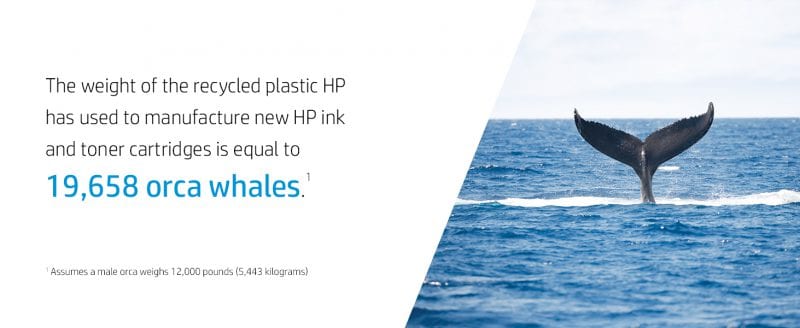
Recovered plastics from these cartridges are used to manufacture new Original HP ink and toner cartridges.
Your benefits when participating in HP Planet Partners for supplies:
Quick and easy recycling- Choose between various comfortable return options and reduce your environmental footprint
Free of charge return- No matter if you use postage-paid return envelopes or HP’s box delivery & pick up service, there are no costs for you.
Sustainable printing- Cartridges collected via PPP are part of HP’s closed loop recycling process and turned into new ink and toner cartridges.
Responsible involvement- Proof your efforts for sustainability with certificates available for corporate customers.
Close the loop with HP
When recycling your HP cartridges via HP Planet Partners, you help bring products back to life. All returned cartridges go through a multiphase recycling process in which materials are refined for use in a new Original HP cartridges and everyday products. For more information on how to protect the planet via HP Planet Partner Programme please visit here.
In the News: The UK’s Fifth Generation (5G)
1 minute read (1MR)
Despite being a ‘high-risk vendor’, Chinese multinational technology company and smartphone superbrand Huawei are allowed to build parts of the UK’s 5G network, but with a 35% limit. With circulating cybersecurity concerns, predominantly centring Huawei’s capabilities of intelligence sharing, Boris Johnson agreed to Huawei’s plans, although Iain Duncan Smith has conflicting opinions and has urged the Government to revoke their decision.
Due to the impending Brexit date, it could be argued that the UK needs to form strong relationships with other countries, in this case China (and possibly other BRICs) to ensure financial and procurement stability for the UK post Brexit.
This is great news for Huawei and their users though, this will open the door to seeing 5G devices swimming into the UK and into our stores against other contenders such as Google, Apple, and Samsung. As seen in Huawei’s promotional videos, the 5G network will enable optimum performance for their ultra HD screens – a handheld cinematic experience.
With dream-like speeds, 5G users will be able to download Netflix episodes in a matter of 3 seconds, have immediate access to YouTube minus any buffering, and download huge games like Pub G and Fortnite at lightning rates.
Emerging Obstacles
You will have to find a 5G node and stay in close proximity due to its high frequency which means it gets blocked by trees, buildings, cars and even people. Not so bad – you will automatically connect to 4G.
It’s a pricey game to enter but with big benefits for both yourself and your devices to reap if you’re a tech-savvy individual. It brings to life the notion of supply and demand – when devices and networks grow in popularity, prices will reduce. But this is unlikely to happen in the foreseeable future.
Although not proven, the web homes anti-5G activists fighting environmental cross health concerns, especially near schools and hospitals. We can expect to see this topic appearing more frequently over news information channels and debate lounges.
Quick Tip
For those of us who avoid saying Huawei out loud because of pronunciation dilemmas, have a go at this:




 Monitoring by Hotjar