Ice on our cars, frost on the grass, frozen fingertips struggling to type…
The mornings are getting brighter and the nights are getting bitter. But how does the cold weather affect our devices?
Have your smart devices been acting up recently? This chilly season could be why…
Sound familiar?
Let’s say you left your phone in your car overnight in sub-zero temperatures, you go to use it in the morning, you click to unlock, then lock, unlock, then lock to get a response. No response… your screen is lagging and you’re getting frustrated (and end up throwing it back on the seat with a sigh).
Our suggestion? Allow your devices time to get back up to room temperature so they can perform as usual.
But why does this happen? Take a read below.
Electron interference
The Lithium-ion batteries found in many current consumer smart devices cannot be charged at temperatures below 0°C without causing damage. Although the cold battery may appear to be charging normally, it might not be. The electric current that a battery generates is produced by connecting a positive terminal with a negative one; this causes a chemical reaction to take place that produces electrons to supply the current of the battery into your device. However, in low temperatures, chemical reactions become slower. Therefore, when a battery is used in cold conditions less current is generated than at a higher temperature. Once the battery runs down it quickly reaches the point where it cannot deliver enough current and will stop functioning.
The solution? Avoid charging your electronic devices at temperatures below freezing.
‘I’ve definitely done more steps than that!’
Your devices will include tiny gyroscopes, oscilloscopes, and oscillators – sensors that collect information that tell us where we’re going, what time we need to get there, how many steps we took, even the calories we burned doing it! These components track the orientation of a device and how fast it’s moving through space. These sensors’ performance also degrades when the temperatures go extreme.
A steamy situation
Condensation is another killer for cold electronics in areas with high humidity. Those of you who wear glasses know that going from the cold outside into a warm house can result in those glasses getting covered with condensation — and you can’t see through the fog on your lenses. Saying this, you are able to wipe it off and move on. But what is this doing to the inside of your phone?
Freeze… It’s the LCDs!
Batteries fare the worst in cold weather, hands down, however something that frustrates even the coolest of cucumbers is screen lagging. LCD screens illuminate our phones, tablets, laptops, digital camera displays, smart watches, and GPS mapping and control systems and consist of a layer of millions of multicoloured pixels, each one controlled by a separate transistor. When turned on, a zap of electricity shocks a tiny, twisted up liquid crystal to attention. In its altered structural shape, the crystal directs light through a pair of polarising filters and into the pixel, lighting up the desired colour. All together these millions of pixels produce all the colours in an image.
But LCD technology gets sluggish when it gets too hot or too cold. Have you ever left your phone out in the sun and received a temperature warning notice?
The same goes for devices in the cold: the colder it gets, the slower the response time from electrical signal to pixel transition, which degrades the image, making it blurry. It can be irritating when we cannot immediately use our phones, as mentioned earlier on, you have to be patient and let them take their time.
To compare it to us, it’s like being spontaneously woken up with a team video call to create a yearly financial plan – not ideal! You would need time to prepare, get set and go.
Technology providers are yet to come up with a ‘warm up before use’ warning. But now we’re in 2020, the year of change, is that a step they could take – or due to the reasons mentioned above, would it be too much work for your device to process?
So if you have been experiencing some glitches on your smart devices that sound similar to the named, don’t be alarmed. Like a good olive, keep them at room temperature for optimum performance.
Sustainability of Original HP supplies
At XMA we strive to help support sustainability efforts that have been developed to help protect the planet. That’s why we’re happy to support HP supplies and their many sustainability programs.
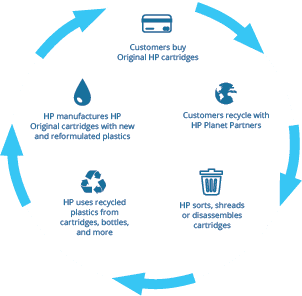
HP has a closed-loop recycling program whereby manufacturing new HP cartridges are done so by using returned cartridges and other plastics to contribute to a circular economy.
The closed-loop process:
Customer purchases Original HP cartridges to use in their printer.
Customer then recycles this cartridge using HP Planet Partner Programme.
HP then work hard to sort, shed and disassemble cartridges collected.
HP collects this usable plastic from the old cartridges and adds plastic from water bottles and hangers.
HP manufactures Original HP cartridges using new and recycled plastics previously collected.
Customer purchases Original HP cartridges…and so the process starts again.
More than 80% of Original HP ink cartridges and 100% of Original HP toner cartridges contain post-consumer or postindustrial recycled content. Since the start of this programme HP have helped divert on average more than 1 million bottles per day and produced 4.2 billion cartridges using 4.4 billion plastic bottles and 101 million hangers.
The HP Planet Partner Programme provides customers a free, convenient and responsible way of returning empty Original HP cartridges for recycling. No Original HP cartridges returned through this programme are sent to landfill. For more information visit here.
2020 Tech Predictions
1919, 2020, 2121
Unless we technologically advance rather ferociously in the coming years, this is the last time we will see a double figure year in our lifetime, so it’s pretty special! An iconic year for us all to really make an impact.
Let’s jump straight into our technology predictions for 2020: sustainable innovation, experiencing technology, time limits, specialised talent, and transhumanism.
Sustainable Innovation
Change is upon us, effective change is imminent.
Being sustainable is at the core of every business. As businesses, we want to be seen making positive changes, but how far are we all actually going to make an impact? Is there any evidence to analyse? Any substance behind the claims?
We can expect to see greater investments in reuse and recycling for closed-loop innovation and expect to say goodbye to the days of bulky hardware, as just like the nano SIM, hardware are becoming smaller and more efficient and we will be more reliant on the Cloud. We can expect more organisations to source new sustainable materials for example being built with recycled and reclaimed goods.
In 2018, HP used 21,250 tonnes of recycled plastic in HP products – including 8,360 tonnes in their personal systems (a 3.5% increase from 2017); 4,790 tonnes in their printers (a 280% increase from 2017); and more than 8,000 tonnes in their ink and toner cartridges.
“As of September 2019, HP sourced about 450 tonnes of ocean-bound plastic bottles (equal to roughly 35 million bottles) that are recycled and used to make Original HP ink cartridges and hardware, including the HP EliteDisplay E273d Docking Monitor (announced in June 2019) – the world’s first display manufactured using ocean plastic. Display manufactured with 5% ocean bound plastic materials by weight, the equivalent of more than three 16 oz. recycled plastic water bottles.” (HP, 2019).
So an absolute #GameChanger is the HP Elite Dragonfly, after launching in September 2019, this beautiful, slimline device has been the talk of Tech Town. Not only is the HP Dragonfly the world’s most lightweight 13” laptop, it is also the world’s first notebook with ocean-bound plastics, including 5% in its speaker, and has started a standing-ovation-worthy cybersecurity revolution…
The motherboard is where the magic happens, but with the Dragonfly, it’s more than magic, it’s where their intelligence driven superpowers are challenged. Sure Sense, required with Windows 10, is trained to seek and analyse trends in Malware. Unlike Norton for example, which detects known malware, Sure Sense looks for codes and changes in malware that Norton would not be able to spot. This is next level. This is now. This is the answer to your cybersecurity concerns.
We predict that the HP Dragonfly will have a snowball effect on other organisations and we will see more plans and launches of devices which use sustainable materials in their products. It’s all part of the sustainability grape vine. Find out why this is so important to us here.
Technology Experience – learning how to use technology more creatively to go the extra mile.
We predict that 2020 will create a new wave of fun for technology users. Consumers will use their devices and software to a fuller extent, producing a richer experience. Technology Education will make a breakthrough from younger ages through to adults and a better understanding of technology and it’s possibilities will be explored. Technology consumers will move forward and develop more creatively – beginning to safely experiment and enjoy the dormant or ‘unknown’ features to a fuller extent.
Time limits Apps/Personal
After studies suggest social media is addictive to younger consumers, we predict apps like Instagram and Facebook will set up ‘recommended screen time’ to present themselves as transparent and responsible media owners. At first, this could be promoted via a push notification, followed by a hideable banner on the homepage if not actioned by the user.
As well as apps encouraging this, we predict that tech users will start taking more of an active role to their technology intake and allocate certain time slots for apps.
As a side note, media giant Instagram appears to have the user at the forefront of their minds. Recently after a trial period in the UK, Instagram removed the amount of likes on photos to other users, only the photo owner can see the total number of likes; however this does not stop savvy users counting the profiles that liked it. The move was designed to promote positive well-being and to downplay the importance of users receiving ‘social validation’ on their posts after concerns of growing online anxiety, and instead to shift focus to the content they freely want to share.
Training for Specialised Talent
As I’m sure you’re aware, ICT is a rapidly growing industry, and after every layer is peeled, another 500 appear. Because of this, there is talent in special areas, we have seen the Facebook Content Manager and Social Media Community Manager, but we can expect to see wild job titles entering the mix. Perhaps Linkedin Automated Message Developer, Instagram Beauty Hashtag Expert, or Website Header Transition Engineer.
Technology has a major role to play in learning and in preparing students for the world and careers they’ll be responsible for in the future – a future where 65% of jobs they will apply for do not exist today. (World Economic Forum, “The Future of Jobs: Employment, Skills and Workforce Strategy for the Fourth Industrial Revolution,” January 2016).
In May 2017, BBC Sounds podcast covered this and even though this circulated figure is debatable, it creates a thought whirlwind… will technology in education create more doors to open with more space to explore? How is technology training in schools being implemented effectively to prepare for these changes? If you’re interested in finding out some more, sign up to one of our Google Interactive Learning Experiences at BETT 2020 here.
Transhumanism
How would you feel about opening your front door by the swish of your index finger? What about picking up loose change from behind the sofa with a magnetic middle finger? Would you find it helpful having a chip in your wrist which is full of your medical information?
Introducing… Transhumanism. The belief or theory that the human race can evolve beyond its current physical and mental limitations, especially by means of science and technology.
When we think of transhumanism and technological developments into our bodies, we could think of a certain alien invader – cyberhumans. And hello 2020, we can liken this concept to BBC’s hit drama ‘Years and Years’, where student Bethany is obsessed with transhumanism and the culture of integrating humans with technology. If you haven’t seen it yet, it is definitely worth a watch to examine life in possibility.
‘I’m going to escape and become digital’. Granted, talk of removing the brain with all your life’s information and storing it into the Cloud is a tad extreme, however that is transhumanism in its ultimate form. Saying this, Winter Mraz, 31, labelled as a ‘Tech Geek’, with a degree in Games Modelling, Animation, and Effects, began augmenting herself after a car crash in the United States.
With ‘bionic’ implants inserted around her body, she argues over popular contraceptive implants, presenting conflicting ideas of ‘what’s the difference between a contraceptive implant and a microchip?’
Working as an engineer, she said her magnetic and data-fuelled implants allow her to sense electromagnetic fields and help avoid touching live wires at work.
Some argue that either through genetics or artificial intelligence, humans will be able to create a human being that is far superior to what we are now. From robotic hearts which don’t stop ticking, to saying ‘see ya’ to Rapid Wrinkle Repair cream and welcoming in genetic enhancements to make us not age or stay young forever, and let’s not forget about the development of bionic eyes that immediately download TV shows.
Overall, the concept of transhumanism is to collaborate humans and technology to make us more functional beings which live longer and more efficiently.
Will humans be free thinking, decision making entities in the Cloud?
Will we upload different versions of ourselves?
What if our Cloud personas are hacked? Rewind to this iconic episode of Doctor Who and The Rise of The Cybermen.
Is this a work of art? Or work for reversal?
Creative Intelligence: The Awakening (iPad edition)
Responding to issues, understanding opinions, activating creative instinct.
Building culture. Instigating change. Deducing potential.
In July 2019, we were enlightened with a youthful outlook on creativity and global concern. We understand the power of societal influxes and demands into our own lives, and how many attitudes and beliefs become stronger as we mature. However creativity through all ages via drawing gives us a chance to express our personal visions. It is those visions we mentally visualise which make us human, which appeal to our instincts, what makes us – us, which makes for interesting and diverse discoveries.
As part of our ‘Everyone Can Create’ campaign and equipped with an iPad and pencil, we invited school children to create an imaginative drawing to share with us, alongside a short description explaining their motivation behind their piece. To our admiration, we received several entries displaying signs of concern for our environment and planet.
Reflecting upon this mirrors findings from Bernardos in 2004, where they deducted how children want to help protect their local environments from less traffic, less litter and more green space. Sixteen years later in 2020, we’ve seen a tremendous rise in planet protection, especially in 2019 with, for example, the rise in veganism and new laws restricting the manufacture of single use plastics. As time passes, our intelligence and awareness of our surroundings heightens as we create a safe culture for the new generations to live in.
As highlighted by Bernardos, ‘children are a powerful symbol of the future’ which provides us with an even more compelling reason to protect the environment.
Task: If we gave you the task of producing an imaginative drawing of your own desire, have a think of what you could do. If you fancy having a go, unleash your creative freedom, grab an iPad and get drawing – our inbox is always open!
Windows 10 & Beyond: Driving adoption and change
Driving adoption and change
What happens once you have migrated your business over to Windows 10 and how does the business start utilising all of the tools that are now available to them?
At XMA, we excel at helping organisations rise above the important, routine tasks involved with running a business. We offer a wide range of services that include helping your business drive Cloud adoption. Through our experience as a Gold Certified Microsoft partner, we can help you to enable the right solutions, tailor it to fit your unique needs, and drive adoption among employees, all while staying within your budget.
Watch our Windows 10 & Beyond Animation
Your first steps towards cloud adoption
Azure Active Directory
Has your business moved your Active Directory into Azure? Active Directory in Azure is the first step in order to enable additional solutions. You can connect your users with apps for a frictionless experience across cloud, mobile and on-premises apps. Single sign-on for multiple applications makes it easier and faster to onboard new employees, terminate access for leavers, and implement access to new cloud services, so users are up and running more quickly.
Microsoft Office 365
Have you moved your emails into Office 365? With Office 365, your employees can work anywhere, anytime and on any device. You will need to consider how you are backing up and securing your data within Office 365, and make sure you are fully utilising what is available within the suite of tools. Office 365 allows your IT resource to access the easy-to-use admin center from anywhere to manage all services. Office 365 takes care of IT for you, so your services are always up and running and up to date.
Microsoft teams
Microsoft have also announced that Skype for Business will come to end of life on July 31st 2021. This means your organisation will need to make the journey to Microsoft Teams. If you are operating on Windows 10 – then you are already half way there! We can help you realise the full benefits of Microsoft Teams, and how it can increase collaboration, lead conversations and integrate with Office 365.
Intune & Enterprise Mobility Suite
The deployment and ongoing management of your estate is essential for effective outcomes. Employees always want consistent access to their company’s resources from any given device. This is a challenge for IT professionals, who want to provide maximum mobility, all the while, protecting the corporate resources. Microsoft Intune is responsible for dealing with the mobile devices of the employees and provides functionalities such as remote wiping of data and mobile application management. Additionally, EMS reduces the burden on IT teams, enhance your data protection, and simplified identity management.
Sharepoint Online
SharePoint online is a collaboration software that enables mobility, and is a centralised document repository that compliments Microsoft Teams and One Drive – all tools that are now available to your business now that you are operating on a Windows 10 environment. You can drive automation through SharePoint online, and give employees places where they can organise and collaborate on content, data, and news to stay on the same page.
Analytics & Automation
PowerApps and Flow are part of the Microsoft Power Platform along with Power BI, and are being promoted by Microsoft as the new tools for the citizen developer. Microsoft Flow is based on workflows and triggers, and there are many different types of triggers that can be used. A Flow can be kicked off when a new entity is created or an existing entity is changed. PowerApps uses the connectors, provided data can easily be pulled from one or several data sources and combined to display what you really need to see with full create, read, write and update functionality, or restricted as you see fit.
We are leading the way in ‘The Modern Workplace’
XMA have started rolling out Microsoft devices across our own business; the hardware and software are built in unity, making them easy to deploy and simpler to manage. Our employees have agreed that their Microsoft device has allowed them to ‘increase productivity even on the most common tasks’… ‘more flexible working which has allowed us to embrace an “always online” approach’… and last but not least, they are proud to be seen with it!
How we can help you embrace the modern workplace
Whether you are at the beginning or the end of your Windows 10 journey, XMA are best placed to help you develop and drive your future road map and strategy.
We can provide end-user training to improve worker productivity, empower your organisation to automate your “starter, leaver, mover” process, and implement your Microsoft Enterprise Mobility Suite.
Our services for training and consultancy
XMA has an in-house team who deliver end user training to improve worker productivity. We understand the importance of enabling your workforce to get the very most out of the tools that are now available to them.
This training can span across multiple departments, including working closely with your own IT resource on how to deploy all of the new software programs across the business. We act as an extension of your IT department, and offer continuous support throughout your journey to a modern workplace.
Rosette’s story: Keep reinventing
HP are committed to making the world a greener more sustainable place to live, with one of their many schemes including their efforts to improve the conditions in Haiti after the earthquake that devastated the country in 2010.
Haiti is one of the poorest countries in the western hemisphere, with little access to clean water, most of the population rely heavily on using water from plastic bottles. Without the infrastructure in place to recycle these bottles it can cause rubbish to pile up and sanitation problems to ensue.
HP have set up a system in which they work with Haitians to collect plastic bottles that are then recycled to make new HP print cartridges.
This initative has in turn helped put money into the local economy and XMA are very pleased to support this amazing story.
Watch the video below to meet Rosette and find out more about her reinvention story.
Evolving the digital workspace with Windows 10
Windows 7 end of support is fast approaching and its not too late to begin your migration.
14th January marks the end of Windows 7 support, and what does this mean for your business?
If you continue to use Windows 7 after support has ended, your PC will still work, but it may become more vulnerable to security risks and viruses. Your PC will continue to start and run, but Microsoft will no longer provide support for your business.
Here are some of the questions you may be asking
Why should i upgrade to a new device?
Modern devices save time and money with improved security (33% reduction in security incidents),3 faster performance (80% better performance),1,6,7 a speedy experience (2.1x faster multitasking),1,5,6 and battery life for a full workday.1,7
What happens if i continue to use Windows 7?
You can continue to use Windows 7, but once support ends, your PC will become more vulnerable to security risks. Windows will operate but you will stop receiving security and feature updates.
Can i upgrade my existing PC to Windows 10?
Yes, you can upgrade compatible Windows 7 PCs based on specific requirements with a full license. To take advantage of the latest hardware capabilities, we recommend moving to a new PC with Windows 10.
Will internet Explorer still be supported on Windows 7?
Support for Internet Explorer on Windows 7 devices will be discontinued on 14th January, 2020. As a component of Windows operation system Internet Explorer follows the same support life cycle.
Manufactured in the UK, Viglen desktops are built entirely around the way you work. Powered by Intel Core processors and a choice of motherboards, form factors and storage options, desktop computing opens to endless possibilities.
Our desktop solutions offer a wide range of quality components, customisable and versatile configurations, and innovative security options.
Equipped with the latest Windows 10 and Intel technologies, the Viglen range reflect innovative products that meet the requirements of the modern user in the evolving digital workspace.
Migrate today with Viglen and don’t risk being unprotected!
View our short animated explainer to learn the risks and associated costs of not migrating
How Microsoft Teams can help tackle data overload
Our shared work area on the school server had become a bloated monster. It was stuffed full with the outdated worksheets, past papers and mark schemes that we’d been feeding it over the years. And to make matters worse, these documents were rarely referred to by staff, and seldom used by students.
So we started to look at how we could kill off this old monstrous shared drive, and look at other digital platforms. We wanted a dynamic digital hub with a range of features that could future-proof us in the rapidly changing world of technology.
Given that we were going to spend money on training, it was essential that we were confident the company we chose would still be around in five years’ time to provide support and updates. But most importantly, we wanted to see it having an impact in the classroom. For these reasons, we chose Microsoft Teams in Office 365 Education
One of the reasons we went for Teams is that our staff and students are already familiar with aspects of it as regular users of Word, PowerPoint, Excel, Outlook. Teams allows all of these familiar programs to seamlessly integrate with additional, sophisticated tools that promote collaboration and creativity. It’s also got a load of apps, such as Quizlet and Evernote, that you can use as extensions.
We have saved a lot of training time from not having to explain features; more importantly, we have saved a lot of lesson time not having to explain to students how to change the settings for an essay or adjust a presentation. Instead, the focus has been on the outcome, not the medium.
Edtech: Identifying what you want to change in the classroom
One of the biggest challenges we have is getting students to work more collaboratively. Our lessons are 35 minutes long, and sometimes setting up a task, in pairs and groups, can gobble up that time. Teams allows a teacher to “prep” a task in advance of seeing the class.
So, for example, if I am teaching my Year 11s poetry, I can annotate texts in Word on an iPad Pro using an Apple Pencil, share it with the students, get them to work on further annotations before the lesson, and share their work among classmates.
They learned from me, then themselves, then each other, and they did this in their own time, at their own pace, rather than in lessons. I couldn’t have done this so efficiently without an effective digital hub. I can also give them immediate feedback online through group Chat. Students find this very different approach stimulating and rewarding, and I am able to test their progress through another feature in Teams.
How to deliver impact
In the run-up to the exams, I was trying to ascertain from the class what it was that they wanted to recap, but I was finding that it was the voice of one or two students that seemed to be directing the topics. So in a bid to try and elicit some honest (and uninfluenced by their peers) responses, I changed up the way I was asking the questions by using Forms instead.
Forms is a really useful tool in Teams. Setting up a Form takes seconds, but the real work lies in the quality of the questions the teacher sets the students. The answers you get back can change how and what you teach. I asked the same Year 11 class 20 questions on different aspects of their GCSE language course and used their answers to map out revision lessons.
Now their answers were much more honest. I learned that the majority of them wanted to spend more time on particular topics and key skills. All this was given to me in easily understood graphics. Getting quick and clean data back from my classes empowered the students by making them stakeholders in their progress and, I believe, improved my teaching.
The impact of marking
Too often, teachers were finding the time it took to mark a set of students’ essays was doubling, because once it was done that student needed to sit with the teacher and recap everything that the teacher had written down. What we needed was a way to mark with the student there – but which didn’t add to our own marking time, and didn’t take up more time in class.
So instead, our teachers have the option to mark live, online, the students’ work. This can be a constructive dialogue focused on approaches to learning, rather than a final mark, which, in turn, leads to a more secure knowledge of the topic.
In other words, teachers are showing their students what works, rather than simply telling them. Seeing it live, in groups or one-to-one can be transformative because it develops skills and application, rather than just retrieval.
All this is good practice, but it is reassuring to know that there is compelling evidence to show that the right technology used appropriately can improve key skills, such as reading comprehension.
Improving professional development
Technology can be a powerful tool for learning, but it has to be used purposely and consistently. Crucially, teachers need to know how to use it, and that requires training.
There are free online courses for educators, but we have found that the most effective professional development comes from us: finding out what works and what doesn’t from colleagues ensures that we drive the learning with the students, rather than worrying about which apps to use, or which device to pick up. If in doubt, you can always test progress using Forms.
There are alternatives available, and they’re good, but Teams is well-named: it brings people together in a secure space dedicated to collaboration.
Credit: David James, Deputy Head (academic) of Bryanston School
Speak to one of our education experts about how Microsoft Surface coupled with Teams can improve learning outcomes.
Have yourself a very Techie Christmas
Emails ding, are you listening?
Whether you’re planning on watching The Grinch for the 518th time, preparing for the annual Christmas Trivia family board game, or gathering last minute bits and bobs, we are in full festive swing.
In the spirit of this tech-induced time, we have come up with some technology inspired Christmas riddles to rattle your nutcrackers. Fancy yourself as a XMAs-Tech whizz? Show us what you’ve got!
***
“What’s in it for me?”
In this celebratory season of giving, if all three riddles plus the bonus riddle are answered correctly, we will donate £10 to our chosen charity, Shelter.
Shelter support and advise millions of people facing homelessness or experiencing housing issues, pledging they won’t stop until there’s a safe, secure and affordable home for everyone. Shelter help people by organising face-to-face appointments, have a free national emergency helpline open 365 days a year, offer an online web chat, and provide legal support. Recently, they announced how London has the highest rate of homelessness in the UK. Let’s work together and care for those less fortunate than ourselves.
***
How about sharing some of these techie Christmas riddles around your office? The more correct responses we receive, the higher our donation for Shelter this Christmas.
Your spontaneous good deed of Christmas time = done.
Without further ado, let’s get going…
How agile working is changing our future
The spaces in which we work have changed dramatically within a single lifetime. Perhaps the most dramatic change comes from how much of our work is now done in a workspace which we can’t even see, which doesn’t exist physically; because the digital space in which we work has transformed services, experiences and entire companies beyond recognition.
This digital workspace can’t be ignored – those entering the workforce now have lived their whole lives with access to the internet and take for granted the advantages which that connection brings. As organisations struggle to utilise the data and functionality at their fingertips, they risk disenfranchising those who expect the flexibility, immediacy and autonomy they have outside the office to be reflected within it.
Agile working isn’t a dream, it is a necessity. Organisations focused on providing employees – as well as customers – with great experience, will grow far beyond those for whom employee engagement isn’t a driver. In research by Gallup we can see that an employee focused workspace creates greater engagement, which – in turn – affects key business outcomes.
But, What Does Agile Working Look Like?
Providing an agile workspace is about bringing together – intelligently – our physical and digital workplaces to provide employees with an experience which works for them, as well as the organisation .
A decade (or three) of employees feeling that technological advances have been grasped by organisations to their own advantage, rather than providing better experience for staff, may make some wary. Agile working isn’t about promoting hot desking to provide less, and smaller, desks for cost reduction, or giving employees smartphones to ensure they answer emails at the weekend.
Agile working has to be about providing employees with the advantages of flexibility and autonomy which digital solutions can provide. It’s also about physical workspaces which promote collaboration, joint working and learning. Because, for organisations, it has become increasingly recognised that employees are what differentiate in an environment where choice is always growing – it’s essential to be the company in which great employees will thrive.
The companies who can bring together physical and digital spaces to create great experiences will be the ones who excel – both for customer and employee engagement.
So, How Does a Business Embrace Agile Working?
Transformation starts by understanding what’s possible, allowing the creation of a vision which embraces a realistic but forward-looking concept. Next, a roadmap can be created, identifying opportunities and driving innovation.
Design and implementation of any changes will only be effective when built against a true understanding of the ‘as-is’ and the ‘vision’. Additionally, it’s essential that this is done against a background which encompasses the whole of the ‘bigger picture’ ensuring the focus is providing a better experience for employees, not just customers or shareholders.
Final steps will involve companies exploring the outcomes of their development to identify opportunities for optimisation and scale.
Conclusion
This improved functionality we’re calling an agile workspace, should be providing benefits for companies and employees alike.
In a world where we can use a phone to find our nearest chemist, confirm they’re open and get directions to a parking space, individuals don’t expect to get lost finding a meeting room, struggle to locate an employee in their own office or want to face the frustration of not being able to book an empty desk.
It’s essential that companies look at employee concerns about their workspace and offer solutions, it’s also essential that these solutions are part of a joined-up picture which provides flexibility and autonomy to ensure employees feel enabled and trusted.
Engaged employees provide better service to customers, are more productive, are less likely to leave taking their skills with them, and instead are more likely to encourage like-minded peers to join firms they perceive to be good for them.
Engage your employees, providing solutions which work for them. If you want to find out more about how we can enable your transformation, get in touch.
Written by Terry Chana – Director of Workspace Transformation @ XMA






 Monitoring by Hotjar