XMA statement regarding Coronavirus and Business Continuity
Coronavirus Statement Update 22/06/20
XMA has continued to operate a full service across all areas of the business during the COVID-19 pandemic, and continued to meet its 3 key objectives:
1. Continuing to support and deliver to our customers the goods and services they need to support their changing requirements
2. Making sure our employees are cared for to the best of our abilities
3. Securing the long-term future and stability of the XMA business, so that our customers and staff can have confidence in these challenging times
We successfully transitioned our staff to home working at the beginning of the COVID-19 lockdown and the XMA Board have acknowledged how well our staff managed the complete transition whilst maintaining service levels, delivering critical projects to the NHS and Education sectors and supporting all of our customers during this time.
Our continued success is underpinned by our ‘key worker’ employees who have continued to operate from our offices and warehouses and we truly appreciate the commitment and efforts of each of these individuals. We have ensured that Government guidance has been followed to protect these key workers in terms of safe working practices, PPE equipment and social distancing.
As the lockdown restrictions begin to be eased, XMA has put in place plans to ensure our staff can return to work safely, in a controlled manner and on a timescale to support their individual concerns and commitments.
This planning has been undertaken by our dedicated ‘Return to Work’ team who have put together an induction programme to prepare employees for the changes to office working brought about by COVID-19. This comprehensive online programme covers the changes required to maintain a safe working environment, with sections covering:
• Setting the Scene
• Practicing Good Hygiene
• Office Operations
• Monitoring your Health
• Communication
Our priority through the return to work transition will be to continue to protect our employees and enable them to operate from our offices in a safe and secure manner. To achieve this, we have carried out Risk Assessments at all locations in accordance with Government guidelines and these assessments have been made visible in reception areas of all locations to promote best practice. The Risk Assessments are reviewed weekly and updated as appropriate to meet current Government guidelines, ensuring we are taking all possible measures to reduce the risk to our employees.
The return to work scheme will be done at a pace that ensures XMA meet all Government guidelines whilst continuing to deliver services to our customers, to meet both the needs of changing working environments and ongoing and future projects.
XMA are pleased to confirm that we have maintained a ‘business as usual’ approach throughout the lockdown and look forward to further supporting our Customers, Partners and Suppliers going forwards.
Please contact us at approvals@xma.co.uk if you need to discuss your business needs.
XMA’s Andy Wright & Jen Norman named CRN Women in Channel judges
XMA Commercial Director Andy Wright has joined this year’s CRN Women in Channel judging panel for the first time. Joining other industry peers including XMA’s Jen Norman – who has also been a judge in previous years – Andy and Jen will be working to identify those in the channel who go the extra mile and are inspiring the next generation.
Andy had this to say:
“The CRN Women in Channel Awards is a great initiative that highlights the achievements of those across the IT channel, who can also act as role models for young women considering a career in the industry. I am pleased to have the opportunity to be part of the judging panel at a time where equal opportunities for all is so very important in our society.”
Jen will be joining the panel for a third year running and had this to say:
“I am absolutely privileged to be on the CRN Women in Channel judging panel again this year. Every year I see so many inspiring women throughout all the categories, so I am honoured to be part of celebrating their achievements. It’s always brilliant to read the successes in every entry and to see the powerful potential that these women have.”
XMA have three nominees for the 2020 awards including Jade Barlow, Kavita Chauhan and Shaira Alibhai. The awards take place in October and we look forward to seeing the shortlist reveal in a few months time.
Best of luck to all the nominees!
Accessibility tools to empower everyone
The true value of technology isn’t how powerful a device is, but by how much it empowers you. Technology is an important contributor to enhance teaching and learning, and a powerful tool for collaboration, inspiration and the measuring of success. But how can educators ensure that every learner can enjoy that technology, to the best of their abilities?
Having previously worked in a role supporting those with Special Educational Needs (SEN), it is clear that every student is different and there is no ‘one-size-fits-all’ approach. Having access to tools that can enable different types of needs is invaluable.
iPad hosts an array of built in assistive tools to complement vision, hearing, mobility, learning and literacy. Whether you are in the classroom or distance learning, these tools will enable you to work with all types of learners, ensuring they receive the best experience possible.
Vision
Seeing the screen is just one way to experience iPad. Assistive features ensure that anyone with a vision impairment is not restricted.
Features include:
- Fully control your iPad using only your voice and have it talk back to you
- Use customisable colour filters to complement different forms of colour blindness
- Use Zoom or Magnifier to make your screen bigger or take a closer look
- Braille capability including braille display or direct braille without the need for braille display
Hearing
Apple have built powerful features into every operating system and device to ensure students who are deaf or hard of hearing, do not have to compromise their learning.
Features include:
- FaceTime for communication using sign language
- Siri to ask questions, set reminders or issue commands
- Hearing aids which are compatible with iPhone and iPad
- Use the Noise App to track your hearing health
Mobility
The powerful assistive features in all Apple products give people with physical limitations greater control over their lives. Teaming multiple accessibility tools allows for an enriched learning experience for every student.
Features include:
- Switch Control to navigate sequentially through onscreen items and perform specific actions using a variety of Bluetooth-enabled switch hardware
- Voice control using Siri and Dictation
- AssistiveTouch lets you adapt the Multi-Touch screen to your physical needs
Learning & Literacy
Learning, creating and exploring the way they think is key to a successful learning experience. Apple technology breaks down barriers and enables individuals with SEN to learn in a way that is tailored to work for them. Not only can technology assist with physical impairments, but also for students with attention and sensory challenges.
Features include:
- Speak Screen to have all the content on pages read back to you
- Safari Reader reduces the visual clutter when browsing the web. It strips away ads, buttons and navigation bars, allowing you to focus on just the content you want
- Guided Access lets parents, teachers or therapists limit iPad to one app at a time, and limit the amount of time spent in an app
Check out our tutorial videos around how to use many of these features here
To learn more about Apple Accessibility and how XMA can help you utilise these features, visit our accessibility page here.
XMA supports local charity Harmless during COVID-19 Pandemic
Harmless are a not-for-profit organisation who provide self harm and suicide prevention support services, as well as delivering The Tomorrow Project – A confidential suicide prevention project that has been set up to support individuals and communities to prevent suicide.
Much like many organisations, they have been faced with operational challenges as a result of COVID-19 and the UK government lockdown. With a focus on mental health being more important than ever, it is vital that they have access to the tools they need to continue delivering support services remotely.
XMA are happy to have partnered with Harmless to provide resources needed for their staff to continue supporting individuals, families and friends exposed to the risk of self-harm and suicide at this time. By providing technology that enables them to deliver their service remotely, Harmless have continued to help hundreds of people in crisis every week. This new way of working will also enable them to continue offering remote support beyond the pandemic, with an even wider reach.
XMA’s Managing Director Lee Hemani, had this to say of the partnership:
“XMA are a family-run business with a head office in Nottingham and are passionate about how technology can connect people and transform lives. We are committed to supporting local grass-roots charities and community projects in achieving their goals, so when we became aware of Harmless / The Tomorrow Project’s plea for technology, to continue their critical, face to face services remotely in these unprecedented times, we wanted to help.
We know that maintaining mental health in the modern world is a very real challenge for many people and that self harm and suicide touch people from all walks of life. We share the vision of the Tomorrow Project; that no one should have to feel so alone that they feel they have nowhere to turn for support, and recognise that the communities within Nottinghamshire and Leicestershire; where so many of our employees live, are very fortunate to have these services available to them; particularly at a time when many other mental health services are closing their doors.”
To find out more about Harmless and the amazing work they do, visit www.harmless.org.uk.
Windows 10 out of 10
I hope everyone is safe and well during lockdown and people are still finding fun ways to stay active and social. Like many people I’ve been having regular quizzes online with friends, often ending up in ‘JD Wetherzooms’ for a few drinks. I recently hosted a Britain’s Got Talent spoof on Teams and people were impressed at how some of the features were in the free version of Teams and how well it integrated with Windows 10 features!
I’ve been a windows 10 user for so long I’ve almost forgotten what Windows 7 looks like for those feeling nostalgic here you go..

With the evergreen Window 10 OS features are rolled out so regularly that often they can be missed! I’ve handpicked some of the top ways I have been more collaborative and productive during current COVID remote working!
Let us begin at the start…
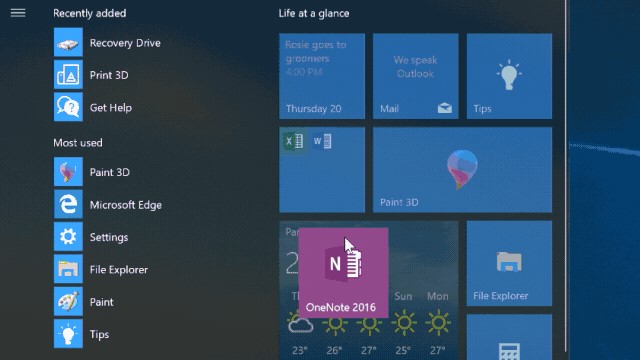
Just like organising your apps on your phone, or bookmarking your favourites within your internet browser, by customising you Start Menu you will have you go to applications and documents just one click away!
Pin apps to the Start menu for quick access to what’s important by selecting Start> press and hold (or right-click) the app you want to pin > Pin to Start.
Treat your start menu to a spring clean by unpinning the apps you don’t need to make it less cluttered!
To get really organised you can actually create your own Start Menu folders.
Drag one tile on top of another to make a folder, then drag more tiles into it. To open the folder, just select it.
Share the workload!
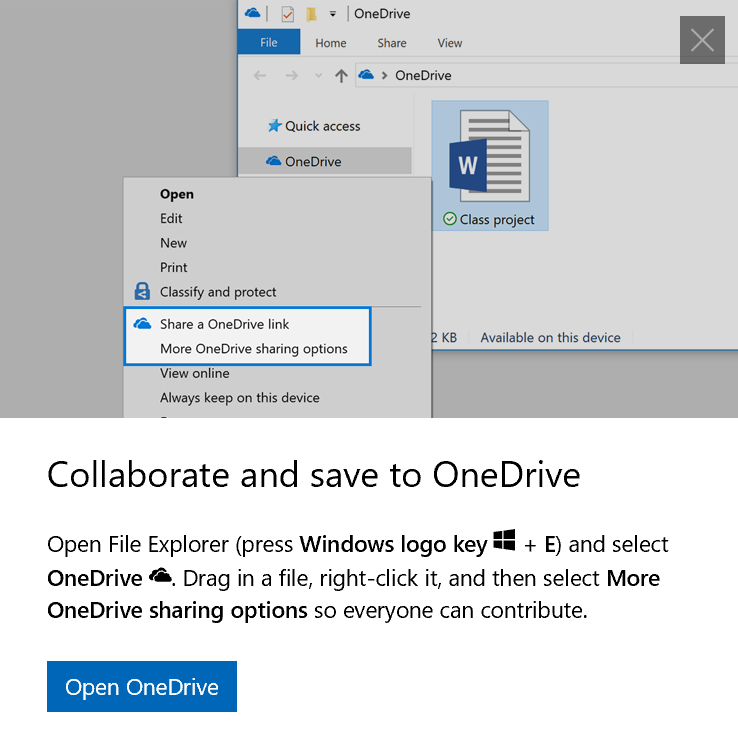
Most people are aware of OneDrive and being able to save and share documents from their own cloud hosted folders. Once a document is in your OneDrive if you want to share the document for joint working you can simply do that via right-clicking the file and selecting More OneDrive Sharing Options.
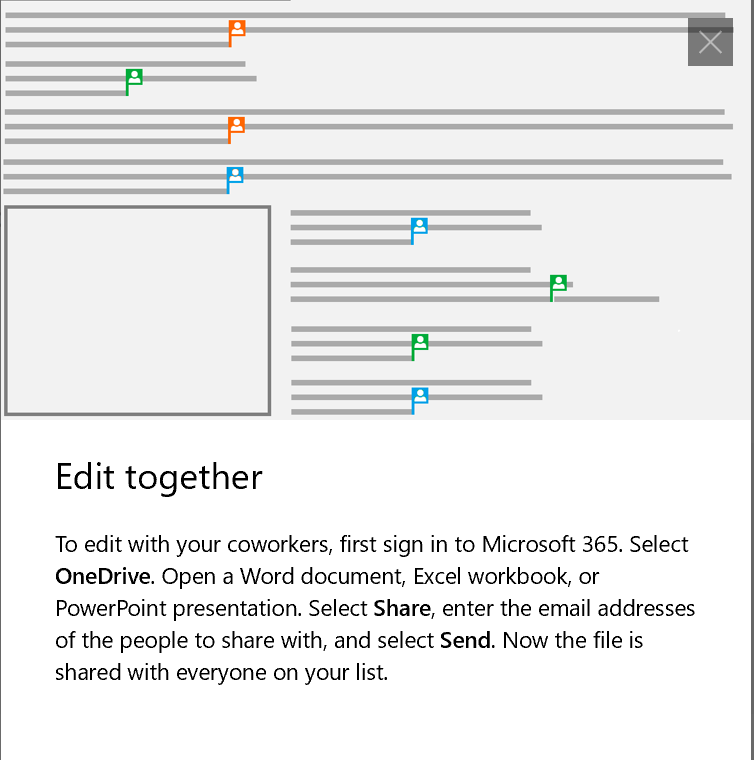
To edit this document in real time with colleagues, once opening the document you can select Share, enter the email address of the people to share with and select Send. Now the file is shared with everyone on your list.
Whilst editing each user will be assigned a coloured flag to illustrate where they are in the document. This saves time emailing around the document and loosing track of versions, and allows maximum productivity when on a team call.
If you are not on voice call, you can still chat with colleague within the shared document. When editing a shared Microsoft Word document if you select the picture of someone who is editing at the shame time, you can hit the Chat.
Many screens make light work…
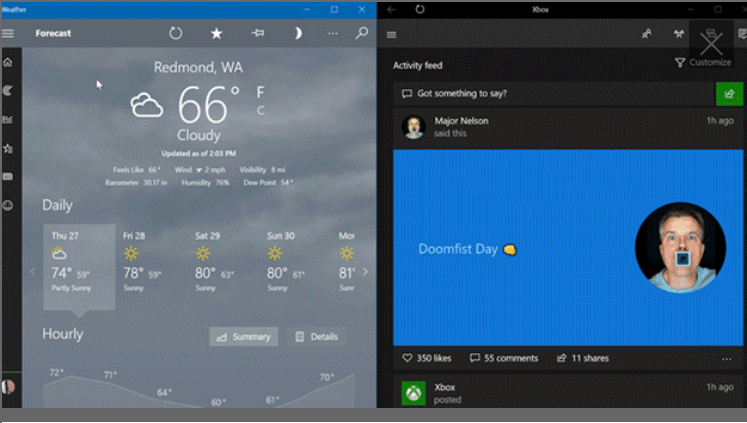
You may have had a dual screen set up in your office or an external monitor that would allow you to view multiple applications at the same time. A prime example for me is switching between a Excel spreadsheet price file and XMA quoting system. Windows 10 provide a handy way of allowing you to snap applications side by side. If you select any open window, then drag and bounce it against the side of your screen. All other windows you have open will appear on the opposite side. Select a window to have it fill the open space.
If your finding yourself spending more time looking at your phone screen as well, you can actually use the phone directly from your Windows 10 machine. The Your Phone App allows you to link your android phone to your device to respond to text, share photos, make calls and more. iPhone users can also use the all-in-one Office app to stay productive wherever you are. Ideal for when you want to get some fresh air and sit in the garden!
Saving your bacon!
Never underestimate the pain of losing documents and folders if your PC breaks when your darling daughter accidentally knocks a whole glass of orange juice over your keyboard!
Thankfully like me, you can automatically back up document, picture and desktop folders to OneDrive so they are protected whatever happens to your PC!
On the right side of the taskbar, select OneDrive > More > Setting and on the AutoSave tab, select Update Folders and specify which folders you’d like to keep automatically synced.
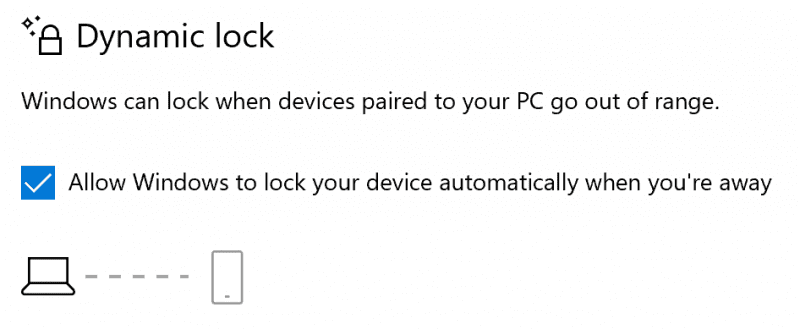
To prevent the offspring from deleting my work when I’ve left my laptop unattended whilst getting a cuppa I’ve also setup Automatic locking on my PC.
You can use Dynamic Lock setting to lock your PC once a paired Bluetooth device (possibly your headset or phone) leaves the proximity around your PC.
Under the Start menu go to Settings > Accounts > Sign-in options. Select the check box under Dynamic lock, and then take your device and walk away, safe in the knowledge that you PC screen is locked!
Oooo work-friends…
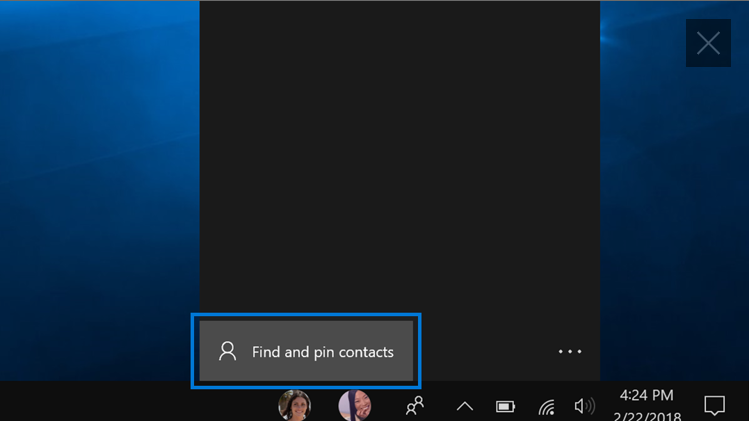
Keep your favourite people nearby… by using the People app you can keep important contacts right on your taskbar, so they’re always within reach when you want to chat.
People pulls in contact info from apps like Teams and Mail. Once you’ve connected those apps, use People to find your favourites and pin them to the taskbar for easy access.
Pin a contact to the taskbar
Easily get in touch with your favourite contacts. Select People > Find and pin contacts, then pick who you want to pin! Obviously, our marketing team are pinned in mine! ?
I hope that you’ve found the above features interesting and useful and honestly this is just the scratching the surface [no pun intended] of ways that windows 10 can help. For more tips and tricks please check out Microsoft’s Windows 10 page here
On the 5th of June I am running a webinar with Dan Boyles from Microsoft to discuss some of our favourite features in Windows 10 and how they are making our remote working lives easier. You can view the webinar here
In the meantime if you have any questions on Microsoft licensing, products or feature please drop me an email on James.Thorogood@xma.co.uk
Stay safe. Stay connected.
All the best,
James
Apply for Department for Education-funded support with XMA

The Department for Education (DfE) has launched an initiative to support schools with remote learning.
An industry coalition headed by Microsoft and Google and its partners – including XMA, are to support the DfE providing remote e-learning platforms, devices and connectivity, for educational establishments across the UK.
Subject to eligibility, the scheme offers grants of up to £2,000 to schools to help fund the implementation of a ‘Digital Education Platform’.
Is your school eligible?
Schools that want to access the scheme need to meet the following minimum criteria:
- Schools in England with a partially provisioned or without a Microsoft Office 365 or Google Suite digital environment will be eligible for funding to help them implement a Digital Education Platform for a fixed cost of £2,000 per platform.
- Schools in England in a Multi-Acadamy Trust (MAT) of up to 10 schools will be eligible for £1,000 per school to configure a MAT wide approach (single platform for whole MAT).
If you’re eligible, great! Here’s what you need to do:


Firstly, select Microsoft/Google and XMA as your preferred partners. We are best placed to help you deliver your Digital Education Platform. We have over 30 years experience of delivering IT solutions into the Public Sector, and have won awards for doing so! We are also an accredited top tier Microsoft Gold Partner and Cloud Service Provider. Our schools team are on hand to answer any questions you may have, and guide you through the process of application.
Cloud Physics: An analytics-driven approach to managing infrastructure
A New Approach
In today’s world of software-defined datacenters, infrastructure is increasingly complex and change is constant. The potential for change-related risk to applications is greater than ever before. In spite of the abundance of tools available, IT administrators lack the ability – and time – to study all the known or unknown configuration issues in their vSphere infrastructure. They struggle to understand whether changes – intended or accidental – result in smoldering performance and availability issues waiting to ignite.
Further, when things go wrong, there’s an inability to replay the changes over time to correlate events or trends that caused the current problem. This creates a significant drag on administrator effectiveness especially as they are thrown into firefighting mode to minimize the impact of unexpected application disruption and related costs.
The goal of CloudPhysics is to provide organisations with an analytics-driven approach to managing infrastructure that enables administrators to preempt emerging hazards and gives them the confidence to act boldly to reduce risk and waste in their vSphere environments.
To learn more , please fill in your details below to receive a free copy of the CloudPhysics whitepaper.
Everything you need to know about dHCI…
XMA’s Infrastructure Solutions Team are seeing a growing interest in dHCI from HPE.
XMA Solutions Director for Infrastructure – Jen Norman – and her team of Datacentre Architects take a closer look..
We’ve been designing and installing Hyperconverged Infrastructure solutions for some time now, and between Myself and my Datacentre team we have over (*cough) 115 years (*ahem) engineering experience between us. So when HPE came to us with a disaggregated hyperconverged infrastructure solution last year, apart from repeating the name several times over to ourselves, we got onboard and got involved. Now we are privileged to have completed our first dHCI live production solution deployments earlier this year.
What could you be facing?
So maybe your VMware system is running out of storage capacity, your servers are dated and you can’t upgrade to run the latest versions.
Ok. Well you’ve done some research and investigation. You want a hyperconverged replacement where you can run concurrent workloads, and like the idea of being able to scale out storage or compute separately. BUT it would be great if you could get this delivered, supported and managed as a single product.
What else might you need?
Well as standard, you want a storage system that has options for encryption, compression and deduplication, application consistent snapshots and advanced replication (ether synchronous or asynchronous) with near all-flash speed and sub-ms latency for always-on apps. That’s a given.
Definitely VMware clusters running on the latest compatible server hardware and block level storage.
A complete turnkey solution? One that is monitored from the application to the storage, proactive alerting and with the ability to predict and prevent infrastructure problems before they happen.
Nothing less than a system designed for 99.9999% availability – no single point of failure, hardware redundancies with the ability to tolerate 3 simultaneous drive failures!
And you’re pretty sure that Procurement will want the choice on finance options – including future proofing, cloud like financing, with integrated support.
Then you definitely need a HPE disaggregated hyperconverged solution (dHCI)
And you are not alone. Since its inception in 2019 we have seen successful installations in Local Government and Education, with interest and opportunities growing in the Corporate, Commercial Enterprise and Healthcare sectors.
It’s a winning combination
You take the power and performance of the HPE Nimble Storage array, with its self-managing flash storage.
Add industry-leading HPE ProLiant Servers, include HPE storage switches, and deploy VMware vSphere.
Then this is all preconfigured as a turnkey solution!
Then automate with full-stack intelligence and policy-based automation for VM-centric management.
But here’s the best bit……
Add the power of HPE InfoSight over all this, and you have full-stack predictive analytics and support automation working for you that predicts and prevents issues. Infosight auto-routes any complex issue directly to L3 HPE Nimble support.
HPE have streamlined their support portfolio to offer four service levels that are easier to understand, easier to align to business needs which gives you visibility into IT assets and support status from anywhere.
You can flexibility and independently grow compute and/or storage – adding new dHCI compatible storage and/or servers when required – for scale-out upgrades that are non-disruptive and transparent to applications.
Eliminate over provisioning and add only the resources when needed. The Timeless Storage means no worries today or tomorrow with all-inclusive software licensing, flat support pricing, no forklift upgrades, and an option to receive a free faster controller upgrade after three years with Timeless Storage.
And, if you’re reading this thinking ‘well this sounds great but I’ve still got Gen9 (or 10) Proliant servers that are in warranty and I don’t want to replace them yet’.. Well HPE read your mind, (just kidding, they leave that to your home speaker system and asked Alexa what you thought), and have designed the solution so you can use the existing compute you already have in place, add a Nimble array and the dHCI software allowing you to convert everything in to a dHCI solution!
Is this Complex?
HPE Nimble storage arrays can be installed and be up and running in half a day requiring no external tools or software – we have completed installations where the HPE Nimble arrays that have been physically installed, configured, integrated and have test VMs running within hours ready for User Acceptance Testing (UAT). They can be All-Flash (AF) or Adaptive Flash (HF) for mixed, mainstream workloads, where cost-efficient flash performance is important. It is a Secondary Flash array for backup and DR while allowing you to put your backup data to work.
For the compute you have the HPE ProLiant Gen10 DL360 a performance driven dense server or DL380 for performance and expandability. These servers deliver security, agility and flexibility without compromise – with the knowledge that you can confidently deploy for virtualisation.
These are completed with a choice of Ethernet HPE storage switches to meet your budget and installation size.
Root Cause…. Could it be the network? A server fault or a storage fault?
Once installed HPE InfoSight can help you stop spending days searching for a root cause deep in your hybrid environment. Every second, HPE InfoSight collects and analyses data from more than 100,000 systems worldwide, and uses that intelligence to make every system smarter and more self-sufficient. The result? HPE InfoSight predicts and automatically resolves 86% of customer issues.
Where to go for more information:
HPE dHCI
Why choose XMA?
We are an HPE Platinum partner and have trained and Certified HPE sales and engineers with Master Accredited Solutions Experts (top-level credential validates technical skills) with experience in building and sizing advanced enterprise systems. Continually staying up to date with the latest technology updates, strategies and programs. One of our core values is “customer focus”. We put our customers at the heart of everything we do. We don’t just provide technology we provide solutions.
Written by Jennifer Norman, Solutions Director for Infrastructure
Microsoft Licenses – April Update
On 1 April, Microsoft launched a new entry-level package, calling it Microsoft 365 F1 (F for Frontline). It bundles together the cloud-based productivity tools you need to be efficient and effective. To make way for this brand-new bundle, the product formerly known as Microsoft 365 F1 has been renamed Microsoft 365 F3. Office 365 F1 becomes Office 365 F3.
View the First Line Worker Comparison Chart along with the full April updates here
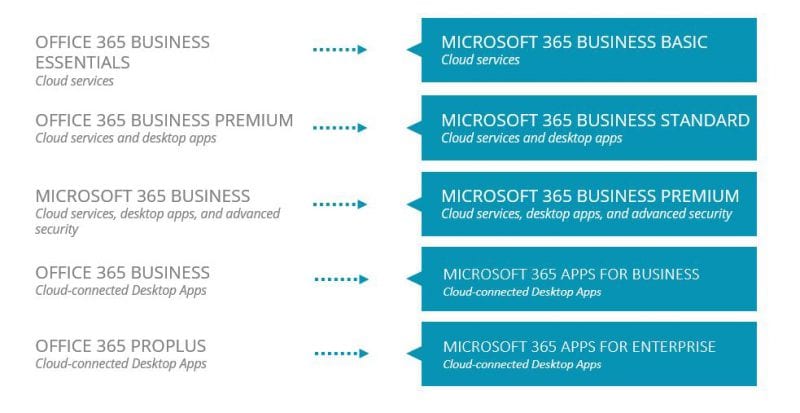
Some licensing products are being rebranded. The plan is to phase out the name ‘Office’ over time and migrate everything to ‘Microsoft’. From 21 April this starting with the following business products:
If you have any questions or need any help with Microsoft Licensing please contact our CSP Business Manager, James.Thorogood@xma.co.uk, or alternatively speak with your dedicated account manager or call our sales team on 0115 846 4000
Manchester Youth Buzz Awards 2020
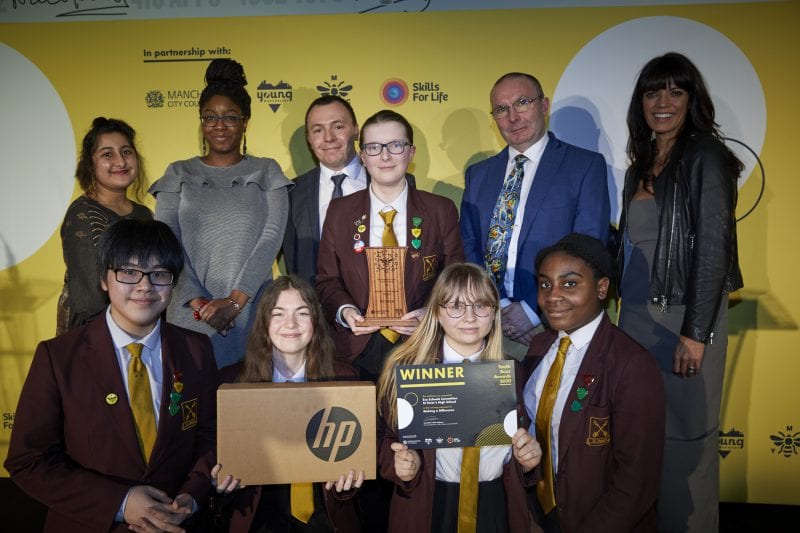
XMA and HP are proud to have sponsored the 2020 Manchester Youth Buzz Awards, donating Laptops and Microsoft Office licences to recognise the category winners. The Youth Buzz awards recognise the positive work and contributions young people aged 11 to 19 make to Manchester. The donation of these prizes provided with the category winners with life changing technology, and in some cases, their first ever electronic device.
The event organisers were over the moon with our contribution in partnership with HP:
Yvonne O’Malley, wrote “We have received fantastic feedback from sponsors, finalists, winners and VIP guests which has been overwhelming, with everyone saying how much they enjoyed the event and how privileged they felt to have taken part. Your partnership to the event was key to its success, it was fantastic to witness the response of the young individuals and community groups who received the laptops and the impact it had on them. Partnership plays a crucial part to the Youth Buzz Awards and without the valued contributions, it simply could not take place.”
David Naraynsingh, wrote “I just want to echo everything Yvonne has said, the laptop donations were greatly received and contributed significantly to the overall success of the night , I have already received very positive feedback from the winners on the difference having a laptop will make to their lives in particular for school and college. Also, receiving a laptop gave a great importance to all the winners and finalists for the reasons why they were nominated and what they had achieved”.
The evening was a great success, most importantly, the finalists had a wonderful evening celebrating their inspirational achievements.



 Monitoring by Hotjar