Considering your Digital Strategy for the new academic year
Technology has long been an important consideration when developing more creative and engaging learning opportunities. It is also an important tool for classroom management and assisting teacher workload. However, there has never been a year like 2020 where the importance of embracing all things digital is critical for the continuation of education.
It is safe to say the re-opening of schools, colleges and universities has been a rocky and uncertain road during and since the UK Lockdown. Educators planning ahead for the new academic year will no doubt have lots of obstacles to face, with the need to plan for multiple scenarios. This might include:
- The possibility that all students will not be able to return to the classroom and need to continue distance learning
- Social distancing measures will still be in place so education will need to be delivered with out physical contact
- Learning hours may need to be extended to allow students to catch up on missed work
It has become clear that the only way to face some of these challenges is through the use of technology. The deployment and adoption of technology can be challenging when not properly executed and aligned with educational objectives – not to mention navigating during an unexpected pandemic!
That being said, institutions have been forced to develop or re-design their digital strategies to suit remote learning and contact free classrooms, while also maintaining security and safeguarding provisions. While considering this new way of working, senior leadership and IT departments will have a lot of questions.
- How do we deploy and manage our digital strategy to meet short and long term objectives?
- Can our infrastructure support this technology and how will this affect our existing safeguarding measures?
- How do we ensure education is accessible for every type of learner?
- How do we support teachers, parents and carers to deliver education digitally?
- How can technology become the primary method of delivering a full, well rounded curriculum?
- What financial implications could this have on my education budget?
What is the solution?
Apple technology partnered with our expertise and capabilities to deploy, manage and support adoption provides the perfect solution to form your digital strategy. iPad and Mac work in perfect harmony together to provide devices that can benefit both student and teacher, in the classroom and at home. The App Store provides thousands of apps to enhance creativity, develop critical thinking and teamwork skills and manage workflows. Our dedicated Digital Learning team are also best placed to train educators, introduce unique ways to use your technology to deliver a well rounded curriculum and collaborate with learners and faculty both in school and at home.
We want to help answer your questions and the many others institutions are likely to have when planning for the new academic year. Find out more about what to consider when developing your digital strategy, as we move forward to ‘the new normal’ here.
So, it’s time to return to work(spaces) – are you ready?
One thing which 2020 has taught us all is the need for adaptability for businesses to survive.
Having turned your working practices upside-down, reducing the number of workers in your building and enabling employees to work from home – now you’re encouraging them to return to the office. How do you follow that up and create a plan for the future? What should that future look like?
We believe the next challenge is to create a plan which includes:
- The stability which creates opportunities for growth and development.
- Enough flexibility to allow for changes which will keep coming.
- Security and comfort from returning to some traditional working practices and spaces.
- Continuing beneficial new working practices, including enabling employees with greater responsibility and rewarding them with openness and cooperation.
But, how can we do this?
Reinforcing the Digital Workspace
Many businesses will have spent the last four, or more, months getting to grips with the opportunities enabled by their digital capability.
With the transformation made necessary by lockdown, businesses will have considered security and management as well as functionality. And, having developed these systems, ensuring they are stable enough for the future makes much more sense than going back to pre-lockdown limitations.
That’s not to say it will be easy, the changes made by many companies will have been developed in haste – ensuring these are the right changes (and changes made in the right way) will be a complicated task. As covered in a previous article, Navigating the New Normal, “Having taken those steps to change, now is the time to review, refocus and reinforce – to ensure these changes aren’t short-term fixes but strong, positive developments which will lead to future growth.”
So, while it will be necessary to review and reinforce these processes to ensure long term stability and opportunities for growth, this is the first step to creating the digital workspace your business needs going forward.
Reintroducing the Physical Workspace
Returning to a subject we explored in Navigating the New Normal, the question is ‘How do we use our offices moving forward?’
At the most basic level, some of our issues can be managed through signage and provision of sanitising stations. However, to ensure the confidence of your people and efficiency within your space, it may be necessary to implement smarter measures – maybe using technology to manage the density of occupancy or monitor routes used by employees to avoid congestion.
In the future, it will be important to use your understanding of your employees and the technology you have available to ensure a safe, smart office environment.
Allowing staff to book desks for working is the first step; however, this needs to include an understanding of the other processes surrounding this desk use. Of course, nearby desks (within an agreed radius) must be kept free and, once used, a desk must be appropriately cleaned before being made available to anyone else.
As well as looking at how smart workspaces are allocated and managed, you might promote the use of smart meeting areas, to enable collaboration regardless of location, and adopt smart document solutions – with contactless printing or digital signatures. These changes, prompted by our current situation, will likely remain, so need to be focused on your goals of increasing productivity and engagement for the long term.
Understanding the Hybrid Workspace
So, how do we ensure the changes we’re making are building systems which are fit for the future? This is something we’ve talked about before, in How Agile Working is Changing our Future.
We’ve already looked at the need to build intelligence into processes to ensure ease of use and efficiency for the workforce as a whole. Now is the time to be considering the possibilities as well as the precautions, to learn from our experiences and build stronger and more flexible systems which benefit everyone in the business. This will be particularly true as we develop systems enabling personalised digital workspaces – again improving efficiency and engagement.
In terms of our digital workspace, providing systems which are available wherever your employees are, tools which enable easy and efficient management and allow for easy communication – these are the most basic standards we have come to expect. Employee performance and engagement is improved by allowing individuals to have some element of choice over where they work.
Physical spaces should also work as well for our teams as they do for our customers and managers. One benefit to the business will come from providing the best workspace for employee engagement and efficiency, and this should be the aim when returning to work. There are additional benefits, of course, in the efficiencies now possible within these physical spaces.
As you look to provide the right environment for your customers and staff, how will you ensure you’re building systems and processes which are helping build your business?
If you need help to understand what’s possible – how you can build a hybrid agile workspace with room to grow and flourish – get in touch. It would be great to talk.
Written by Terry Chana – Director of Workspace Solutions @ XMA
XMA revolutionises its operational efficiency through Andover relocation
Described as a new centre for innovation, XMA have relocated its entire warehouse and configuration services operation to Andover alongside parent company Westcoast. The opportunity the new Andover warehouse provides is immense – just like the warehouse itself – 341,871 square feet of flexible space with a huge configuration and PDI centre.
With a view to future proofing our continued growth, we have increased our operational efficiencies by moving to a facility capable of meeting increased demand. Through the Andover warehouse we can now dispatch large quantities of stock to our customers across the UK, keep all operations cost-effective and efficiently meet customer expectations.
This new location boasts some sizeable stats:
- 5,000 devices configured per day
- 90 HGV parking spaces
- 65,000 pallet locations
Kelvin Lee, Operations Director at XMA had this to say of the move:
“The XMA Board are immensely excited about our transition into the Andover facility, which we see as the next step in our evolution as one of the top value added resellers in the UK.
This move is fantastic news for both XMA and our customers as we can now provide storage, logistics and configurations on a much larger scale in this state of the art, automated and highly secure centre. We look forward to welcoming all of our current and new customers for a tour in the coming weeks.”
If you would like to find out more about the services we can provide from our new facility, or would like to visit Andover for a tour, please contact your Account Manager or email us on info@xma.co.uk.
Start monitoring enterprise Wi-Fi with Aruba User Experience Insight (UXI)
Understanding your end user wifi experience has never been so easy. The award winning Aruba User Experience Insight sensor and dashboard helps you deliver a consistent user experience and performance.
The sensor itself is silent and compact and has a stylish design that looks good in any setting. It constantly checks your wifi and wired network letting you know if your users are having a good or bad experience, sending readings to an easy to use dashboard that shows the health of your network performance.
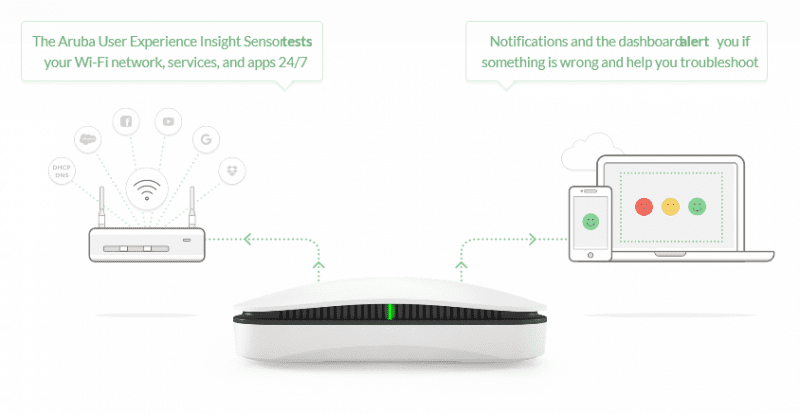
Watch the video below for more information or contact: info@xma.co.uk 0115 846 400
XMA tops winners list at CRN Sales & Marketing Awards 2020
XMA are thrilled to have been named the winners of two prestigious awards at this years CRN Sales & Marketing Awards, taking home the win for both Best Sales Team and Best Marketing Campaign.
The XMA Public Sector team were named Best Sales team, following years of expediential growth and customer success. When announcing the winners for the category, the judges said:
“An absolutely fantastic entry that stood head and shoulders from the considerable competition. Humorous, packed with information and testimonials while showing impressive achievements. A stand out winner!”
Matt Biggs, Public Sector Sales Director had this to say:
“It is an absolute privilege to have been awarded Best Sales Team of the year by the CRN judging panel. Our team has gone from strength to strength and we pride ourselves on delivering exceptional value to our public sector customers. During a year like 2020, it is great to be recognised for all our efforts and I couldn’t be prouder of what we have achieved together. Thank you CRN!”
Following in the footsteps of our parent company Westcoast, XMA went on to win Best Marketing Campaign in the reseller category. Comments included:
“The Judges unanimously voted this entry as the winner with a campaign that engaged school children with tech through a clever competition and drove sales and teacher engagement with that tech to a new level. Brilliant!”
Helen Workman, Head of Marketing at XMA had this to say:
“What an incredible triumph for the XMA marketing department. I’m very proud of this achievement, and this is a fantastic way of showcasing the true value effective marketing can bring to an organisation. Not a lot of people will realise the amount of work that goes into the planning and execution of marketing campaigns, and for this particular project to be deemed award-worthy by CRN is a fantastic recognition for all of the teams hard work. We felt truly passionate about producing a campaign that encouraged young people to be creative with technology, and wanted schools to realise the endless potential of using iPad in the classroom. We will continue to produce meaningful, engaging and relevant campaigns across the IT channel that will make a difference to our customers. Bring on next year!”
The winning campaign saw school children from across the UK take part in a digital self-portrait competition using iPad. Details around the competition and its winner can be found here
You can also find a link to our gallery holding all the amazing entries here
Congratulations to all this years winners!
The growth of video conferencing
The growth of the video conferencing industry has been seen by us all, from work video conferences, to quizzes and birthday parties. To say that the COVID-19 pandemic has changed life as we know it is already an overused statement, but it’s hard to argue with it. Whilst growth predictions for many markets are now cut, video conferencing is by no means in the same situation.
In early February, when the COVID-19 pandemic was in its infancy, one provider saw a surge of 15% in its stock price. Analysts predict this company could potentially double its value by the time the pandemic settles.
The COVID-19 pandemic has driven greater demand and adoption of video conferencing tools, and this has seen many short-term benefits, as well as challenges created by the demand. Whilst some companies offering video conferencing have gained negative attention for privacy concerns and technical capacity issues, overall, the demand has increased exponentially. These new levels of growth have been driven by this increased demand, predominately from corporations organising remote working solutions.
2020 is already said to be the ‘Year of Remote Working’, with many businesses making the decision to change their business model to a remote working organisation, or an organisation with new degrees of flexible working, this growth is set to continue. Research demonstrated 57% of small businesses will continue to work at home after ‘Stay-at-Home’ orders are relaxed. Many big employers are also talking about introducing or building upon their work-from-home models, including Facebook, Twitter and Google. Like most changes to routine, this can feel unusual and daunting, however Video Conferencing technology allows for continued collaboration and teamwork.
In 2018, the global video conferencing market was valued at just over 3 billion dollars. This is estimated to more than double to 6.4 billion dollars by 2026. This means a compound annual growth of 9.8%. As we are all adjusting to the ‘new normal’ and connecting in new ways, video conferencing will become an increasingly important tool in productivity, collaboration, and connectivity.
If you would like any help or advise, please contact your XMA account manager.
Top 4 benefits of introducing MPS
There’s a wide variety of benefits that can be seen by organisations who introduce MPS, from cost reduction through to reducing your environmental footprint. Let’s take a look at the top 4 benefits your business could experience from MPS.
Flexibility- Businesses change. Especially in this current climate and through MPS you can tailor your own printing solution with options to reduce fleet size or change device mid contract enabling a printing solution that adapts to your changing business needs.
Reduction in costs- By instructing a specialist to firstly carry out an audit on your current print fleet you can benefit from consolidating your current printers or replacing them with efficient newer technology which can reduce printing costs overall by up to 30%.
Sustainability- An introduction of MPS to your organisation can dramatically reduce waste and lower your environmental footprint by identifying fleet areas that can be rationalised and implementing rules around best practices for printing within your workforce.
Print Less- Overall a Managed Print Solution will focus on monitoring print usage and maximising efficiencies. XMA’s ‘Print less’ solution is based upon three pillars: sustainability, flexibility through innovation and a focus on delivering an outstanding service.
For more information on how your organisation can benefit from the above and introduce a managed print solution, Email: print.solutions@xma.co.uk

Modern Deployment with Microsoft Surface – What is it & How does it work?
Ben Coley, Microsoft Surface Global Technical Specialist, has provided us with his insight into Modern Deployment, what it is, and how it works.

“One of the most interesting parts of my job is talking to customers about Modern Deployment with Surface devices. Traditionally, most customers I speak to are using classic deployment methodologies and tools, where they will build a custom image, deploy it to a device, push down policies, settings and then finally applications – essentially overwriting what originally came on that device.
The advantage with Surface devices is that the image that comes installed from the factory is a clean build of Windows 10 Pro, which has all the latest drivers and firmware pre-installed, and all the optimisations required to deliver a great end-user experience, as well as the latest Office 365 Pro Plus applications such as Word, Excel and PowerPoint.
What most organisations are doing is essentially throwing away this image, and then doing their best to recreate it, which can lead to all sorts of problems
and complexity.
This is where Windows AutoPilot comes into play. AutoPilot essentially takes that clean gold-standard image that ships on a Surface device, layers down settings on top of it, optionally activates the Office apps and gets a user to their desktop in record time. So no waiting around for a two hour deployment – it can be accomplished in just over thirty minutes (depending on what apps and settings are being deployed). Another advantage is that it is a user-driven process, so instead of IT having to do the deployment, the user can unbox the device themselves and the device will automatically configure itself.
So, how does it work?
Essentially, your business would work with XMA as a Cloud Solution Provider (CSP), which then gives that CSP the right to enrol devices into your organisations environment on their behalf. When the end-user turns on the device, such as a Surface Pro 7, it checks in with the AutoPilot service (once connected to the internet) and sees that it is registered, so deploys the relevant settings applications for your organisation.
The whole service is underpinned by Azure and Intune, the organisation needs to have all their user accounts in Azure AD, and Intune is then used to configure a deployment profile and push down the relevant settings and apps to a device. Once all this is in place, you are able to move to Modern Deployment using devices like Surface – drastically speeding up their device deployment and removing the requirement for a device to pass through their IT department before it is deployed, as everything can be configured remotely.
Additionally, for certain use-cases, there is an extra service called Whiteglove deployment. This allows the CSP to automate most of the deployment and pre-stage all the configuration and applications without user credentials. This means when a user receives their Surface device they are simply prompted to sign in. Everything is already there ready for them to use, and complete set-up of a device is less than five minutes!
If you are interested in looking at AutoPilot with Surface devices to save your organisation time and deliver a better end-user experience, then please reach out to your XMA account manager who will be able to assist further in getting you on the road to a Modern Deployment experience.
Contact us to find out more about Microsoft Surface deployment.
4 steps to Navigating the New Normal
It’s rare for businesses and institutions to face huge shifts in working practice. And, on those occasions when a firm chooses to change location, review working practices or update multiple offerings, leadership would usually demand a detailed plan of action and a period of time to execute it. Recent events have – for many businesses – forced unforeseen change. So, where contingency planning hasn’t provided all the answers for your business, how will you create the plan for your new way of working?
With these 4 steps to Navigating the New Normal, I’m providing some guidance to help us all build the right foundations for our business’ new normal.
Preparing for Business Continuity
When your business is facing a crisis, finding a way to maintain continuity is the first priority.
For organisations with a predominantly desk-bound workforce, having to restrict access to office locations can cause a number of issues – ensuring systems access and flexible processes will be the initial concern.
Remote working isn’t new, so many organisations will feel quite comfortable suggesting employees take home their laptop and create a makeshift desk. But is this enough? Systems and processes designed for occasional remote working by a small number of staff might not be robust enough to support an entire workforce homeworking. Are the secure systems able to maintain the number of users necessary? Is access possible on this new scale? Can we ensure employees are using only company devices and secure networks?
There are solutions for all these concerns, which will be dependent on an organisation’s existing infrastructure. And, while businesses will make immediate decisions to enable business continuity in an emergency, following up these decisions with consideration and an eye for the future is the only way to ensure continuity going forward.
Developing a Digital Capability
Many organisations were already developing their cloud-first agenda before we all started talking about Covid-19. The reality, however, is that this work will likely have been pushed at a rate – and possibly even in a direction – which companies hadn’t previously expected.
While embracing the cloud will bring many benefits, understanding the impact of these large-scale changes will take time – and meaningful data. To understand your organisation’s usage trends as well as it’s readiness for cloud-based productivity and collaboration tools, will require information and assessment. And, only once the right data has been gathered can a meaningful strategy be developed.
The world has changed, your processes and systems have changed, ensure those changes are built on a clear understanding of what you have and what you need to build the right capability for your future.
In our current position, as humans as well as employees, keeping our focus and being productive may not be our main drive. Particularly in roles where remote working has – in the past – not been possible, expecting employees to pick things up at home will undoubtedly face hurdles.
Organisations have the opportunity to develop new processes and strategies with tools which will benefit everyone:
- Online communication tools to maintain relationships and encourage collaboration
- File sharing through cloud services for the same
- Chatbots to reduce enquiry traffic through helpline services can be used both externally with customers and internally to manage queries
And, while these tools will make change easier to handle, it’s also well recognised that employee engagement is a major factor in productivity. So, when considering new tools, think about the implications for the user. Ensure employee engagement is at the forefront of these changes, enabling those employees to see true benefits and realise the value of increasing productivity for everyone.
Balancing Innovation and Security
Many organisations have moved quickly to ensure continuity, and this speed has – necessarily – brought with it risk. It is essential that these organisations continually review.
Retrospective checks on security and governance are needed to ensure vulnerabilities haven’t been introduced, to confirm systems are managing the necessary scale, and to ensure teams responsible for managing these requirements are in control.
Creating an environment and culture where these responsibilities are framed correctly will also be key.
Reintroducing the Physical Workspace
So, what about when this is over? When the office doors are open again and the desks have been dusted off – how will your organisation react?
For some, the instinct will be to pull everyone back behind their desks to return to “business as usual”. For those who previously pushed against workplace flexibility there are likely to be questions from employees – and now isn’t the time to lose the momentum you’ve gained for change.
The ideal would surely be to use this time to review – to understand the benefits of our working practices before and during this crisis – to make changes for the better. Which of those changes in working practices are improving life for our employees and the business? What can we learn about the physical space we have and how we have used it?
Having made bold steps into the future, organisations who strengthen their position and continue to ask questions will find their future opens up in a way they may previously have missed. The fact is that many organisations too scared to develop agile solutions in the past will have either leapt to make these changes in haste, or struggled to survive. Having taken those steps to change, now is the time to review, refocus and reinforce – to ensure these changes aren’t short-term fixes but strong, positive developments which will lead to future growth.
It’s important we look to the future, and seek opportunities to collaborate with those who can support us going forward. We’d love to talk.
Contact us now on info@xma.co.uk or by completing a contact form.
Want more online information around how you can tranform your digital workspace? Check out our Workspace section on our website here.
Written by Terry Chana – XMA Workspace Solution Director
XMA partner with the Youth Sport Trust to help address digital disadvantage
According to a study by The Sutton Trust, 15% of teachers report that more than a third of their students from the most deprived areas would not have adequate access to an electronic device for learning from home, compared to only 2% in the most affluent state schools.
This suggested a huge gap in learning for those students without access to technology during the UK Lockdown and COVID-19 pandemic, prompting the Youth Sport Trust to launch their Digital Deficit Campaign.
Thanks to a charitable donation of £100,000 from entrepreneur Sir John Beckwith CBE, it is expected 300 children will benefit from access to a device for activities and guidance that will keep them moving, boost their wellbeing and ensure they have access to education, even when not in the classroom. With the hope that other organisations will support the cause, their goal to raise £1 million would extend this reach to up to a quarter of a million children.
Sir John Beckwith, president and founder of the Youth Sport Trust, said:
“This pandemic has brought to the fore just how many children miss out because they do not have access to technology at home. It was an issue I felt strongly about before the pandemic struck but now with home schooling and remote learning due to continue for some time there are too many children missing out.
I also hope this donation can highlight how technology can play a part in active lifestyles and encourage active learning at a time when we know less than 50% of children access the recommended 60 active minutes a day and the least active, are again, the most disadvantaged.”
XMA have partnered with the Youth Sport Trust to assist with the supply of iPad’s, technical support and training to be delivered by our team and network of Apple Professional Learning Specialists. As an Apple Authorised Education Specialist, we were thrilled to have the opportunity to provide Apple technology to schools and students that need it most, at a time when distance learning and the need to stay connected is more important than ever.
Ian Cunningham, Director at XMA had this to say:
“XMA were thrilled to be presented with the opportunity to work with Youth Sport Trust. Equipping young people with the equal opportunity to access learning, regardless of their circumstance, is at the heart of what we have continued to do for many years alongside our key educational partners including Apple, Microsoft and Google.
Our purpose has always been to empower learners through the efficient use of technology, and together with Youth Sport Trust this continues to become a reality. As an Apple Authorised Education Specialist, our in-house team of qualified educators will support and mentor teachers and learners in adopting this technology, both for use in the classroom and at home.”
The Youth Sport Trust are a children’s charity working to ensure every child enjoys the life-changing benefits that come from play and sport. Find out more about what they here
If you’d like to know more about their Digital Deficit Campaign, please visit their campaign page here



 Monitoring by Hotjar