

Archive

Better Together: HPE and Nutanix HCI, provided by XMA

In this technical blog post, we’ll delve into the specifics of an HCI solution implemented by XMA, combining the industry-leading hardware from HPE with the marketing leading hybrid/multi-clouding software from Nutanix. We will explore the technical advantages, cost benefits, and flexible purchasing options that make this solution a compelling choice for modern data centres.

What is HCI?

In the rapidly evolving landscape of IT infrastructure, Hyperconverged Infrastructure (HCI) has emerged as a transformative force, revolutionising the way organisations manage their data centres. HCI, by consolidating compute, storage, and networking resources onto a single software-defined platform, simplifies IT operations, enhances scalability, and reduces costs. It’s clear that HCI is not just a trend, but a fundamental shift in the way we architect IT infrastructure.

HPE + Nutanix: A Powerful Combination

HPE’s partnership with Nutanix brings together HPE’s industry-leading hardware with Nutanix’s market leading hybrid/multi-cloud software, offering a pre-integrated solution that streamlines deployment and reduces time-to-value.

• HPE InfoSight: Simply management by leveraging AI-driven predictive analytics to proactively identify and resolve potential issues before they impact operations, maximising uptime and performance.

Improved Efficiency: Compared to traditional three-tier architectures, HPE + Nutanix delivers more efficiency through reduced hardware footprint, simplified management, and improved resource utilisation.

• Pre-installed Nutanix Software: Eliminates the complexity of software installation and configuration, accelerating deployment and reducing the risk of errors.

Nutanix: The Optim

Nutanix’s software-defined platform is renowned for its robust feature set, including:

• Acropolis Hypervisor (AHV): A highly performant, secure, and cost-effective hypervisor that seamlessly integrates with the Nutanix platform.

• Prism Management: A unified management interface that provides centralised visibility and control across the entire HCI environment, simplifying day-to-day operations.

• One-click Upgrades: Enables seamless, non-disruptive upgrades to ensure your HCI environment remains up-to-date and secure.

Flexible Deployment Options

XMA offers two operating models to suit your specific needs:

• Outright purchase and deployment: Deploy the HPE + Nutanix solution outright via XMA, leveraging our strong partnership and solutions architect expertise to ensure a smooth implementation.

• HPE GreenLake: Subscribe to the HPE + Nutanix solution through HPE GreenLake, gaining the flexibility and agility of a consumption-based model.

HPE GreenLake: The Power of AI and Subscription

HPE GreenLake combines the power of AI-driven insights with a subscription-based model, offering several key advantages:

• AI-powered Infrastructure: Leverages AI to optimise performance, predict capacity needs, and proactively resolve potential issues.

• Consumption-based Pricing: Pay only for what you use, eliminating upfront capital expenditures and aligning costs with actual usage.

• Scalability on Demand: Easily scale your HCI environment up or down as your business needs change, ensuring you have the resources you need when you need them.


XMA: Your Trusted HCI Partner

At XMA, we possess the expertise and experience to help you design, implement, and support your HPE + Nutanix HCI solution. Our consultants have earned prestigious industry awards, including Nutanix Rockstar and HPE TrailBlazer, demonstrating our deep technical knowledge and commitment to excellence.

As a HPE Gold Partner and Nutanix Reseller Champion, we maintain strong relationships with both vendors, ensuring we have the latest product knowledge and access to the best pricing and support.
 

The Unseen Roadblock to Windows 11

The Lingering Impact of COVID-19 Hardware Purchases

The global shift to remote work during the COVID-19 pandemic triggered a massive wave of hardware purchases. Organisations rushed to equip their newly distributed workforce, often prioritising immediate needs over long-term compatibility.

Obvious and Immediate Benefits

The move from Windows 7 to 10 was a major overhaul. It brought a visual redesign, a performance boost, and significant security upgrades. With most organisations skipping Windows 8, time between upgrades was lengthy. The changes Windows 10 offered were so substantial that organisations almost had to invest in new hardware to keep up.

Subtle but Important

Unlike the leap from Windows 7 to 10, the initial transition to Windows 11 was less about flashy new features and more about subtle, under-the-hood enhancements. It offers more features, better security, and improved Microsoft apps.

However, many organisations felt that these improvements were not reason enough to upgrade. Remember, at the time of the pandemic, Microsoft Copilot, which requires Windows 11 to access its full capabilities, had not been released or even announced. Prior to Copilot, many organisations felt that it would be more cost-productive to upgrade only when they needed to, assuming the same hardware would be compatible with Windows 11.

This was not the case.

The Pandemic Destroyed Upgrade Paths for Thousands of Companies

Windows 11 requires TPM 2.0 to be enabled to support its robust security features. If you were buying brand-new hardware, it probably had TPM 2.0. However, if you’d bought a fleet of older machines as a response to the global pandemic whilst trying to save costs, you’d have unwittingly stranded your company without an upgrade path.

And with Windows 10 support running out in October 2025, companies saddled with old incompatible hardware are realising the massive task ahead of them.

XMA Helps you Navigate the Windows 11 Transition

At XMA, we understand that the Windows 11 transition is about more than just a new operating system – it’s about ensuring your hardware infrastructure is primed for the future.

Our comprehensive approach starts with a thorough assessment of your existing hardware. We use cutting-edge tools to identify devices that fall short of Windows 11 requirements, giving you a clear picture of your upgrade needs.

From there, we handle the entire hardware refresh process, from procurement and deployment to ongoing management. We source the right equipment for your needs, seamlessly integrate it into your environment, and provide proactive support to ensure optimal performance throughout the hardware lifecycle.

Don’t let the legacy of COVID-19 hardware hold you back.

Visit our Windows 11 page at Windows 11 | XMA today and book a free consultation at Windows 11 Readiness (office365.com) to discover how we can help you harness the full value of Windows 11.

ARM vs x86 – The Battle For The Future of Windows 11 in the Workplace

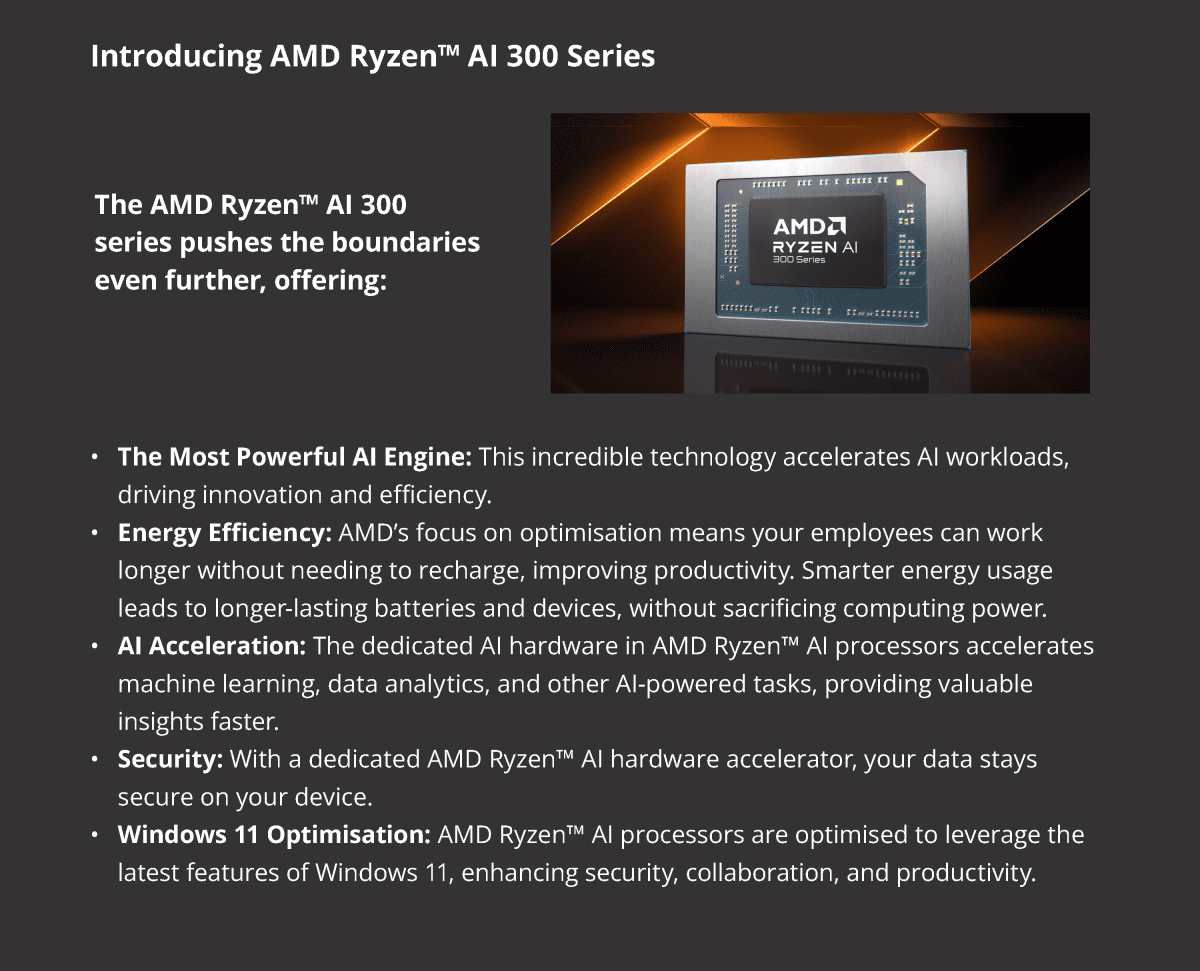
The modern organisation demands computing power that can keep up with complex tasks, data analysis, and collaborative workloads. As businesses upgrade to Windows 11, the choice of processor architecture becomes critical. While ARM-based processors are making a splash for their energy efficiency, AMD’s new Ryzen™ AI processors are redefining the landscape for enterprise computing.

What’s Jumpstarting this Technology Evolution?

With the rise of AI, a lot of eyes are on how end-user devices can utilise this new technology. Instead of all the AI computing taking place in the cloud, AI-powered PCs use NPUs (Neural Processing Units) baked straight into the processor. This makes Gen AI more energy-efficient and secure, with the caveat that these new processors need to be lightning fast and economical with energy usage. For enterprise, there are 2 options to choose from: ARM or x86.

ARM-Based Processors: The Upstart

Used mainly in mobile phones and tablets, ARM-based processors have made their way to PCs and laptops, offering impressive battery life and portability. However, they utilise completely different architecture than traditional x86 processors, meaning even the most popular apps need to be rebuilt from the ground up to work. Whilst creating a virtual machine that “runs” like an x86 device can alleviate some pains, you’re sacrificing performance to do so. To summarise, even though they have made inroads for use in enterprise, their historically lower performance and limited compatibility with enterprise software have been significant drawbacks.

x86-Based Processors: The Reigning King

x86 processors, such as the ones from AMD, have long been the backbone of enterprise computing. Their raw power, wide software compatibility, and ability to handle demanding workloads have made them the go-to choice for businesses. They’re no slouches when it comes to power-efficiency and the latest processors are more than powerful enough to race ahead of ARM-based processors.

Efficient at Their Core

Processor performance with these new CPUs is matched only by their efficiency, delivering innovations in power management, ensuring customers stay unplugged for longer and enjoy uninterrupted work and play on the go. The AMD Ryzen AI 300 Series processor’s NPU is projected to enable up to 2X power efficiency across select AI workloads, compared to previous generations, ensuring that performance goes up while customers stay unplugged for longer.*

The world of productivity and entertainment is AI enhanced; reach out to your AMD representative today or learn more about AMD Ryzen™ AI 300 Series processors on amd.com.

Why AMD Ryzen AI Processors are Perfect for Enterprise

The demand for AI capabilities in the enterprise is rapidly growing, impacting everything from data analysis and decision-making to customer service and productivity. 

AMD recognised this need and introduced their AMD Ryzen™ AI processors. These processors are not just an incremental upgrade; they represent a paradigm shift in enterprise computing, offering a powerful combination of performance, efficiency, and AI acceleration that has the potential to redefine the way businesses operate.

A suite of AI-powered Laptops, Ready to Go

Many leading laptop manufacturers are offering powerful workstations and business laptops powered by AMD Ryzen™ AI processors, providing a wide range of options to suit your company’s needs. 

Enterprise technology is evolving rapidly. With AMD Ryzen™ AI processors, businesses can now harness exceptional performance, energy efficiency, and AI acceleration, all within a secure and Windows 11 optimised platform.

*Based on performance and power estimates correlated to measurements on hardware platforms as of May 2024 comparing projected Stable Diffusion iterations per second per watt for Ryzen AI 300 series to a Ryzen 9 8945HS processor.  Configuration for Ryzen AI 300 Series Processor: Reference platform, 32GB RAM, Radeon 890M graphics, Windows 11 Pro. Configuration for the Ryzen 8945HS processor is: Razer Blade 14, 32GB RAM, Radeon 780M graphics, Windows 11 Home. Specific projections are subject to change when final products are released in market. STX-14.

Sector-Specific: Windows 11 in Healthcare

Welcome to Sector-Specific, a series of articles about how Windows 11 is poised to help different job roles within the public sector. Today, we’re diving into the Healthcare sector, covering a wide range of roles with their own demands and needs.

The healthcare sector demands innovative solutions to enhance patient care and streamline operations. Windows 11 steps in to meet those demands, offering a suite of advancements that benefit healthcare professionals across the board.

Protecting Sensitive Data

In an industry where recent data breaches have had devastating consequences; Windows 11’s robust security framework is paramount. Enhanced features such as hardware-based isolation, secure boot, and virtualisation-based security (VBS) provide an extra layer of protection against cyber threats.

  • Healthcare administrators can rest easy knowing that the organisation’s digital assets are safeguarded, reducing the risk of costly data breaches and maintaining compliance with stringent healthcare regulations.
  • Medical practitioners can focus on delivering quality care, knowing that patient data is handled with the utmost confidentiality and integrity.
  • Researchers can securely collaborate and share sensitive findings, advancing medical discoveries without compromising data security.

Simplifying IT Operations

Healthcare IT teams face immense demands, but Windows 11 eases the load with simplified deployment and management. XMA enhances this by assessing hardware compatibility and ensuring cost-effective, timely hardware upgrades if needed. Our consultants support full deployment, guiding your IT team through zero-touch setups, rollout programs, and thorough testing to ensure seamless application performance.

  • IT professionals can easily manage updates across devices, ensuring the healthcare system stays up to date with the latest features and security. This frees up IT teams to focus on strategic projects and innovation.

Efficiency Amplified

Windows 11’s user-friendly interface, coupled with its performance optimisations, elevates the productivity of healthcare professionals.

  • Physicians can seamlessly navigate through electronic health records, access diagnostic images, and utilise medical applications with enhanced efficiency.
  • Nurses can stay connected, whether they’re on the hospital floor or providing remote patient monitoring.
  • Administrative staff can schedule appointments and manage patient records with ease.

The intuitive design and improved performance contribute to a smoother workflow, allowing healthcare professionals to focus on what matters most: patient care.

Copilot, Your AI-Powered Assistant

Windows 11 introduces Copilot, an AI-powered assistant integrated into the operating system. Copilot enhances user productivity and creativity by offering intelligent suggestions, automating tasks, and streamlining workflows.

  • Researchers can leverage Copilot to analyse complex datasets, uncover hidden patterns, and accelerate medical research.
  • Healthcare administrators can optimise operational efficiency by utilising Copilot to manage schedules, streamline communication, and generate reports.
  • Medical practitioners can receive personalised insights and recommendations, enhancing decision-making and patient care.

XMA’s HMaaS

With XMA’s Hardware Management as a Service (HMaaS), you can ensure your devices remain maintained, updated, and optimised for peak performance. We actively monitor your hardware, advising on upgrades and refreshes when necessary, guaranteeing your entire operation runs without a hitch.

The Future for Healthcare

Windows 11 represents a meaningful upgrade for the healthcare sector. Its fortified security measures, deployment capabilities, efficiency, and revolutionary Copilot feature enable healthcare professionals to deliver exceptional patient care while optimising operations.

Conclusion: Embracing Windows 11 with XMA’s comprehensive assistance is not just an upgrade; it’s a strategic investment in the future of healthcare, ensuring a smooth, secure, and efficient transition.

To find out more about how Windows 11 can improve your organisation’s efficiency, visit Windows 11/XMA.

Contact XMA for a free consultation on how you can make the most of your Windows 11 investment. Start your Windows 11 journey by booking a free consultation at Windows 11 Readiness (office365.com) 

XMA Retains Spot on ITRAP Framework

We are thrilled to share some exciting news:

XMA has successfully retained our place on the

ITRAP framework.

Register online and get full access to the XMA Store now

or contact us at ITRAP@xma.co.uk to get started

What is ITRAP?


Operated by the SUPC (Southern Universities Purchasing Consortium), ITRAP is a leading framework for IT related accessories and parts, encompassing a wide range of products such as:

The goal of the framework is to make these products accessible at the best possible value, offering a streamlined and efficient purchasing process. We have retained the ability for customers to direct award on ITRAP, and pride ourselves on providing an industry leading online experience, particularly for institutions making high-volume peripheral purchases.

What This Means for XMA and our customers

Our retained place on ITRAP is a major victory for us, keeping doors open to further engagement and growth within the Higher Education sector. We look forward to building new relationships whilst strengthening old ones and continuing to provide exceptional service and value.

Register online and get full access to the XMA Store now

or contact us at ITRAP@xma.co.uk to get started.

How to Avoid a Ransomware Horror Story with Pure Storage

You’re working late at the office. Ready to leave, you just finish up a few bits and go to shut down your PC. Except it won’t let you. For a moment, your screen looks frozen, then a loading bar appears. You freeze. This can’t be happening. Another window pops up. A skull, smiling in all its pixilated horror, relays this message.
These 4 words strike fear into the hearts of companies worldwide and appear in the nightmares of all IT professionals. If you receive this message, you’ve been placed at the heart of a ransomware attack.

The UK has seen a surge in these attacks, crippling businesses and institutions alike. So is there any way to mitigate the risk of a ransomware attack? How do we break free from this horror story?

Well first, we need to understand the monster at the heart of this tale.

What Exactly is Ransomware?

A major concern is how planned in advance these attacks may be. When you restore your data, how do you know it’s clean? You might receive notification of an attack today, but in reality the breach could have been over 100 days ago. Even if you recover your data, is the breach still there? How far back do you go?

And the horror doesn’t end there. After the initial attack, it can be a slow road to recovery. You need to consider your Recovery Time Objective (RTO). How is your data stored? Recovery takes time, and if you’re having to dredge up petabytes of data from your backups, it could take days, weeks, or even months before it’s back to business as usual. But by that point, it’s not really business as usual, is it? You’ll have been delivered a haunting experience that may very well collapse the future of your organisation.

It’s important to note that with the current landscape of cyber-attacks, the question is not IF you’ll be attacked, but WHEN. Whilst this sounds terrifying, knowing that an attack may be inevitable allows you to prepare properly, and that’s where Pure Storage shines
While preventing ransomware is the ideal scenario, Pure Storage offers a powerful defence strategy for when the worst happens. Their innovative solutions are designed to minimise the impact of an attack and accelerate recovery.

Step-by-Step Recovery with Pure Storage

1. Detection and Isolation: Pure1®, Pure Storage’s AI-driven management platform, acts as an early warning system. It detects unusual file activity, signalling a potential ransomware attack. Rapid isolation of affected systems contains the damage. Pure Storage is constantly monitoring and analysing your data, allowing to pinpoint the exact moment of an attack. This alleviates fears of a breach being hidden in your data, waiting for months before enacting a heist.

2. SafeMode Snapshots: Pure Storage’s SafeMode snapshots are your digital safety net. These immutable copies of your data are immune to encryption or deletion, even by attackers with administrator privileges. They provide a secure, verified starting point for recovery. It’s a fallback for when the worst happens, and an immutable picture of your data before an attack.

3. Rapid Data Recovery with FlashBlade®: Time is of the essence after a ransomware attack. FlashBlade, Pure Storage’s high-performance storage platform, empowers you with Rapid Restore. This feature allows you to recover petabytes of data in mere hours, not days or weeks, minimising downtime. Best of all, you can assign FlashBlade to different sets of data that hold different levels of importance to your organisation. By giving you different levels of recovery time, you can still achieve lightning-fast recovery of your critical data whilst staying within your budget.

4. Continuous Data Protection (CDP): Pure Storage goes beyond recovery. With Continuous Data Protection, you create near-instantaneous recovery points, minimising data loss and ensuring your business operations continue with minimal disruption.

Evolving Threats, Proactive Defence

The cyber threat landscape is ever-changing, but Pure Storage is committed to staying ahead of the curve. Their solutions continually evolve to combat the latest ransomware variants and other cyber threats. By partnering with Pure Storage, XMA delivers the perfect storage solution for you. We work with best-in-class cyber-resilience vendors such as Commvault, Druva, Veeam, and Rubrik, ensuring that you’re protected on all fronts, building a pro-active and reactive fortress of defence for your data.

We understand that every organisation has unique needs, and our team of experts is dedicated to helping you assess, design, and deploy a Pure Storage solution tailored to your specific requirements. From initial consultation to ongoing support, we’re with you every step of the way

Protect Your Organisation Now

Don’t wait to become a horror story. Be proactive in your cybersecurity defence. Pure Storage offers a comprehensive suite of solutions to protect your data, minimise downtime, and recover from ransomware attacks with unparalleled speed

Ready to fortify your digital defences?

Visit Pure Storage | XMA and contact us today for a free consultation and discover how XMA and Pure Storage can safeguard your valuable data.

Boost Your Bottom Line With Windows 11 – How Upgrading Can Increase Your ROI

Businesses are constantly seeking ways to optimise their operations and maximise their return on investment (ROI). While technology investments are often viewed as necessary expenses, they also hold the potential to significantly improve efficiency, productivity, and overall profitability. A recent study conducted by Forrester highlights how upgrading to Windows 11 can lead to substantial financial benefits for organisations. 

The Forrester Study: Key Findings 

The Forrester study examined the potential ROI that organisations can realise by deploying Windows 11 devices. The research involved in-depth interviews with IT decision-makers and end-users across various industries, along with financial analysis to quantify the benefits and costs associated with the upgrade. 

The study found that organisations deploying Windows 11 devices can experience significant improvements in several key areas, including: 

  • Enhanced Security: Windows 11’s robust security features, such as hardware-based isolation, secure boot, and advanced threat protection, help reduce the risk of cyberattacks and data breaches. This translates to cost savings by minimising downtime, preventing data loss, and avoiding regulatory fines. 
  • Improved Productivity: Windows 11’s streamlined interface, intuitive navigation, and enhanced multitasking capabilities enable employees to work more efficiently and complete tasks faster. This can lead to increased output, improved collaboration, and accelerated project timelines. 
  • Streamlined IT Management: Windows 11’s simplified deployment, configuration, and management tools reduce the burden on IT staff, freeing up time for strategic initiatives. Additionally, the platform’s improved compatibility and support for modern hardware can lead to cost savings on maintenance and upgrades. 
  • Enhanced Employee Experience: Windows 11’s modern design, improved performance, and focus on user well-being contribute to a more positive and engaging work environment. This can boost employee morale, reduce turnover, and improve overall productivity. 

Calculate Your Potential Savings 

The financial benefits of upgrading to Windows 11 can be substantial. The Forrester study found that organisations can achieve a three-year ROI of 250% and recoup their investment in just six months. To help businesses understand their potential savings, Microsoft has developed a Windows 11 Devices Calculator. By inputting a few key data points about your organisation, you can generate a customised report that estimates the financial impact of upgrading to Windows 11. 

Try the calculator now: Windows 11 Devices Calculator (totaleconomicimpact.com) 

Capitalise on your Savings with XMA 

Upgrading to a new operating system can seem daunting, but XMA is here to support you every step of the way. Our Windows 11 solutions and services ensures you realise the full benefits of Windows 11 without the headaches of managing a complex IT project. Here’s how we can help: 

  • Windows 11 Readiness Assessment: We’ll evaluate your existing infrastructure to identify any compatibility issues and recommend the most suitable devices for your needs. 
  • Device Procurement: Leverage our extensive network of suppliers to get the best deals on the latest hardware. 
  • Rollout and Deployment: Our experienced engineers will handle the entire deployment process, minimising disruption to your business. 
  • Hardware Management as a Service (HMaaS): We’ll proactively manage your devices, ensuring they’re always up-to-date and performing optimally. 

With XMA, you can focus on your core business while we take care of the technology. 

Turning a Necessity into an Investment 

Upgrading to Windows 11 is not simply a technology refresh; it’s a strategic investment that can deliver significant financial benefits. The Forrester study provides compelling evidence that organisations can increase their ROI by deploying Windows 11 devices. From enhanced security and improved productivity to streamlined IT management and an enhanced employee experience, the advantages are clear. 

Take the next step and see how Windows 11 can boost your bottom line. Try the Windows 11 Devices Calculator today!  Windows 11 Devices Calculator (totaleconomicimpact.com) 

Contact XMA for a free consultation on how you can make the most of your Windows 11 investment. Windows 11 Readiness (office365.com) 

Sector-Specific: Windows 11 in Education

Welcome to Sector-Specific, a series of articles about how Windows 11 is poised to help different job roles within the public sector. Today, we’re focusing on the industry that has a wide net in terms of IT needs: Education

Windows 11 is designed to provide students, educators, and IT staff with innovative features and enhanced security, all working in tandem to create an efficient yet enjoyable learning experience.  

But time is of the essence. Support for Windows 10 is ending on October 15, 2025, meaning no further security updates or technical assistance will be provided. This leaves educational institutions that haven’t upgraded vulnerable to cyberattacks and compatibility issues. The transition to Windows 11 is not just an upgrade; it’s a necessity for the safety and efficiency of your institute’s digital environment.

But with 100s of potential devices needing upgrading to your specific needs, where do you even begin? XMA’s comprehensive suite of services, including Windows 11 readiness assessments, device selection and procurement, and hardware management as a service, provides a complete roadmap to make your transition smooth, secure, and cost-effective.

How Windows 11 Transforms the Classroom Experience

Let’s take a closer look at how Windows 11 caters to the unique needs of everyone in the educational environment:

For the Engaged Student: Windows 11’s speed and responsiveness ensure projects and presentations run smoothly, without frustrating crashes or delays. Integrated collaboration features like OneDrive and Teams, make group work simple. And for creative students, Windows 11’s compatibility with a wide range of creative software means they can work best with the apps they love.

For the Innovative Educator: Windows 11 and Microsoft Teams for Education combine to create a dynamic hybrid classroom, fostering communication and simplifying assignments. Built-in accessibility features ensure all students can fully participate, while the intuitive interface allows educators to focus on teaching, not troubleshooting. With Copilot, educators can draft lesson plans, quizzes, and emails in a fraction of the time, allowing them to focus on more impactful tasks.

For the Pragmatic IT Staff: XMA’s expertise and Windows 11’s deployment tools makes managing devices hassle-free. Advanced security features protect sensitive student data, and compatibility with existing software minimises disruptions. Plus, our cost-effective solutions help you maximise your budget. Copilot can assist IT staff in troubleshooting issues and finding solutions quickly, reducing downtime and increasing efficiency.

XMA’s Windows 11 Roadmap: Your Path to a Secure Future

Here’s how XMA partners with your school to ensure a successful Windows 11 implementation:

  1. Windows 11 Readiness Assessment (6-8 Weeks): We assess your existing infrastructure, identifying any potential compatibility issues or areas for improvement.  
  2. Device Selection and Procurement (4-8 Weeks): Our experts guide you through selecting the right devices for your specific needs and budget.
  3. Testing and Deployment (16+ Weeks): After rigorous testing of app compatibility, IT infrastructure, and pilot programs, we roll out the upgrade across the organisation.
  4. Hardware Management as a Service (Ongoing) from first deployment): We handle ongoing device management, updates, and maintenance, freeing up your IT staff to focus on strategic initiatives.  

Act Now to Protect Your Institute’s Digital Future

The clock is ticking. With the end of Windows 10 support looming, the time to upgrade to Windows 11 is now. Contact XMA today for a free consultation and let us help you make a smooth, secure, and cost-effective transition.

Are you ready to start your Windows 11 journey? Visit us at Windows 11 | XMA or book a free consultation at Windows 11 Readiness (office365.com)

Enhancing Cyber Resilience in 2024: 5 Key Trends & Strategies for Business Transformation

In the ever-evolving digital landscape of 2024, cyber resilience is more than a technical concern – it’s a core business strategy. As threats grow more sophisticated, organisations must adapt to safeguard operations and data. XMA, in collaboration with Commvault, highlights the 5 critical trends and best practices shaping cyber resilience.

1: The Changing Face of Cybersecurity Leadership

The days of cybersecurity being solely an IT issue are over. Today, CEOs and board members are taking a more active role.

• Executive Involvement: Top-level executives are now directly involved in cybersecurity initiatives. This means they’re not just approving budgets but guiding strategic decisions and ensuring regulatory compliance. Boards that holistically understand cyber resilience are better equipped for the future.
• Strategic Decision-Making: Cybersecurity is no longer just about preventing breaches; it’s about aligning security strategies with broader business goals. Leadership plays a crucial role in this alignment.

“Security is about mindset, first and foremost, so it is vital that an organisation’s leadership team lead by example. As such, obtaining buy-in from the board and from line-of-business leaders is vital for a CISO to be effective.”
– Scott Wright, Head of Pre-Sales, XMA

2: Breaking Down Silos & The Power of Collaboration

• ITOps & SecOps Convergence: To effectively combat threats, it’s essential to break down the traditional barriers between IT operations (ITOps) and security operations (SecOps). This convergence allows for the sharing of threat intelligence and a more unified defence strategy.
• Shared Intelligence: When teams work together, threats can be detected earlier and responded to faster. This collaborative approach strengthens the overall security posture.

3: Harnessing AI & Automation for Defence

• Efficiency & Risk Mitigation: Artificial intelligence (AI) and automation are becoming indispensable tools in cyber resilience. They streamline threat detection and response, analyse vast amounts of data for anomalies, and automate routine tasks, freeing up human analysts for more complex challenges.
• The Balancing Act: While AI is a powerful ally, it’s crucial to recognise that cybercriminals are also using it. Organisations must develop balanced strategies that leverage AI’s benefits while mitigating its potential misuse.

“With AI-based tools for generating phishing emails and other attacks, AI-based defences are essential to combat the sharply rising numbers of never seen before attacks. The traditional
“try and match to a list of known malicious” approach is no longer fit for purpose. Some cybersecurity vendors embraced this years ago and are offering mature products capable of making highly reliable determinations on zero-day threats.”
-Scott Wright, Head of Pre-Sales, XMA

4: The Evolving Cybersecurity Skills Landscape

• Integrating Skills: The demand for professionals who can bridge the gap between AI and cybersecurity is on the rise. This integration is key to building robust defences against emerging threats.
• Continuous Learning: Cybersecurity is not a static field. Organisations must invest in continuous education and training to keep their teams equipped to handle the ever-changing threat landscape.

5: Testing, Clean Rooms, and Holistic Risk Management

• Regular Testing & Clean Rooms: Frequent testing of cyber defences, including the use of clean rooms (controlled environments for secure data recovery), is essential to ensure preparedness and the robustness of an organisation’s defences.
• Holistic Risk Management: Understanding digital risks is not just about technical vulnerabilities. It requires a comprehensive approach that integrates cybersecurity into every aspect of business operations.

“Incident response exercises are a crucial part of readiness testing. These exercises can range from a half-day for a small group to a week-long exercise involving representatives from all areas of the organisation. There are always great lessons learned!” Scott Wright, Head of Pre-Sales, XMA

Commvault: The Solution for Cyber Resilience
Commvault’s comprehensive solutions help organisations build a resilient digital infrastructure. By embracing the trends and strategies like the ones above, businesses can achieve greater continuity and security in the face of evolving threats.

Ready to Strengthen Your Cyber Resilience?

Bertha Park High School: Building Technology into Educational Foundations

A School with a Mission

In 2019, as a new school serving a new community, Bertha Park High School in Perth, Scotland, wasn’t content with simply opening its doors – it aimed to rethink the place of technology in education. Driven by the belief in its capacity to unlock the potential of its students, the school embarked on a mission to find the perfect tools to empower students and teachers alike.

A Vision Without Concessions

Bertha Park’s Headteacher, Stuart Clyde, didn’t settle for compromises. He looked for technology that was more than just functional; it needed to spark creativity, invite collaboration, and bridge the gap between the classroom and the ever-evolving workplaces of tomorrow. User-friendliness and accessibility weren’t just buzzwords – they were fundamental to driving learning every day.

“We are creating a school fit for the 21st Century, so that our students have the most up-to-date and relevant experience that prepares them for the modern-day workplace. To achieve that, we have created a digitally immersive learning environment. We want technology not merely to compliment what we do, but to be built-in to the very DNA of the school.


– Stuart Clyde, Headmaster, Bertha Park

XMA and Bertha Park, fuelled by iPad and Microsoft 365

Building on a strong, well-established relationship with XMA, Bertha Park took the first steps on their edtech journey. XMA’s mission was clear – provide stella procurement, training, and consultancy services. XMA’s guidance gave them the space to explore the art of the possible, ultimately landing on the winning combination of Apple iPads and Microsoft 365. Microsoft 365 offered the familiarity students would need in the workforce, while the iPad burst with creative power, endless versatility, and inclusive tools designed to level the playing field and bridge the digital divide.

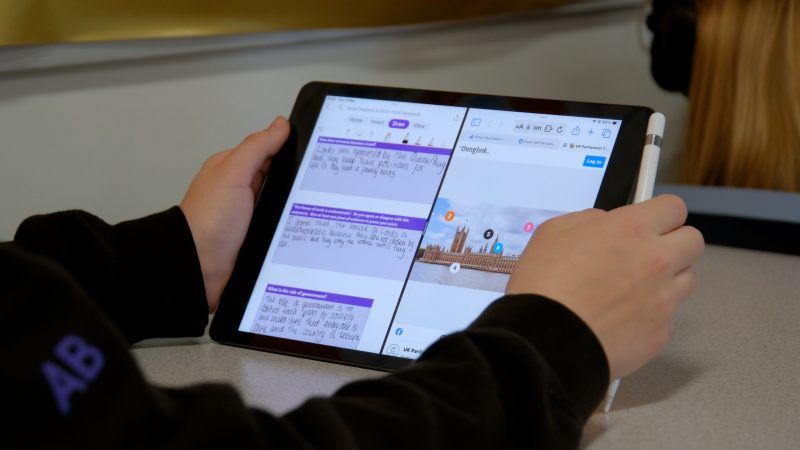
An excellent example of this is Microsoft OneNote. Already a versatile piece of
note-taking software, when paired with the Apple Pencil and the iPad camera, it becomes a truly digital jotter – a canvas to capture learning across a whole school day.

“Perth & Kinross and the team behind Bertha Park took great care in defining what they wanted learning and teaching to look like. They understood that utilising the best iPad and Microsoft could offer would give students and teachers the broadest opportunities to shape learning in meaningful, relevant and engaging ways.”
– Michael Conlon, Education Transformation Consultant, XMA

Touchscreen-Friendly Interface:
The entire Office suite (Word, Excel, PowerPoint, etc.) is redesigned to work effortlessly with the iPad touchscreen. Menus, toolbars, and navigation are intuitive for finger-based input.

Apple Pencil Support:
Take handwritten notes, annotate documents, and draw with precision in Word, OneNote, and PowerPoint, leveraging the pressure sensitivity of the Apple Pencil.

Accessibility:
The visionary set of accessibility features built into the iPad is boosted by Microsoft tools for inclusion, like Immersive Reader, that work across its suite of applications.


Apple Pencil Support


Touchscreen-Friendly Interface


Accessibility

Training began in May 2019, with XMA Education Transformation Consultant, Michael Conlon providing guidance on how to maximise both the use of iPad and Microsoft 365 Apps. Teachers weren’t simply asked to rewrite previous lesson plans and reuse old templates; they were inspired to reimagine lessons, weaving iPad capabilities and Microsoft’s software into the very foundation of their teaching styles. As the countdown to the end of school holidays was ticking down, the initial iPad rollout was a key milestone, putting 250 devices – each paired with an Apple Pencil – into the hands of students ready to learn.

“Planning for learning using iPads is completely different, but so much better. My lessons naturally include research opportunities and alternative work options for pupils, allowing me to better meet their needs. Having iPads available helps me to build in both support for those who need it to achieve highly, and for those who require further challenge. It is common for me to ask pupils to work collaboratively on tasks using shared documents, live response apps on the whiteboard or even in the collaboration space on Microsoft OneNote. Retrieval practice and AiFL are so easy to build into every lesson. Put simply – I can’t imagine teaching without iPads in the hands of every pupil – it is truly transformational and worth every minute of extra effort to learn these new skills.”
– Educator, Bertha Park

Bertha Park was Prepared for the Unexpected

The true test of Bertha Park’s bold vision came with the unprecedented challenge of the COVID-19 pandemic. Yet, they didn’t just weather the storm; they thrived. Because technology was already ingrained in their learning model, the transition to remote instruction was seamless.

“Having the school’s learning organised around the Microsoft Office 365 suite was crucial in establishing our remote learning model. The students were able to transfer almost seamlessly into this way of working as it was already the way we did things. It has allowed us to have a legacy of facilitating working out of school that we still utilise today.”
– Educator, Bertha Park

This resilience has fuelled Bertha Park’s rise to the pinnacle of educational innovation. Their commitment has earned them the rare dual distinction of being both a Microsoft Flagship School and an Apple Distinguished School – the first in the UK to hold both titles.

A Long-Lasting Partnership

XMA is more than just a technology provider for Bertha Park High School; we are partners in progress. Together, we continue to push the boundaries of what modern education can be. Bertha Park’s story is proof that when schools embrace technology, students and teachers gain the skills and confidence to shape it.

“Using my iPad has allowed me to present my work in unique and different ways. I feel I have developed my skills in using film and media to demonstrate what I have learned. I have discovered that working this way is one my greatest passions, so I now know that this is what I want to do as a career.”
– Robert Jack, S4 Pupil, Bertha Park

Fill in the Form to Download the Case Study

Fill in the Form to Download the Case Study

Fill in the Form to Download the Case Study

Skip to content
Monitoring by Hotjar Monitoring by Hotjar