5 considerations for moving to an All-flash data centre

Simplifying All-flash with HPE Nimble
The path to an all-flash data centre and cloud may be complicated, but it doesn’t have to be disruptive. Like many other organisations, you may be planning to move to all flash as your primary storage technology because of the many advantages over traditional storage.
But there are many obstacles related to application performance, availability, manageability, scalability, investment protection, and disaster recovery that need to be considered first. With a few simple recommendations, your organisation can avoid the most common missteps and make the transition painless.
Download this FREE check list and find out how to overcome the obstacles related to the all flash data centre.
Buy or rent – which Software Licensing model is right for you?
Managing the software license lifecycle can be difficult but your immediate hurdle is finding the right licensing model for your organisation in the first place.
What licensing models are available?
Perpetual: Requires the user to pay an upfront license fee for the on-going right to use the software.
Subscription: Allows you to lease software at a lower upfront cost by paying on a per user, per device or server fee, for either 1 or 3 years.
Consumption: Allows you to adjust your costs to reflect actual usage to avoid overpaying for services.
How do you decide which licensing model is right for your organisation?
Compatibility
Although perpetual licences may be used indefinitely, they have a short lifecycle and within few years eventually become obsolete if the maintenance is not purchased with the license or due to the organisations direction to migrating to the cloud. As a result you may need to upgrade periodically to ensure compatibility with other applications. If you continue to use a product which has reached end of life updates, patches and hotfixes will no longer provided. This may expose your organisation to risks, including harmful viruses, spyware and other malicious software which can steal or damage your data.
With a subscription model, upgrades and new features are released in real time and rolled into the annual anniversary cost, ensuring no compatibility or obsolescence issues.
With the consumption model, again upgrades and new features are released in real time and rolled into the daily cost, ensuring no compatibility or obsolescence issues.
Scalability
With perpetual licences, if you employ new staff members you need to buy additional licences outright – but if a staff member leaves, you are stuck with those additional licences. Also every time you buy an additional license it may be of a newer version than a previously purchased license meaning that different users will be working on different versions of a particular software.
The subscription model provides a degree of flexibility because you only pay for what you use, adding and scaling back licences in line with demand at each annual anniversary. Furthermore you would be able to update each user and device to the same version according to your business needs.
The consumption model would allow you to switch off any service at any time providing the maximum flexibility and on the long run potentially saving you the most money.
Cost
The perpetual model allows you to pay for software upfront and maintenance in addition, for a set period of time. This model has the highest initial cost and the maintenance cannot lapse otherwise you may lose out on updates.
A subscription model offers better affordability with a predictable payment schedule, enabling the organisation to budget in advance for the expenditure.
The consumption model also offers better affordability in comparison to perpetual licensing together with the added flexibility of being able to switch services on and off as and when desired.
Which is right for you?
We have a team of highly experienced licensing consultants on hand ready to discuss your requirements and offer options based on your business needs.
4 reasons why you should talk to us about establishing a technology benefits scheme
Establishing a technology benefits scheme is an effective way to engage and excite your people. Through salary contributions, you can enable access to the latest technology, at unbeatable prices.
Here’s 4 reasons why you should talk to us about establishing a technology benefits scheme at your organisation.
1. Purpose built XMA Benefit Store
Our exclusive secure online store, provides access to preferential pricing to employees of public and private sector customers, as well as parents and students in education. Simply register for an account using your organisation email address to access a huge range of promotions and discounted prices on leading high street technology brands.
2. The choice really is yours
With over 6,000 products to choose from, you’ll be spoilt for choice. We have an extensive range of computing products including laptops, desktops and tablets from all the biggest brands, printers and printing supplies, iPhone and Apple Watch, along with all the accessories you’ll ever need.
3. Hassle free
We provide a simple, easy to deploy programme with minimal effort and no cost to your organisation.
4. Quick and easy
It was always our intention to keep this process simple – and we won’t keep you waiting around. Simply let us know that you want to be a part of XMA Benefits Store we’ll do the rest. And for products in stock, we’ll even deliver them next day, for free, to your home or workplace.
We can give you the best advice, ordering experience, pricing and product selection, so why not visit the XMA Benefit Store and see for yourself.
It Isn’t Easy Being Green – But Hyperconvergence Can Help
Everyone seems to be looking for ways to be more “green” these days – hybrid cars, reusable grocery bags, etc. And those in IT are no exception. Traditional IT environments consume an incredible amount of energy resources, such as power and cooling. The key for organisations focused on moving towards a greener data centre is to emphasise efficiency in energy consumption and efficiency in IT processes and systems. In other words, green IT needs to align to efficient IT.
The road to a greener data centre is paved both by small, incremental changes as well as monumental technology shifts. Advancements in software often naturally lead to more energy efficient data centres. For example, hard drives are now built to consume less power than in the past, new server features help reduce superfluous cooling costs, and data optimization techniques, such as inline and at inception deduplication and compression, lead to efficiencies in processing, storage, and backup.
Hyperconvergence represents a major technology development capable of transforming the data centre into a lean, green, efficiency machine. By converging all IT below the hypervisor, hyperconverged infrastructure immediately makes the data centre more efficient and environmentally sound. The data centre goes from as many as 12 disparate IT components to a single solution, so there is no longer a need to utilise storage space, power resources, or cooling functions on these IT components.
In fact, an IDC whitepaper found 75% of respondents realised an average of a 65% improvement in utilisation of storage resources as a result of hyperconverged infrastructure. In addition, nearly half of surveyed customers realised a 47% reduction in cost of data centre power and cooling expenses.
Though revolutionary, hyperconverged infrastructure is not a rip-and-replace technology as it can be introduced into existing environments as part of normal refresh cycles. For example, a hyperconverged solution can first be deployed in place of traditional data storage as a first step to modernising a data centre, and can later replace additional IT components over time as needs arise. This approach offers an opportunity to simplify the existing infrastructure and the complicated process of updating that infrastructure. Once standardised on a hyperconverged solution like HPE SimpliVity powered by Intel®, IT teams would only have a single product to refresh instead of a variety of separate IT components – which helps explain why 26% of customers in that same IDC study cited the need for fewer tech refresh cycles.
Hyperconvergence has always been focused on simplifying and consolidating the data centre. It’s no surprise that organisations looking to reduce their environmental footprint have discovered significant “green” opportunity in hyperconvergence. The benefits in space utilisation and operational efficiency make it more than worthwhile to implement a hyperconverged solution and transform your data centre into a lean, green efficiency machine.
5 ways MPS could benefit your business
When you have existing printers you’ve already bought and paid for, it’s tempting to think that maintaining your existing fleet will cost less than purchasing new printers or signing up managed print services (MPS). Why replace them if it’s not absolutely necessary?
The costs of an ageing fleet stack up, and in the long term, managed print services are able to save you more than just money. Here are five benefits MPS could bring to your organisation. Many businesses allow outdated, legacy printing devices to negatively impact productivity. Learn about the positive impact Managed Print Services can have on your business in this report from IT Pro.
1 – Cost savings
The consequences of sticking with an old printer are sometimes hidden, and can work at various levels, from running out of toner when you want to print an essential document, to the device breaking and your IT department being too busy to fix it. These consequences cost money, and the benefit of using managed print services is that you have the maximum availability of print when you need it most.
An MPS provider will look for ways to rationalise and consolidate your printers, replacing many old, large laser printers with a smaller number of newer, better distributed, faster devices or multi-function printers with all the necessary functions built in. Costs are visible and predictable, and you never have to worry about the expense of replacing ink and toners at different times across the business.
Maintaining your old printers might seem to help you keep costs low in the short term, but in the long term you’ll miss out on cost-saving opportunities, while facing expenses and uncertainties that MPS providers are there to alleviate.
2 – Efficiency
Old printers waste valuable time, which always has an impact on the bottom line. Not only does the time spent waiting for a slower printer really add up over a business year, but every paper jam and malfunction means more wasted time that could be used more productively.
An MPS provider will come in and analyse your business, printers and requirements in terms of printing, scanning and copying. This doesn’t mean pushing expensive hardware into every corner of the business, but instead they will look at where teams need specific capabilities, then will find the printer/s that will match those needs.
A really good provider will go further and look at ways that the business overall can print more efficiently, and save money by reducing the everyday print costs.
3 – Minimised downtime
In many organisations, employees can end up spending excessive amounts of time dealing with printers – not just waiting for old, slow devices to print, but dealing with malfunctions, changing cartridges, adding paper or waiting for someone from IT to fix a problem.
A good MPS provider will help reduce support costs and minimise downtime. Because it’s their job to maintain your printers and keep them running with a steady stream of supplies, your own IT team frees up its time to work on other projects.
4 – Up-to-date security
Newer printers have better tools for maintenance, management and most importantly, security. This has never been more important, with every old and outdated device now a potential security risk. Options like pull-printing, cloud printing and printing from mobile devices have gone from being expensive extras to standard features, while NFC and ID card-based authentication are no longer the preserve of larger businesses.
MPS providers are there to sort out things like security updates or rapid changes to firmware. With more threats out there and greater penalties for data breaches, that’s good news for businesses of every size.
5 – Environmental benefits
Do your existing printers have effective, high-performance duplex printing enabled? If not, you could be missing out on features that could save you up to 40% of your paper costs, according to some studies.
MPS providers look for ways to reduce waste, helping businesses make more effective use of more advanced printers and functions. Such printers have management features that prevent or discourage wastage, can restrict the use of colour, make duplex printing the default, or switch on pull printing, so that print jobs only print when actively requested from the printer. This can see drastic reductions in the number of printed pages left abandoned in the output tray.
Meanwhile, more modern, high-quality draft and eco-printing settings could use up to 50% less ink than standard modes, while producing output that’s easily good enough for both internal and external usage.
Source: HP
Tried, tested and trusted.
Performing under pressure
Having been put to the test by tough independent testers and business everywhere, the verdict is in on the Brother laser range. Proven to deliver high performance, reliability and great value for money, it’s clear how these machines have helped Brother become the number one brand for laser printers.
Independent testing facility Buyers Lab examined the Brother laser range over 2 months, printing up to 80,000 pages, and the results speak for themselves. With no service callouts required and no post-test servicing needed, the printers proved themselves to be faultlessly reliable and excellent performers time after time. Other areas the printers excelled in included:
- Superior print quality
- Simple setup, operation and maintenance
- Mobile and Cloud connectivity
- High-grade security
- Large paper capacity
- Lower than average energy consumption
Reliability where it matters most
Businesses across the UK have put Brother’s laser range to the test too, and trust them to deliver every time. Here’s what happy customers are saying about these dependable printers.
Colour printers you can count on
Every machine across the colour laser range has been proven to deliver crisp colour prints every time. Whether you need a dependable single function printer or a high-performance all-in-one, you can count on our tried and tested colour laser range to deliver the ‘highly reliable performance’ recognised by Buyers Lab.
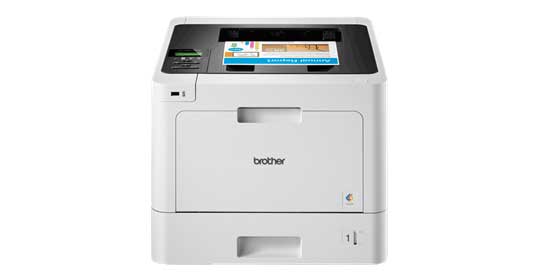
HL-L8260CDW
Mono machines that always deliver
With high ratings from Buyers Lab and fantastic customers reviews, the quality, performance and reliability of Brother mono laser printers has been put into black and white too. Whether it’s print, scan, copy or fax you won’t be let down by the robust build quality and tested reliability you’re guaranteed with these machines.
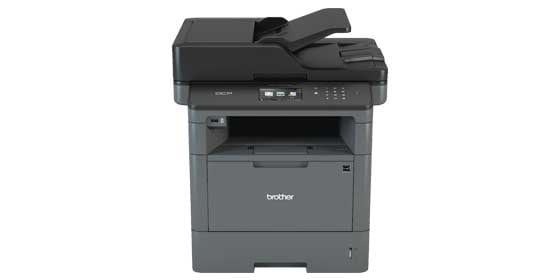 DCP-L5500DN
Whether your plans are to integrate into a managed print strategy in the future or to just help make a difference in the way you operate now, we make printing easy.
Our print specialist are on hand to help, alternatively, buy online at Big Office Little Office.
Shop Now
Enabling Success in Education
In a recent Education survey* Lexmark identified three key points based on the research project findings, in which Lexmark can help enable the Educations sector save time, money and the environment through its productive, secure and sustainable solutions.
Approximately 12% of respondents spend up to four hours scanning hard copy documents per week and 41% can’t qualify the amount of time they are spending scanning hard copy documents.
Enabling productivity
Lexmark’s smart multifunction printers are leading the way in delivering productivity enhancing features, using innovative touchscreen technology that can help manage costs more effectively and work smarter.
99% of respondents believe device security is a high or medium priority, but only 57% are confident that they have a security solution in place.
Enabling security
Lexmark makes security an integral part of all products to help create a safer and more productive environment for your school, college or university.
81% of people place at least a medium priority on the environment in their decision-making process when purchasing new printers.
Enabling sustainability
Lexmark is a recognised industry leader for sustainability initiatives and supports a number of environmental features which allow users to reduce the environmental impact of their printing and imaging activities.
Read More
Top 5 causes of downtime across the infrastructure stack
When access to your data lags, your business lags. Understand how to apply machine learning in your data center to predict and prevent the problems that cause downtime.
This research by Nimble Storage, a Hewlett Packard Enterprise Company, outlines the top five causes of application delays. The report analyses more than 12,000 anonymised cases of downtime and slow performance. Read this report and find out:
- Top 5 causes of downtime and poor performance across the infrastructure stack
- How machine learning and predictive analytics can prevent issues
- Steps you can take to boost performance and availability
Download the free report by completing the fields below
Beating customer SLA’s
HPE InfoSight took infrastructure management out of the equation for Rent-a-Center, and freed up staff time to execute instead of managing storage. Hear from their Director of Technical Operations on how they transformed.
Watch video
The mobile optimised network for small and mid-sized businesses
Explore how an integrated network, built around 802.11ac, can provide SMBs with a higher-performing, secure network for today’s business environment, and how simple – and profitable – setting up such a network really is.
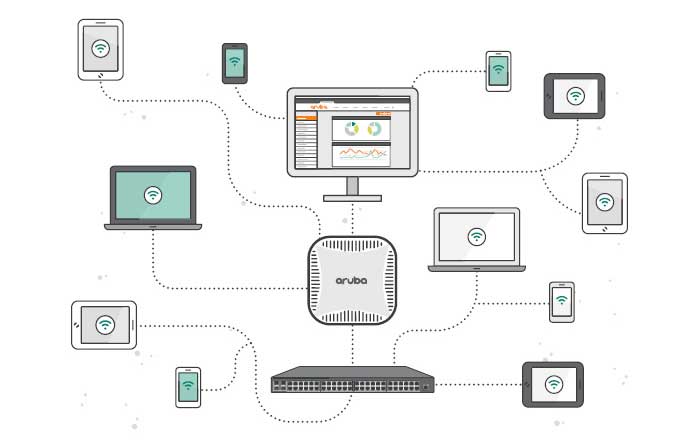
Download your FREE eBook by Aruba by completing the form below.
It’s no tall order as XMA shortlists at the CRN Women in Channel awards

Historically, the IT industry has always been hugely male skewed but with the gender imbalance beginning to slide, it’s time we celebrated the women who are already making a significant difference in the channel.
The CRN Women in Channel awards recognises and applauds female talent, celebrating their success and achievements as entrepreneurs, leaders and exceptional employees. Over the recent months, resellers, distributors and vendors across the UK, have been nominating outstanding women within their organisation, as those they believe to be role models, able to inspire the next generation.
At XMA, we are powered by our people. We promote diversity and equal opportunities and as such, are extremely proud to announce four short listings at this year’s awards.
And the nominees are…
Technical Employee of the year
Jen Norman – Head of Infrastructure Transformation
Not only is Jen nominated for the Technical Employee of the Year award but she is also on the judging panel! As the Head of Infrastructure Transformation at XMA, Jen is leading the way in digitally transforming our customers and has also been working on a series of vital social impact projects as part of the huge University of Northampton project. For someone whose original career path was to be a ballerina, she has excelled in the industry!
Manager of the Year
Katie Goodwin – Head of HR
The manager of the people! As the Head of HR, Katie has helped XMA achieve its vision of being a great place to work. Implementing a new HR system, helping enhance our vision and values, supporting the introduction of our Learning and Development Academy and working with partners to design an interactive and informative Induct and Inspire workshop for all staff – Katie has been at the forefront of allowing the workforce voice to be heard.
Rising Star
Emily Bovington – Head of Project Support Office
At 24 years old, Emily is already managing a team of 10! A self-taught manager, her staff’s success and satisfaction is what is most important to her and she has worked hard to build and restructure a team to offer progression and learning opportunities to support their career development. She is wise beyond her years, and has made huge career progress in a short space of time. She now has 100% staff retention in 12 months and has helped deliver over £10mill+ of projects for XMA – and growing!
Unsung Hero
Gina Vaccarella – Events Manager
Having meticulously organised more than 100 events since joining XMA, Gina has made a real difference to how we engage our customers and internal audiences. As example, with her desire to transform traditional learning styles, Gina took the lead on establishing a social outreach programme which offered teachers access to free training in a fun and exciting environment, providing fresh ideas and skills to apply in the classroom.
The awards ceremony will take place on the 18th October where we look forward to celebrating success with other inspirational women from across the channel.



 Monitoring by Hotjar