Deliver A* learning outcomes with Microsoft 365 Education
“The Modern Classroom”. A term that reminds us that the face of education is changing the way that teachers teach and students learn. Schools are constantly striving to achieve better learning outcomes, and technology is shaping the way in which this can be delivered. As technology becomes more and more sophisticated, so do the expectations of teaching staff, parents, and even students. So, what steps can schools take to meet these high expectations? How can they embrace “the modern classroom” and maximise learning and teaching outcomes all at the same time?
Microsoft 365 Education empowers teachers to unlock creativity, promote teamwork and better collaboration across the classroom, as well as provide a simple and safe experience in one affordable solution. Schools can ensure that students and educators always have access to the latest feature innovations; with automatic updates for Office 365 and Windows 10, as well as being able to experience new technologies such as Minecraft: Education Edition for students, and OneNote for teachers.
This is how we think Microsoft 365 can transform your school:
Giving students the tools they need to succeed
Microsoft 365 Education can level the playing field, and ensure every student has the tools they need to succeed. Minecraft: Education Edition has had a broad impact on teaching and learning, and connects educators right across the globe. It facilitates a project-based learning environment that allows students to develop skills that can prepare them for the modern workforce:
- 97.7% is Problem Solving
- 95.5% is Creativity
- 93.3% is Critical Thinking
- 91.1.% is Collaboration
- 88.8% is Decision Making
- 86.6% is Communication
Promote teamwork and effective communication with Teams
Microsoft Teams enhances collaboration, the sharing of ideas and documents, connecting with peers inside and outside of the classroom, and can bring teacher and student conversations together in one digital hub. Schools can promote equity and student voice with collaborative classrooms, and connect in professional learning communities – all from a single experience in Microsoft 365 for Education. This really is a hub for every type of teamwork, and can be the most empowering form of communication for students who may struggle to connect with others in an education environment.
“With Teams, I communicate better with my classmates and my teacher. It has changed the way we relate to each other, and it lets us post useful information to help peers who are struggling with a lesson.” – Student, City of Westminster College
Provide a simple and safe experience
We understand that the most important thing for schools is the safety of their students and teachers. With new technologies there may come additional risks in terms of access to appropriate content, the misuse of devices and breach of data confidentiality. Microsoft 365 Education has been built around the delivery of a simple and safe experience.
- Manage users, data and devices with a single dashboard
- Protect identity, apps, data and devices with intelligent security enhanced by machine learning
- Manage data archiving, governance and discovery.
We want you to get the very most out of Microsoft 365 Education, and provide you with affordable devices that can maximise your school experience.
Discover the best devices for your Microsoft experience
Find out more
To find out more, please contact us today.
01727 201890 | softwarelicensing@xma.co.uk
3 ways to empower cloud workers
We are currently in the age of the cloud worker, but what does that mean?
The way in which we work has evolved due to the developing transition of cloud technologies and the increasing number of organisations adopting these ways of working. The progression towards cloud technologies can be seen throughout many industries and all sizes of organisations who are keen to uncover and utilise what cloud can offer them.
Employees in their personal lives embrace a plethora of cloud technologies: from ordering food and transport to shopping, all within a touch of their screen. It could be suggested that this has heightened their expectations of the workplace where they now require efficient and effortless technologies to do their job.
The evolution of the workforce can’t be ignored, with 1 in 4 employees currently seen as a cloud worker. A cloud worker can be defined as a worker who uses cloud apps and either laptops or tablets daily spending a minimum of 3 hours a day within a browser (Forrester, 2018).
A recent survey on employees showed:
- 65% believed their technology requirements for work are constantly changing.¹
- 73% rely on their employee to continuously improve their approach to devices/apps that support their productivity.¹
- 80% agreed they needed instant access to information from a variety of sources to succeed in their job.¹
There is an increase in workers operating on-the-go, using shared devices and working within large international teams. They are relying heavily on cloud-based apps and want to be able to do their job through any device and at any time of the day; structured 9-5 working is becoming a thing of the past. The working behaviours of employees are changing sufficiently enough that workplaces are adapting the working environment to ensure efficiency, retention and productivity are high.
A recent survey on ITDM enterprises showed:
- 71% agreed technology developments had evolved organisations expectations of employees day to day work.¹
- 73%consider employee experience as a top priority when making decisions about devices and business applications.¹
- 73% believed that complementing employee tasks with tech like AI cloud ans mobility is crucial to my organisations future.¹
(Forrester, 2018)
The growing trend of employees rating flexibility to work anywhere anytime as essential in carrying out their job effectively means they embrace technologies that help them do that. Working for an organisation who understands this and puts time and effort into the employee experience has never been so important. Introducing cloud technologies into the work place to enable these workers will have a positive impact on: attracting and retaining talent as well as productivity and efficiency whilst the right technology will also keep organisations safe and secure from cyber-criminal activity.
3 ways to empower your cloud workers:
1) Workplace efficiency
Cloud workers are on the go and busy throughout the day so need features that will help them do the job and assist with increasing productivity. Chrome OS automatically secures data with a cloud-based back up system enabling them to work worry free, from any location. Updates run automatically in the background and do not disrupt users whilst working, introducing new features over time to maintain device performance. Employees can also stay on task whilst being offline and save and sync features help them to stay productive on any device.
2) Premium hardware
Cloud workers care about having the best quality hardware to do their job efficiently and effectively whilst using helpful features to empower them to get the job done. Just like this portable Chromebook device that provides secure cloud access and a seamless transition from online to offline work. The Chromebook provides full interactivity on a single device and accommodates users who need to share company materials on the go as well as those who need secure, reliable data access to collaborate with team members across different locations.
3) Enterprise applications
Cloud workers need to securely access a range of applications that enable them to perform tasks effortlessly. Chrome enterprise enables access to SaaS apps, directly from the dock with safe browsing technology to protect users. Google Play gives seamless access to leading apps including: Cisco, Jabber, WebEx and more whilst continuously protecting users. The G suite app is readily available in the dock at every login with no browser setup required
Want to find out more about Chrome Enterprise?
Contact a member of our team today to discuss cloud worker empowerment for your work environment.
Sources:
¹ Forrester, 2018 ‘Rethink technology in the age of the cloud worker’

What does the modern workplace look like?
A Modern Workplace; this is now an employee’s expectation and a big necessity.
Today’s workforce have an expectation to be able to work anywhere at any time, and it’s more important than ever that organisation’s embrace and empower mobile working. Implementing a modern workplace is essential if your business wants to:
- Attract and retain talent: 82% say that workplace technology has an influence when deciding whether or not to take a new job1
- Embrace new workstyles: 50% of the workforce will be mobile by 2020. It’s imperative that your employees are not restricted on mobile working2
- Inspire innovation: 72% of workers believe their future success depends on their ability to be creative3
We understand the challenges businesses now face when embracing the modern workplace.
For example, cyber-attacks are increasingly becoming more sophisticated… customer expectations outpace internal adaptations… and attracting the best talent in the market means becoming a digitally enabled leader in a saturated environment.
And with a minefield of technology available to businesses, how does an organisation select the best device that suits their needs and budget?
Microsoft devices offer a number of benefits that are suited for every organisation, no matter what industry you might operate in.
Here is a list of Microsoft features that we at XMA have implemented ourselves, and feel are a great platform for collaboration, reporting, and relationship building:
Hardware and software working in unity, just the way they were intended
XMA have started rolling out Microsoft Surface devices across our own business; the hardware and software are built in unity, making them easy to deploy and simpler to manage.
Our employees have agreed that their Surface device has allowed them to ‘increase productivity even on the most common tasks’… ‘more flexible working which has allowed us to embrace an “always online” approach’… and last but not least, they are proud to be seen with it! This has increased employee satisfaction and encouraged them to “use it all the time” because of the great device and M365 experience.

We’re all working as a Team
XMA have recently embraced Microsoft Teams as our primary platform of communication. This is where we communicate from one department to another, can create specific channels to engage with select individuals, share files and relevant information which can be collaboratively edited within Teams, and instant message individuals both inside and outside of the organisation.
Microsoft Teams perfectly integrates with an O365 environment and can be used as the central area for all communications across a business.
It doesn’t just end there – Teams can be used for sales teams to engage with customers. Files can be instantly shared and edited, there is a ‘chat’ feature to encourage seamless conversations between employee and customer, and the Teams groups are by invite only, so you can invite in the people you want, and keep out those who you don’t!

We make the most of Microsoft 365
Our Surface devices allow us to work with the essential foundation and familiarity of Windows 10, the protection of Microsoft Enterprise Mobility + Security, and the Office 365 productivity apps which we all rely on every day. For example, OneDrive; with OneDrive syncing across devices, files are stored in the cloud. If someone accidentally leaves their beloved Surface device at home, they can now pick up any device, securely log in, and instantly pick up where they left off.
There’s a Surface device suitable for every department
Directors: Providing leadership across an organisation, no matter how big or small, comes with a number of challenges; overseeing the health of the business and wellbeing of customers… providing guidance and support across multi-functional teams… task and responsibility randomization… and being a positive reflection of the organisation’s brand.
|
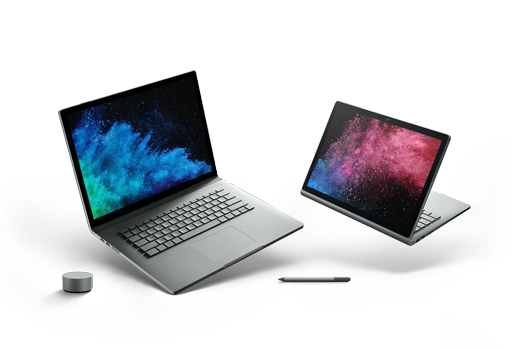
The best device? A Surface Book 2 for Business. Directors can oversee the business by approving documents and providing feedback through Office collaboration features, perform complex analysis with confidence, and represent the company through Surface’s premium hardware and elegant design. This high powered and all-day battery life device has a detachable keyboard, which allows the user to stay on top of work and industry news, even when limited on space.
|
 |
| Creative design department: A company designer have their own challenges they face each day. For example, communicating with their colleagues and customers on design work… engaging in meetings both on-site and remotely… create modern designs for both the business and its customers… and collaborating on promotional plans.
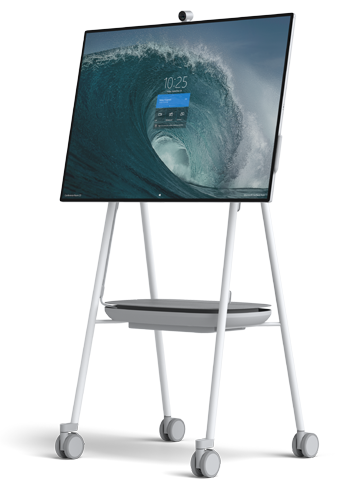
The best device? The Surface Hub 2S together with pens can be used as a whiteboard to present new and exciting designs anywhere, with a remote stand and long battery life. It enables real-time document editing whilst working with a widely distributed team through the Teams application. The stunning wide screen shows each detail in crystal clarity and will never fail to impress in customer presentations. |
 |
Want to find out more about Microsoft Surface into Business?
Contact a member of our team today to discuss the modern workplace for your environment.
Sources:
1 US Future-Ready Workforce Study, 2016
2 SectorWatch, MarketWatch, April 19, 2017
3 Steelcase, “The Future of Work is Creative, How Technology and Place Enhance Creative Behaviours”, 2017

The complexity of protection made simple
Last year there were almost double the amount of cybersecurity incidents in companies compared to in 2017, with 159,000 data breaches driven by ransomware or new attack methods.
And the global cost of cybercrime is expected to exceed $2 trillion by 2019.
Gartner recommend organisations with a focus on security adopt Endpoint Detection and Response (EDR) solutions to increase cyber-resilience with hardening, investigation, incident detection, and incident response.
However, in their 2018 “Endpoint Protection and Response” survey the SANS Institute highlight, that only 50 percent of organisations had next-gen antivirus, and 37 percent of these had not activated the advanced capabilities due to its complexities.
Organisations are finding it hard to strike the balance between deploying the best possible network protection without becoming overwhelmed by false alerts which need investigating or simply the complexity of administration.
Advanced cybersecurity systems produce massive amounts of data—much more than any number of people could sort through and analyse – in a relevant time frame.
This is why Artificial Intelligence (AI) and its subset Machine Learning (ML) are applied within EDR solutions, where the software learns to solve problems and think by itself in a way that’s similar to humans. These technologies are able to sift through the vast amount of network data turning it into security intelligence able to detect threat events, traditional antivirus products would miss.
By learning what normal network activity consists such as programs used, user activity and traffic patterns, deviations from these norms show a greater threat potential and can be highlighted and dealt with in a faster fashion.
However, it is here where the threat of alert fatigue can kick in with too many false alerts requiring investigation mean that only a small percentage can be adequately dealt with. Should the security solution require administrator intervention shutting the user or process out this can seriously impact operations.
The EDR solution must be advanced enough so the AI and ML technologies handle routine tasks and first level security analysis, leaving security analysts free to focus on more critical or complex threats.
While not a “philosophers stone” AI and ML are useful tools in your security arsenal to shift the approach from reactive defense to proactive real-time threat hunting and detection.
A new cybersecurity paradigm is born.
Panda Security realised back in 2010 that existing endpoint protection techniques were limited and started from the ground up building a new single platform which is today known as Panda Adaptive Defense 360 providing 100% process attestation, meaning no process is allowed to run until actively classified as good and Threat Hunting included as standard.
This approach was only made possible through the development of a cloud-based automated detection service to classify every new Portable Executable (PE) process and identify and block fileless malware and other threats which ‘live off the land’ utilising legitimate tools – such as RDP, powershell, macros etc – repurposed for their nefarious ends, moving laterally on the network stealing credentials, browsing history, and data.
This concept was further developed into Panda Security’s Threat Hunting and Investigation service, where fed by hypotheses from the experts at PandaLabs Security Operations Center, these technologies can gather and analyze data, trace threats, search for vulnerabilities, respond to breaches, and thus reduce the IT team’s workload. This way we can focus on the really dangerous attacks.
Panda Adaptive Defense 360, and its Advanced Reporting Tool, Data Control and Patch Management modules, help you to secure your network and comply with regulatory requirements such as GDPR.
For your free demonstration or trial of Panda Security solutions, contact your XMA Account Manager.

XMA pledge to support the Armed Forces Covenant
Our pledge to the Armed Forces
XMA have formally pledged their support to current and former members of the Armed Forces and their families, including reservists, by signing the official Armed Forces Covenant.
The document highlights the moral obligation owed to the Armed Forces by the nation and businesses signing-up to it are able to officially declare their own support for the military community.
As a responsible and equal opportunities employer, XMA has committed to working more closely with past and present members of the Armed Forces to enable them to manage their military careers with civilian jobs or to find full-time employment once they leave the military.
Signing the covenant enables XMA to officially recognise the value serving personnel, reservists, veterans and military families bring to the company.
See our Pledge
Brexit Committee Update March 2019
Brexit Committee News Update – March Update
As UK Parliament move towards a crucial series of votes, HMRC are still advising businesses to prepare for ‘No Deal’. Below sets out some key actions XMA are taking before 29th March to prepare for such an eventuality.
It is worth pointing out that should a deal be passed by parliament in the coming days, the resulting transitional period lasting to at least Dec 2020 would mean that business would continue to operate as they do today with free movement of goods between the EU and the UK and would give XMA and its partners further time to prepare for any changes we would face as part of the final withdrawal agreement. We may face exactly the same issues we currently face or even a different set of issues for which we may have little time to prepare for. However, it will allow the Government to prepare more robust customs procedures and processes as well as negotiate favourable trade deals with both the EU and other countries.
Inventory
As mentioned in previous updates, XMA have negotiated increased one-off stock holding deals with its main hardware and supplies partners. This will result in a significantly increased stock holding. Whilst naturally not a long-term solution, it should mitigate any immediate shortfalls as delays at ports build up. In addition, we are advising customers to ensure they order channel stock as opposed to product built to order in EU factories to ensure the best service to customers. XMA have stepped up its services capability to configure locally to ensure end-users are serviced well during this period of uncertainty.
Customs & Border Control
Customs declarations will be mandatory for imports and exports for trade between the EU and the UK. Through our parent company (Westcoast) we are well versed in managing such declarations and have been busy collecting standard (UK will continue to be consistent post-Brexit) commodity codes (HS codes) for all live SKUs in our portfolio to understand whether tariffs will be applied. This work is on-going and to date we have confirmed codes on over 73% of active products in Westcoast’s catalogue. Any tariffs levied by the UK on imports or the EU on exports will be passed on to customers in the cost of goods along with admin fees levied by our customs clearance partners. At this point, we have identified very few risk areas, yet we encourage you also to take proactive steps to identify whether SKUs you wish to purchase from us could attract additional tariffs. Westcoast will inform customers when tariffs – currently at WTO non-preferential rates – are levied.
Safety and security declarations will be mandatory for imports and exports and Westcoast have a strong partner that will handle any such declarations.
It is mandatory for delivery documentation for goods being exported to show cost prices in order to clear customs effectively. Customers should note that whilst you may feel this is not ideal for direct deliveries to your end users, XMA must comply with all necessary customs clearance requirements.
We are only expecting physical customs checks on a small fraction of consignments particularly as not all ports have Border Inspection Posts (including Calais, Ostend and Normandy). All have plans to build new facilities, but it is not known whether these will be ready and sufficiently staffed in time for 29th March. Whilst we are not anticipating delays to XMA shipments, it will be checks on other products that bear significant tariffs that will create delays as well as the five-fold increase in HMRC custom declaration workload.
Ireland
There are likely to be delays in delivering goods to Ireland from the UK. Through our parent company (Westcoast) Ireland’s warehouse in Tallaght, Dublin, XMA will be have the ability to manage roll-out projects and cross-stock only. Customers are advised to discuss their project deals with their account managers to ensure appropriate space can be allocated. Single pick items will still be delivered from the UK using Westcoast’s logistics partner although some delays may occur at ferry ports.
FAQ’s
EORI – Westcoast do have a UK EORI number which will be sufficient for all declarations.
AEO – Westcoast have not applied for this status as management consider this will not be effective in speeding up customs procedures.
TSP – Westcoast have applied for this accreditation and the application has been acknowledged as received by HMRC.
Warranty – no vendor has yet amended their warranty terms so we can anticipate that warranty procedures will be the same as currently available post-Brexit.
VAT – exports on goods shipped from the UK will not bear VAT from the UK as currently.
Tariffs – where they are imposed, they will be applied on the full price of the goods (i.e. before discounts).
For any questions or queries contact our XMA Brexit committee at approvals@xma.co.uk
Read previous Committee Update for January 2019
XMA are thrilled to be a part of ‘The Inspire Learning Program’
9,000 iPads to be handed out to all Scottish Borders Council children aged 11 to 17.
Through the newly approved digital education strategy, XMA are thrilled to be partnering with Apple and CGI to deliver every child aged 11 to 17 in the Scottish Borders Council an iPad.
This strategy has been named “The Inspire Learning Programme”.
During the early stages of this programme’s planning phases, XMA partnered with Apple to run a number of demos to councillors, SLT’s and teaching staff.
This was to demonstrate the huge impact digital learning is having in schools across the UK, and we worked closely with the Scottish Borders Council to build a digital education strategy that would change the face of education across the Borders.
East Berwickshire councillor Carol Hamilton, the authority’s executive member for children and young people, said: “The Inspire Learning programme is our game-changing opportunity to make a difference to both our young people and our teaching staff here in the Borders, empowering them to deliver forward-thinking, innovative learning to our young people.”.
It was widely recognised that this programme is not about handing iPads to children. With a new age of digital learning, and a future that is becoming more digitally orientated than every before, it is important to equip young people with the knowledge and skills they need to develop their future careers.
This program is also about investing in teachers and empowering them to use technology to positively change the way they deliver their lessons. Digital technology will allow them to maximise every student’s learning potential and opportunities, as well as contribute to their own professional development.
Carol Hamilton says “Not only does the programme open up the opportunity for pupils to learn in new and exciting ways, it also brings with it a raft of wider benefits including extra support and professional development opportunities for teachers, expansion of Wi-Fi to provide fast and reliable internet access in every school and the rollout of flexible audio visual learning spaces through equipping classrooms with wireless and efficient technology.”.
This is an incredibly rewarding program for XMA to be a part of, and XMA are playing a key role in deploying these iPads across the Borders.
Our Scotland Business Unit Director said, “It’s an exciting time to be a pupil or a teacher in the Borders and this project addresses the nationwide challenge of attainment, pupil equity and the digital skills gap. As the National Framework provider for Scottish Procurement, XMA are delighted to be partnering with CGI, Apple and SBC to help deliver this truly transformational project.”.
An estimated 6,500 iPads will be rolled out from this August to all high school pupils and then to 2,500 pupils in P6 and P7 next year.
In future years, iPads will be shared among 5,700 P1 to P5 pupils. XMA look forward to watching how young children’s education will thrive through the use of iPad.
Read more
Did you know: you can improve clinical outcomes and workflows with apps?
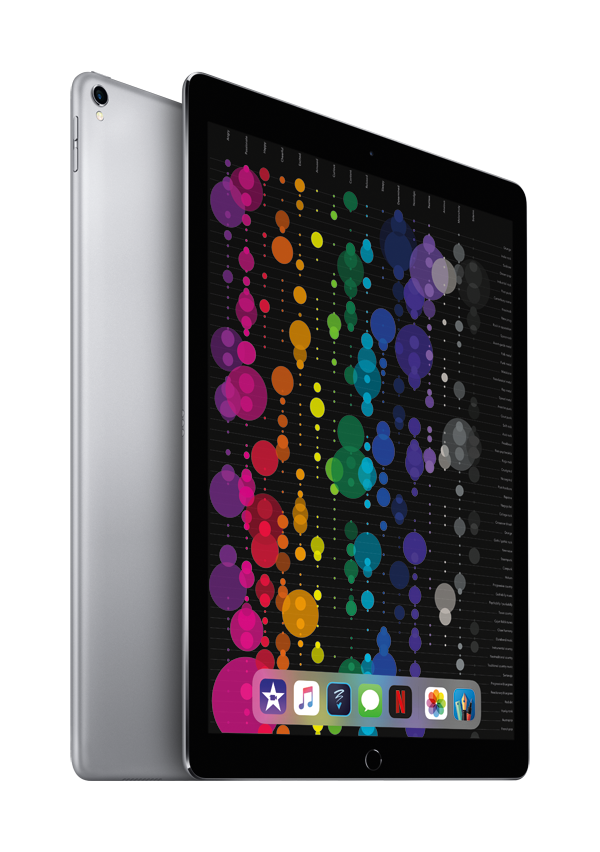
Apple technology is giving medical professionals the power to positively change the way they deliver healthcare. iOS devices come with a broad range of clinical apps that can support your day to day operations, and can ultimately change the way you engage with your patients, fellow clinicians and Trusts.
The App Store features over 40,000 apps that are changing the world of healthcare. Medical professionals can now use apps to provide faster, more personalised care both inside and outside of a hospital. Patients are also empowered to manage their own health outside the hospital with suggested apps, and medical researchers can now gather robust and meaningful data from larger, more varied populations.
We have listed some key apps which can help clinicians streamline their workload and provide more humanised patient care.

PatientTouch makes healthcare collaboration smart, mobile and simple with secure messaging, voice-over IP communications, and a consolidated view of alerts.
By connecting frontline clinicians to their patients and their care team, the PatientTouch app improves safety and efficiency, while reducing costs. Ultimately, the PatientTouch system allows you to spend more time on direct patient care.

Kainos is designed to give healthcare providers and carers secure access to patient information, regardless of the location. The app supports easy integration with other clinical systems using healthcare interoperability standards and is accessed using mobile apps that have been developed exclusively for iPhone, iPad, iPod touch and Apple Watch.
The new platform is available on-premise, hosted in the cloud and is designed to meet the requirements of an increasingly diverse healthcare market, from large hospitals through to community and emergency care providers.
Formerly known as Vitalpac, CareFlow Vitals is our market leading electronic observation and decision support system designed to improve patient safety and outcomes.
It monitors and analyses patient vital signs to identify deteriorating conditions and provide risk scores to trigger escalation pathways.

Custom apps are applications you create and tailor yourself using the FileMaker Platform. These apps are the perfect replacement for paper.
Organize contacts, track medicines and stock, record events, and much more. The same app works on your mobile device, computer, the web, and in the cloud.
Want to understand more about upgrading to a modern device?
Speak to our healthcare team today, and learn about how Apple devices can transform your healthcare environment.
iOS is Enterprise ready and works seamlessly in a Microsoft environment
Delivering better care with more powerful technology
Why upgrade to iPhone?
The security on iOS devices means that NHS have full protection over their staff devices.
The stable and secure design, combined with the periodic software updates, will enable hospitals to be protected against security threats.
NHS staff can also easily access documentation and reports in real time from their iOS device, which speeds up everyday tasks and frees up more time to spend on patients.
We have listed below some of the supporting functionalities of an iOS device, which can help to improve overall productivity and efficiency for healthcare clinicians.
iOS with Cisco Collaboration Cloud allow users with VoIP to connect to their company’s phone systems with the iPhone. This brings significant cost savings for organisations because they aren’t using the cellular network and reducing their roaming charges.
It will remove the need for many users to forward calls from their desk to mobile numbers, and leverage additional apps that allow connectivity to key features. It will also mean that healthcare organisations have compliant mobile policies.
- Productivity gains for clinical staff
- Improved connectivity and reliability
- Secure real-time collaboration
Office 365 empowers health teams to work together with the right tools and solutions, allowing healthcare workers to securely share ideas and improve quality of care.
Office 365 can increase the effectiveness of their improvement processes, coordination of treatment plans, and enable research projects.
- Streamline communication & collaboration
- Make information easier to find and share
- Strengthen privacy, security, compliance
Apple Financial Services (AFS)
Trusts can get 20% more with your capital budgets with Device as a Service using Apple Financial Services (AFS). This flexible leasing programme is stress free and can be tailored to any deployment requirements.
AFS enables clinicians to effectively manage their technology lifecycle plans and provides expert advice around how to extract the most value from used devices.
Want to understand more about upgrading to a modern device?
Speak to our healthcare team today, and learn about how Apple devices can transform your healthcare environment.
Reducing Teacher Workload

Reduce your workload with a brand new classroom assistant
It is a commonality across schools that teacher workload is too high. Teachers are forced to spend too much time on administrative tasks around data management, rather than focusing on the most important element of the profession; teaching.
With only 40% of their time actually dedicated to lesson planning and delivery, schools are recognising a need for change.
Teachers need access to tools that can help them to streamline their workflow and reduce their overall workload. There are so many tools with iPad at a teachers disposal that can provide valuable insight into
student’s progress and seamlessly collaborate.
The tools can provide instant feedback on school work, guide students through a lesson and keep the class focused on the task, as well as share information and documents with pupils, staff and the parents across the school.
Technology now has the ability to transform the way schools can approach reducing teacher workload. Admin time can be significantly reduced for both teachers and other staff at the school by implementing and utilising education technology effectively.
With this in mind, we’ve pulled together a list of our favourite apps for you to use in the classroom to help reduce teacher workload, so more time can be focused on delivering lessons that students will never forget:
Classroom: Your new teaching assistant
Requires iOS 11.3 or later. Compatible with iPad
Classroom turns your iPad into your very own teaching assistant. Through the use of Classroom you can
guide your students through a lesson as well as monitor their progress. This app also gives teachers the
capability to launch the same app every students iPad. Alternatively, you can launch different apps across
each iPad if your students are working in groups.
“How can I trust my pupils to focus on the task at hand, and not launch different apps on their iPad?”
There is a feature on the Classroom app called ‘Screen View’, which allows teachers to view what is on each students iPad screen. You also have the power to lock or pause all iPad screens if there is a need to
refocus the class, or focus on one particular element. At the end of the lesson, there is a capability to log all students out of Shared iPad so they can begin focusing on their next task.
“I have lots of files to share with the class. How easy is it to transfer files to each student via iPad?”
It’s now easier than ever to share files with your pupils. With just one tap, you can Airdrop any file to any iPad in the classroom. Teachers can then ask students to Airdrop their files to them in order to present their work at the end of the lesson – no more worrying about losing students work or important files! They can now be stored in one central location.
Schoolwork: A new base for you and your students
Requires iOS 11.4 or later. Compatible with iPad
This app is designed to help reduce teachers workload, and maximise every student’s potential. You can collaborate and provide instant feedback, tailor instructions to suit student needs, and more effectively organise assignments to automatically appear on students iPad’s. You can also keep track of each student’s progress, which will allow you to tailor the teaching needs to suit them.
Within the Schoolwork app is a feature called Handouts, where you can share a homework assignment, present collaborative documents including web links and photos, and even a specific link to an activity app.
Need some help getting started? Take a look at Apple’s teacher’s guide to the Schoolwork app for iPad – you can get yourself set up and using the app in no time! (https://www.apple.com/uk/education/docs/
getting-started-with-classroom.pdf)
“What’s the difference between Schoolwork and Classroom?”
Classroom allows you to manage the pupils in the class, whereas Schoolwork allows teachers to view the progress of each pupil. Classroom allows teachers to see the capability and performance level of each pupil
within the group, and Schoolwork compliments this feature by give teachers a live view of how students are performing and managing the group task as individual performers. Another way in which the two apps
compliment each other, is that through Classroom you can lock students in to view a particular screen, and Schoolwork allows you to highlight the content you want students to focus on.
Showbie: The Paperless Classroom
Requires iOS 10.0 or later. Compatible with iPad and iPhone
The Showbie app is fast, easy and extremely effective for assignments and student feedback in your classroom. Through this app, you are able to assign, collect and review student work from thousands of compatible apps. You can even have your pupils complete assignments with Showbie’s built in tools. You can also mark classwork using an Apple Pencil directly onto PDF’s and images… record voice notes for verbal feedback or language exercises… and even create individual digital student portfolio’s to add their work to.
“The school parents love to see examples of their children’s work in the classroom. Can this app help me share classroom projects with them directly?”
The collaboration doesn’t end with the students; you can also extend it out to the parents as well. This app allows you to invite school parents to view their children’s work, and keep them up to date and informed of
classroom activity and homework tasks.
Seesaw: The Learning Journal
Requires iOS 9.0 or later. Compatible with iPad and iPhone
Seesaw is a digital portfolio that inspires your students to do their best work and saves a lot of time in
teacher workload. This app is used in over 200,00 classrooms, and 1 out of 2 schools in the US.
This is an evolution of what would have previously been a ‘scrapbook’, where work can easily be damaged
or misplaced. By creating a digital portfolio with Seesaw, this can be a space where students have the ability to express themselves, reflect on their learning and develop something that they’re proud to show to
their teachers, parents and classmates.
Teachers can also collect student responses to classroom tasks, which means they have less papers to carry home each evening, and translate their notes, comments and captions into over 50 different languages – perfect for international or placement students.
“How can I find out more about the Seesaw app?”
You can visit the developers website here: www.web.seesaw.me . You can sign up free, and get more of an insight as to how teachers are using SeeSaw in their classrooms.
Speak to a specialist
Speak to one of our Education Specialists today, and we will talk top you in more detail about how XMA can help to assist you and your school with reducing teacher workload.
Email: schools@xma.co.uk
Tel: 01727 201820
Discover more
Speak to one of our Education Specialists today, and we will talk to you in more detail about how XMA can help to assist you and your school with reducing teacher workload.
Want to find out more about how iPad’s are being used in classrooms across the world?
Watch Apple’s Real Classroom Stories here: https://www.apple.com/uk/education/real-stories/
Want to know about other ways you can introduce iPad into your curriculum?
Read our blog on Augmented Reality in the classroom









 Monitoring by Hotjar