Archive

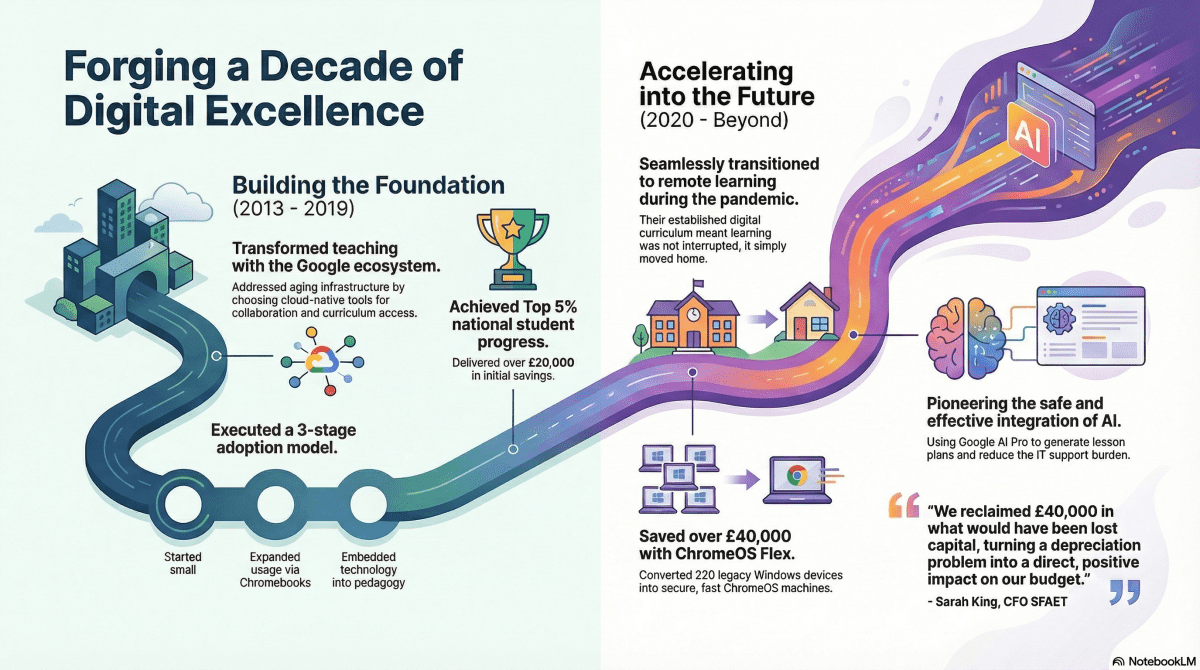
Forging a Decade of Digital Excellence: How SFAET Saved £40k and Pioneered AI with XMA

In the education sector, technology procurement is often reactive, fixing what is broken or refreshing devices on a rigid cycle. However, the most successful Multi-Academy Trusts treat IT as a strategic foundation for pedagogy, not just a utility. 

Our latest case study explores the 10-year partnership between XMA and the Success for All Educational Trust (SFAET), specifically focusing on Redden Court School. This relationship demonstrates how a long-term vision yields significant financial and operational returns. 

Practicing what we preach, we’ve used the transformative power of Google’s NotebookLM to effortlessly create an infographic based on the case study. NotebookLM also gave us the ability to make our own podcast on the subject, as well as a video! Check them out below

For everything educational, rely on XMA for your next IT project. Contact us at enquiries@xma.co.uk for more.

Practicing What We Preach: A Candid Q&A on Cyber Resilience with XMA’s Head of IT Security & Compliance

In the IT channel, it is easy to talk about security in the abstract. But at XMA, we don’t just recommend security architectures, we live them. As a major IT solutions provider managing critical infrastructure for UK government bodies and large enterprises, we also must be on top of our cyber resilience.  

To be a true strategic Technology Partner, we must practice what we preach. We sat down with Charlotte King, XMA Group’s Head of IT Security & Compliance, to discuss the reality of defending a modern organisation. From the rise of AI-driven phishing to the dangers of the “silver bullet” mindset, here is the view from the inside. 


Section 1: The View from the Inside 

Q: As Head of InfoSec for a major IT solutions provider, you see a broad spectrum of threats. Moving beyond the buzzwords, what are the specific, high-risk trends keeping you up at night right now? 

Charlotte King: Firstly, our prevention controls – are they actually working? It’s not enough to have shiny tools, we need to constantly test and tune them to keep attackers out. This is not a “one and done” exercise. It keeps us on our toes every single day. 

Supply chain attacks are a real headache, and we have seen several big ones this year. We rely on suppliers for hardware and software, so if they’re compromised, so are we, and this affects our valued customers. Downtime or breaches in the supply chain can ripple right through our environment and soon become the critical task of the day. 

Phishing is relentless. Email remains a favourite attack vector, and the sophistication of these attacks is only increasing with AI. Finally, our staff – are we doing enough to train and support them? Are our technical teams prepared and well enough resourced to cope with the “business as usual” work and then the swerve balls that can come from suppliers, customers, or our industry partners? 


Q: We manage critical infrastructure for customers across the UK, including government bodies. How do we approach our own security to ensure we remain resilient against supply chain attacks? 

CK: We do a vast number of things to help with this. We certify and align to recognised security standards and frameworks. You can’t be an IT company these days without having these external validations of your policies and controls. We have just completed the re-cert for ISO 27001:2022 and have Cyber Essentials Plus next week. 

The audit cycle helps us to be continuously aware of possible weaknesses so we can fix and strengthen them. For us, security isn’t static, it’s not a goal or a destination, it’s our everyday. We’re always assessing our people, processes, and technology, reviewing how we can make it better, stronger, more resilient or efficient. We look at how these multiple layers of security can ensure that if one fails, others stand in the way. 

We have recently made big improvements to our supply chain onboarding. We don’t just trust our suppliers blindly, we vet them thoroughly. 


Section 2: The Human Firewall 

Q: Technology is only half the battle. How do you approach security culture at XMA to ensure staff are an active line of defence rather than a vulnerability? 

CK: Technology and processes are only half the battle. We have all sorts of people here at XMA, from technical teams to sales, and the usual back-office support staff too. We have robust staff security training, and we run ongoing simulated phishing campaigns and monthly bulletins to help keep security in everyone’s mind. 

This month our bulletin was for Black Friday and Christmas scams, helping keep our staff safe in and outside of work. I would like to think we also have an approachable security and compliance team. We make it easy for staff to ask questions and report issues. We are also looking at a Security Champions programme to help further embed security advocates in every department. 


Q: Phishing remains a primary trigger for security breaches. With the rise of AI-generated content, attacks are becoming harder to spot. What specific “tells” should organisations teach their staff to look for in 2026? 

CK: You’re right, and in fact, AI is making it easier for attackers to craft convincing messages. As a business, we have a strong online presence, so finding who works here isn’t difficult. So, it comes down to our staff to be careful with emails, whilst knowing much of it will be caught by our tools and filters. 

Check URLs and domains carefully. Hover before you click! Watch for odd language or tone. AI can mimic, but it’s not always colloquially perfect. Scam psychology is to provide a sense of Scarcity, Urgency, Authority, or FOMO (Fear Of Missing Out). If the email has that, you don’t recognise the sender, or it seems a bit off, use the easy reporting mechanisms we have at XMA which make it simple for staff to flag suspicious emails. 


Q: With the ease of using AI tools, Shadow IT is a growing governance nightmare. How can IT Directors and business owners identify unapproved applications without halting productivity? 

CK: This is always a balance: to permit staff to access tools or applications that allow them to innovate, whilst being secure and well-governed. We publish a clear applications catalogue for staff to use as a first point of call. 

If the application we already have doesn’t meet their needs, we make it easy for staff to find and request approved tools, which then goes through a due diligence process. This allows some flexibility for niche needs whilst meeting security standards. Admin rights are locked down so staff can’t install software without authorisation. 


Q: Many organisations have security policies that sit in a drawer and are rarely read. How can businesses create policies that employees actually follow, rather than work around? 

CK: At XMA we have one clear, concise user agreement, signed annually. Keeping it short, simple, and in plain language means staff are more likely to engage with it. We track compliance of this overarching policy, and it forms a key part of our security foundation. Generally, if a workflow is built into technology (perhaps the triage of a suspicious email) that’s better than a dusty process document. 


Section 3: Our Vendor-Agnostic Take 

Q: Vendors often promise a single tool will solve all security problems. Why is this mindset dangerous, and what is the reality of building a layered defence? 

CK: Every department has different needs. What works for procurement might not work for sales, so you have to create a layered defence to protect all systems, people, and physical assets. Single tools can fail. Relying on one solution is risky and not resilient. 

Layered defence is key. Using specialist tools that work together, supporting your people and processes, means you can protect your business even if one security system stops working. We’ve seen big security vendors hit by ransomware, configuration changes impacting uptime, and global hyperscalers suffering significant downtime. No security vendor is immune to some kind of failure, so we need to spread our bets insightfully across tools and technology to keep the wheels of commerce turning for our stakeholders. 


Q: If a customer (whether an SMB owner or a Public Sector compliance officer) could make one immediate change today to improve their security posture, what should it be? 

CK: Enable Multi-Factor Authentication (MFA) everywhere you can. It’s one of the simplest, most effective ways to block attackers. This is for all areas: social media, work applications, shopping portals. Call out suppliers that don’t have MFA on their applications. Oh, and mandate a corporate password manager too. 


Need a Strategic Partner who understands the reality of cyber threats? 

At XMA, we don’t just sell technology, we use it to secure our own business every day. Contact your XMA Account Manager or talk to us at enquiries@xma.co.uk to discuss how we can help you build a resilient, layered defence. 
Android Desktop: How does Security and Management Change with Phones as Primary Devices?

This is the fourth in a series of blog posts exploring Android Desktop. Our Head of Pre-Sales, Scott Wright, will be looking at the current state of Android Desktop, following its improvement as release approaches, examining use cases, looking at essential apps & peripherals and more. 

Picture of Scott Wright

Scott Wright

Scott is XMA’s Head of Pre-Sales. An IT industry greybeard, he believes strongly that proper planning & preparation prevents poor performance.

Something a little different for this one – I sat down with Charlotte King, XMA Group’s Head of IT Security & Compliance to discuss her thoughts on how a shift to an Android device as the primary (only) device for some users might affect security and compliance. Below are my notes from that conversation.

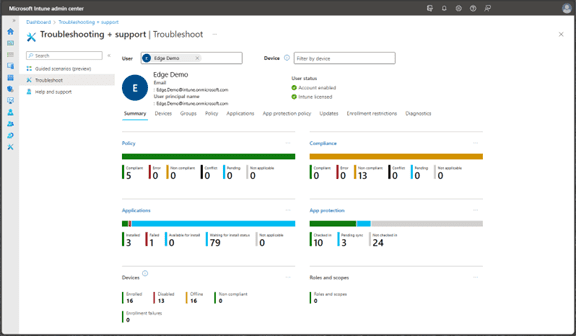
Charlotte King: XMA group currently has all Android devices enrolled in Intune. Although there is a security baseline in place covering encryption, patching, etc. this change in device use should trigger a review of that baseline to ensure it remains fit for purpose given the significant increase in usage and in the variety of applications used which is likely to occur.

Similarly, the IT Use Policy should not require changes but should be reviewed in the context of this new usage. Some elements will increase in priority, for example the use of unauthorised charging cables (which presents a security risk) may need additional training.

The same Smart Update process used on Windows devices, which monitors user experience to trigger a device refresh rather than arbitrary dates, should be extended to Android devices.

Remote support tools should be reviewed to ensure that the same level of ease of use and functionality in remote device access is provided for Android devices as is currently available for Windows devices and the security of those tools must be assessed.

Historically XMA has seen higher rates of breakage on mobile devices. This will need to be factored into the costings for a device use change unless it can be mitigated via device selection or accessories. This is especially significant given that it is likely that a more expensive device would be issued.
[note from Scott – I am doing some testing on devices of different specifications to see what’s needed for a good experience]

Security features would also be a key consideration for device selection with a highly effective fingerprint reader being the preferred solution after initial consideration but testing of alternative methods for rapid, secure device unlock would be called for.

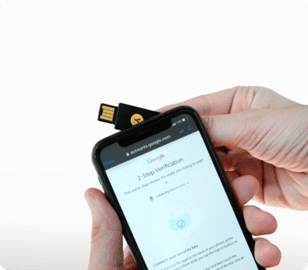
MFA would also need some consideration. Currently the mobile device is used as the MFA platform deliberately to separate it from the primary device, this would not be possible where an android device is fulfilling both roles. Potentially a phone compatible token solution such as Yubikey would alleviate these concerns.

Testing of applications will need to occur, just as with the recent Windows 11 migration, with especial focus on key line of business apps.

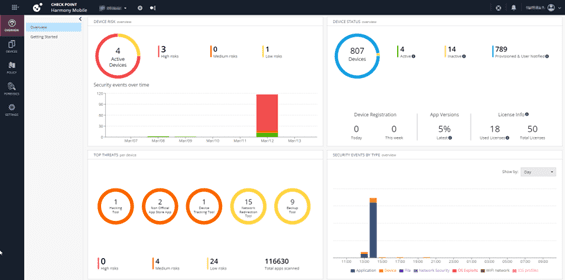
An endpoint security solution for mobile should be considered with thought given especially to capabilities that may be missing from the current desktop endpoint security solution.

Android devices are considered to be easier to manage by the XMA IT team with less administrator intervention needed for updates and a much lower frequency of updates negatively impacting user experience.

The total number of managed devices will be reduced since the majority of likely candidates for this change in device strategy currently have both a Windows and Android device.

Auditing and certifications is expected to be faster, and therefore less expensive.

There is the potential for a saving in Microsoft Licensing given the various options that are available for devices with smaller screens.
[note from Scott – I will be raising this question with Microsoft as small devices docked with large monitors is not a scenario mentioned by the current user agreement]


Scott Wright: Some interesting points, I think, and a good outline of the assurance process that will likely be required for most organisations considering an introduction of Android devices as laptop replacements.

Beyond Windows 10: A Strategic Opportunity for Compliance and Modernisation

The end of official support for Windows 10 marks a strategic turning point for UK organisations. It’s a clear opportunity to move your business from a reactive footing to a proactive one. The migration to Windows 11 is a business-critical decision that allows you to secure your operations, protect your data, and build a modern, resilient technology foundation. 


A Strategic Path to Modern Compliance and Governance 

For large enterprises and public sector bodies, achieving compliance is essential for operational continuity. Windows 11 is built with a modern security architecture designed to help you meet these goals. 

  • Hardware-Level Security: Windows 11’s requirement for TPM 2.0 (Trusted Platform Module) provides hardware-based encryption. This is a critical component for protecting sensitive data and aligning with stringent standards like Cyber Essentials Plus. 
  • Control Data Access: The operating system delivers robust identity protection, vital for implementing zero-trust principles. This gives you granular control over who accesses sensitive data, a key part of modern governance and risk management. 
  • Invest in a Modern Platform: Migrating to Windows 11 is an investment in a platform that receives continuous security innovation. This protects your organisation from emerging threats and demonstrates a clear commitment to security best practices. 


For the Growth-Focused Business Owner 

If you are a Small or Medium Business (SMB) owner, your focus is on reliability and growth, not IT problems. You need technology that works, protects you, and stays out of the way. The move to Windows 11 directly supports these needs. 

  • Protect Your Business: A cyber-attack can cause serious disruption. Windows 11’s improved security baseline provides a much stronger defence against ransomware and data theft, protecting your operations and your reputation. 
  • Focus on Your Business, Not IT: Running an unsupported OS, often on older hardware, can lead to system failures and lost productivity. A modern OS and hardware mean reliable performance. This reduces time spent on IT issues and allows your team to focus on serving your customers. 

The end of Windows 10 support is a catalyst for positive change. It’s the right time to assess your environment and develop a migration plan. XMA can help you manage this transition efficiently, ensuring you achieve a more secure and compliant organisation with minimal disruption. Contact us at enquiries@xma.co.uk or take our Quiz to see how XMA can help you maximise your journey to Windows 11

Is Your Hardware Ready for the AI-Driven Workplace?

Artificial Intelligence (AI) is fundamentally changing how we work. As organisations adopt AI-powered tools to improve productivity, a critical question arises: can your current computers handle the demand, or are they becoming a blocker to innovation?

For years, the hardware replacement cycle has often been reactive: When a device fails, it gets replaced. However, the shift to AI requires a more strategic, proactive approach to your device strategy. This is where Copilot+ PCs, running on Windows 11 Pro, represent a necessary evolution.


What Makes a Copilot+ PC Different?

Copilot+ PCs are the first generation of computers built specifically for the era of AI. Their key differentiator is the inclusion of a Neural Processing Unit (NPU), a dedicated processor designed to run AI tasks efficiently directly on the device.

This new architecture provides critical business advantages:

  • Performance: These are the fastest Windows PCs ever built. The powerful, 40+ TOPS NPU frees up the main processor (CPU) and graphics card (GPU), resulting in better overall system speed and responsiveness. In benchmark tests, Copilot+ PCs perform up to 5X faster than 5-year-old Windows PCs1.
  • Security: Copilot+ PCs provide the most powerful Windows security by default. Rather than relying on a single feature, they integrate hardware-based protection, including Secured-core PC safeguards and the Microsoft Pluton security processor. This layered approach is estimated to block 70% of typical breach vectors2.
  • Efficiency: The NPU enables new AI capabilities to run with high efficiency. For a hybrid workforce, this translates to tangible benefits like all-day battery life, with devices offering up to 22 hours of local video playback or 15 hours of web browsing on a single charge3.


Addressing Key Business Challenges for Every Organisation

This new category of hardware is designed to solve distinct challenges for organisations of all sizes.

For the Enterprise IT Director: A Strategic Approach to Innovation and Risk

For large organisations, AI adoption introduces significant questions around security, compliance, and total cost of ownership. Copilot+ PCs allow you to build a refresh strategy that is both innovative and responsible.

  • Mitigate AI Data Risk: For specific features like the new Recall (preview) function, AI processing occurs locally on the device. All snapshots are securely encrypted and stored on the PC, helping you meet governance and compliance obligations. IT administrators retain granular policy control to disable or manage these features.
  • Future-Proof Your Investment: Adopting AI-ready hardware ensures your device estate is prepared for the applications of the next three to five years. This maximises the long-term value of your technology investments and aligns with a projected substantial ROI over three years.2
  • Strengthen Operational Resilience: Use the advanced, hardware-based security features of Windows 11 Pro, specifically Secured-core PC protection and Microsoft Pluton, to build a stronger defence against new AI-powered cyber threats.

For the Growth-Focused Business Owner: Productivity and Peace of Mind

For a small or medium-sized business, technology must be a reliable tool that supports growth, not a source of frustration. Copilot+ PCs provide access to capabilities that directly address your main concerns.

  • Increase Staff Productivity: Provide your team with faster PCs and new AI features that automate repetitive work. This delivers real-world results, with an expected time-saving of up to five hours per employee each week.2
  • Protect Your Business Data: The built-in, hardware-level security of Copilot+ PCs defends against common threats. This approach is validated by IT leaders, as 96% say that hardware-based protection provides a more secure environment.4
  • Control Your IT Costs: The fear of large, unexpected IT bills is a major concern. Our Device Management as a Service (DMaaS) model provides new Copilot+ PCs, plus all security and support, for a single, predictable monthly fee, removing the risk of surprise costs.


Build Your Strategy with an Expert Partner: XMA

New technology is only valuable if it can be implemented effectively and if your team can use it from day one.

Moving to Copilot+ PCs doesn’t have to be a complex or disruptive process. XMA provides the practical support and technical expertise to help you build a clear, costed, and compliant strategy for your upgrade to Copilot+.

Is your organisation ready for the next wave of AI-driven productivity?

Contact us today at enquiries@xma.co.uk to arrange a Copilot+ PC Readiness Assessment, and we’ll provide a clear, data-driven plan for your migration.


1. Based on Cinebench 24 Multi-Core benchmark. Learn More

2. New Tech: The Projected Total Economic Impact™ of Microsoft Copilot+ PCs. Microsoft-commissioned study by Forrester Consulting, July  2025. Projected benefits for a single composite organization that has US$1 billion annual revenue and 2,000 employees with 80% using Copilot+ PCs. In comparison to a mixed environment of conventional Windows 11 and Windows 10 PCs.

3. Battery life varies significantly by device and with settings, usage and other factors. See Copilot+ PCs claims.

4. Understanding Employee Productivity and Satisfaction Benefits of Next-Generation AI PCs as You Plan Your Next Refresh, IDC in partnership with Microsoft, August 2024.

Android Desktop: Where Is It At Today?

This is the third in a series of blog posts exploring Android Desktop. Our Head of Pre-Sales, Scott Wright, will be looking at the current state of Android Desktop, following its improvement as release approaches, examining use cases, looking at essential apps & peripherals and more. 

Picture of Scott Wright

Scott Wright

Scott is XMA’s Head of Pre-Sales. An IT industry greybeard, as well as an Android fanboy he is also a military history & technology nerd so would love one of the unobtainable Samsung Tactical Editions.

Android Desktop: Where is it at today? 

Today I’m going to talk about the current state of Android Desktop and some of the key productivity applications. Despite being in a surprisingly complete state there is still definitely work to be done on Android Desktop and a lot of apps will need feature improvements to deliver in this significantly changed use case. 

A big update has just dropped on 10th Oct which brings Desktop Experience to regular (non-Beta) Android. If you’ve got a device that has had its Android 16 update you can now enable Desktop Experience via developer options without needing to enrol in the Beta program. There seems to be improvements in this version which are not in the current Beta version so I will be switching to that and re-writing this post.  


So where is Android Desktop itself at? 

The core functionality is here – apps in movable, resizable windows, a taskbar, etc. Android has always been quite good at interface scaling and many apps have a tablet mode that makes them work at least adequately well on a monitor. There are, however, a whole variety of niggles that will need attention (and do remember that this is a pre-release version of the software): 

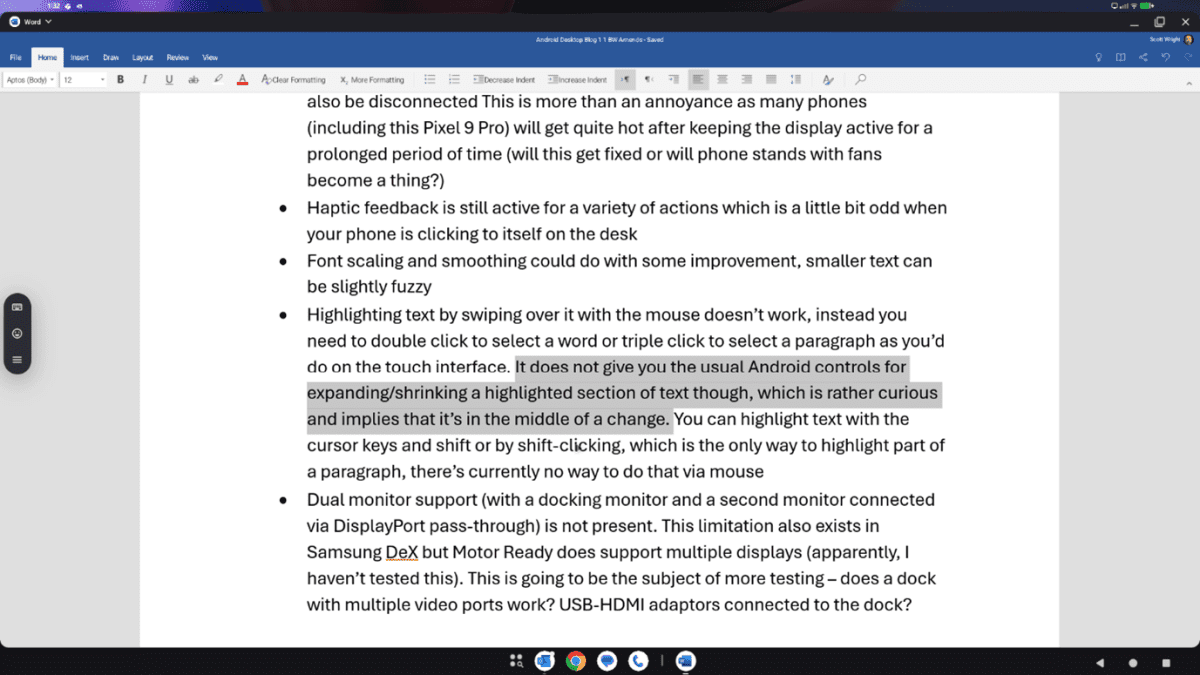
  • You can’t unlock the device via mouse and keyboard, you have to unlock via the phone 
  • The phone screen has to be kept on. If you hit the power button to turn off the display (as you might do when listening to music, for example) the monitor will also be disconnected This is more than an annoyance as many phones (including this Pixel 9 Pro) will get quite hot after keeping the display active for a prolonged period of time (will this get fixed or will phone stands with fans become a thing?) 
  • Font scaling and smoothing could do with some improvement, smaller text can be slightly fuzzy  
  • Dual monitor support (with a docking monitor and a second monitor connected via DisplayPort pass-through) is not present. This limitation also exists in Samsung DeX (multi-monitor support is just out) but Motor Ready does support multiple displays (apparently, I haven’t tested this). This is going to be the subject of more testing – does a dock with multiple video ports work? USB-HDMI adaptors connected to the dock? 

What about the M365 suite?

Top of most organisations’ list of apps is the M365 suite and support for these will be key to acceptance of Android Desktop as a laptop alternative.

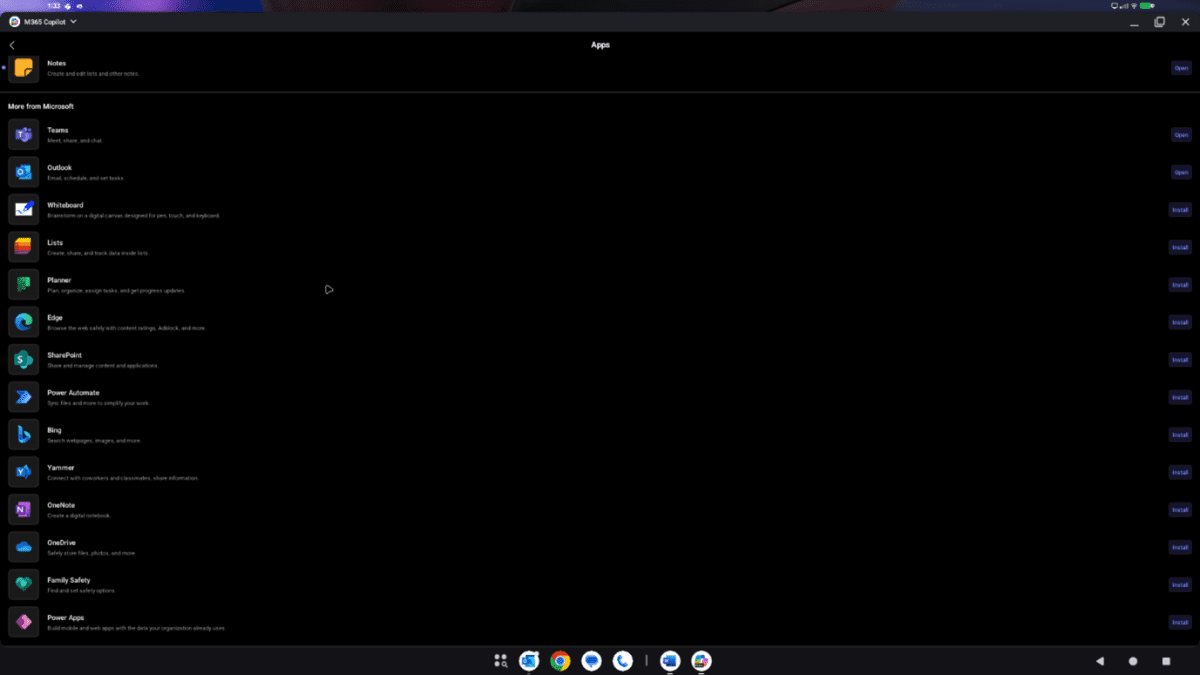
Outlook, Teams, Word, Excel, PowerPoint, Yammer, Bookings and more are available as Android apps with the M365 Copilot app being a hub for all of these.

The email side of Outlook works quite well, not quite as slick as desktop version but perfectly functional. The calendar doesn’t work as well – in particular the list of shared calendars needs to be better optimised to take advantage of the additional display real estate.

Teams works well for chat with my only niggle being that you can’t hover over someone with the red status dot to see if they are on a call or just busy, something I do frequently in Windows (big difference between someone having something in their calendar at the moment and someone actually being in a call). There is a substantial issue with Teams for conferencing though – it will not use USB devices connected to the docking station such as cameras, speakers, microphones, etc. This is new functionality that Microsoft will need to implement, currently there isn’t even a devices page in the settings menu to allow you to try and configure external audio and video devices.

Word, Excel and PowerPoint all work quite well and have the core functionality (this blog post was written on Word for Android). There are some missing elements of functionality that might be an issue for some users, for example you cannot embed a file into a Word document, but the core functionality is good and works well (this is something that you can evaluate without using Android Desktop).

Can’t we just use the M365 web apps?

Yes and no. The web apps refuse to work on Chrome for Phones. Chromium for Desktop does work on Android phones and provides a variety of browser functionality that Chrome for Phones does not, including support for extensions. Some of the read only web apps work on Chromium but when you try to switch to write mode you are directed to the Android application where there is one and don’t get to try using the full web app. I will be speaking to Microsoft regarding workarounds for testing this and, if I can share them, their plans for improving support for Android Desktop.

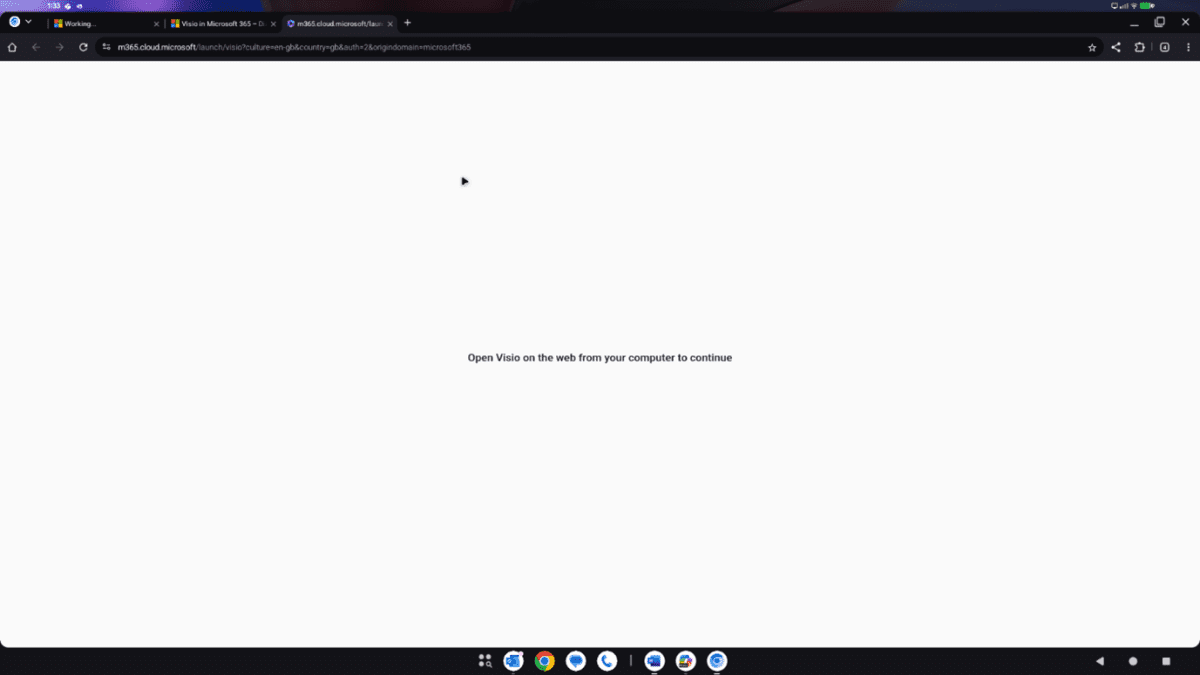
For some apps, for example Visio which does not have an Android app, it simply doesn’t work, telling you to go and use a real device. This isn’t helped by office.com redirecting you to the M365 Copilot application (which does not have a Visio app).

In summary then, there are definitely some gaps at the moment. Some of these are for Google to fix, some for Microsoft and others. The ability to use two monitors (Samsung and Motorola are ahead of the game here) and for the Teams app to use external video and audio devices would be top of my personal list – without those it just isn’t a serious desktop/laptop replacement.

As I edit this summary one more time I am yet again irritated by the inability to click-drag to highlight text so that’s got to be added to my list!

Don’t Let Legacy Applications Block Your Windows 11 Migration

The October 14, 2025, end-of-support date for Windows 10 is compelling organisations to plan their migration to Windows 11. The move is a critical step towards stronger security and improved productivity. However, one of the most common and significant concerns delaying these upgrades is the uncertainty around legacy applications.

For many organisations, business-critical software (such as older accounting platforms, bespoke CRM systems, or other line-of-business applications) is the operational backbone. The fear that this essential software will not work after an operating system upgrade is a primary reason for delaying the transition, creating a roadblock to modernisation.

The Compatibility Challenge

While Microsoft data shows that 99.7% of applications are compatible with Windows 11, the remaining fraction often includes the custom-built or legacy systems that are most integral to an organisation’s operations. Delaying an OS upgrade to protect these applications creates long-term risk. Without purchasing Extended Security Updates (ESU), organisations will no longer receive security updates, leaving them vulnerable to security risks. Read more about this here: The Hidden Risks and Rising Costs of Relying on Windows 10 Extended Security Updates (ESU) | XMA

A major worry for any business is whether essential software will work after an upgrade. Simply hoping for the best is not a viable strategy. A structured approach is required to test and validate these applications to ensure they do not hinder your migration to Windows 11.

How XMA Mitigates Application Risk

At XMA, we address the challenge of legacy applications head-on. Our services are designed to help you find proactive solutions that mitigate issues with legacy applications, ensuring they do not stand in the way of a secure and seamless migration.

Our approach includes:

  • Windows 11 Application Analysis: We accelerate your application analysis by effectively consolidating and standardising your application estate, ensuring a consistent and secure service delivery. We rationalise your software landscape by focusing on proactive management, license consolidation, and service efficiency. By utilising crowd-sourced application compatibility data, enhanced by a Confidence Score, we help you make informed decisions with greater confidence.
  • Secure Legacy Applications: Containerise your applications to securely run legacy applications on your modern device estate. Containers provide a secure way to run legacy applications by blocking inbound traffic and reducing potential vulnerabilities, helping you achieve Cyber Essentials Plus. Run any application without modification on Any OS. Anywhere.
  • Application Lifecycle Management: Obtain low touch deployment of applications and updates to Windows (and macOS) Apps through a powerful automation engine. Gain a unified, dynamic, adaptive, and contextual workspace for organisations and users. Automatically keep all applications updated and patched in real time, and cut application packaging and testing time by as much as 90%.

Legacy applications are a valid concern, but they should not be a barrier to modernising your IT estate. By taking a proactive and structured approach, you can ensure your essential software continues to support your operations on a secure, modern platform.

Contact an XMA consultant today at enquiries@xma.co.uk to build a migration plan that addresses your specific application compatibility needs.

Share with your network
WhatsApp
X
LinkedIn

When It Comes To Windows 10 End-of-Support: Don’t Replace, Refresh Your Device Strategy

When It Comes To Windows 10 End-of-Support: Don’t Replace, Refresh Your Device Strategy

The final day of support for Windows 10, October 14, 2025, is now just weeks away. For many organisations, the initial reaction is to focus on the operating system upgrade itself. However, the move to Windows 11 presents a more fundamental challenge that an OS update alone cannot solve: hardware compatibility.

A significant portion of existing device estates simply do not meet the hardware requirements for Windows 11. This reality is forcing a difficult and often unplanned conversation about a large-scale device replacement. For many, this will feel like a reactive and expensive problem.

But it doesn’t have to be. This deadline should not trigger a panic-buy. Instead, it should be the catalyst for a more strategic, data-driven approach to your entire device estate. It’s time to move from a reactive replacement cycle to a SMART Device Refresh.

The Cost of Inaction and Unplanned Refresh Cycles

Organisations still running on Windows 10 after the deadline will be required to purchase Extended Security Updates (ESUs) for every non-compliant device to avoid exposure to cyber threats. This is a significant financial drain with no return on investment. The cost escalates dramatically, doubling in the second year and doubling again in the third, creating a recurring budget item spent only to maintain an obsolete OS.

Furthermore, many organisations are already caught in a cycle of reacting to device failures and budget availability rather than making informed, data-driven refresh decisions. This approach often leads to overspending on devices that are not suited to user needs, while leaving other areas with inadequate technology that hinders productivity and impacts employee morale.

A Strategic Approach: The XMA SMART Device Refresh

XMA’s SMART Device Refresh service provides a structured, data-driven plan to navigate the Windows 11 transition and optimise your entire device estate for the long term. We help you balance performance, user experience, and cost-efficiency.

Our approach is built on providing actionable insights to make smarter investment decisions. We help you avoid overspending and extend device lifecycles where appropriate, without compromising on security.

How We Help:

  1. Insightful Hardware Assessment: Our first step is a fast-track assessment of your entire hardware estate. We identify which devices are compatible with Windows 11, which ones are not, and which can be redeployed to other roles extending their useful life. This gives you a clear, data-driven baseline for your migration plan, as well as a more sustainable approach to your IT assets.
  2. Data-Driven Procurement: For devices that require replacement, we provide a streamlined procurement service. Our advice is based on a deep understanding of user needs, ensuring you invest in hardware that is powerful enough for the job but affordable enough for your budget. For example, we use insights on application usage to ensure a designer gets the right GPU and a data analyst gets the right CPU, avoiding unnecessary expense while improving productivity.
  3. Flexible Procurement and Lifecycle Management: We understand the pressure on capital budgets. We offer flexible procurement options through public sector frameworks, including financing and as-a-service models that can shift expenditure from CapEx to a predictable operational cost. For a complete solution, our Device Management as a Service (DMaaS) can handle the entire device lifecycle, from procurement and deployment to ongoing support and secure disposal, reducing the burden on your internal IT team.

The Windows 10 end-of-support deadline is a chance to break the reactive cycle of device management and implement a cost-effective, long-term plan that aligns with your organisation’s goals.

Don’t pay the price for delay. Contact XMA today at enquiries@xma.co.uk to build a SMART device refresh strategy for your transition to Windows 11.

Share with your network
WhatsApp
X
LinkedIn

Android Desktop: Potential Use Cases and Benefits

This is the second in a series of blog posts exploring Android Desktop. Our Head of Pre-Sales, Scott Wright, will be looking at the current state of Android Desktop, following its improvement as release approaches, examining use cases, looking at essential apps & peripherals and more. 

Picture of Scott Wright

Scott Wright

Scott is XMA’s Head of Pre-Sales. An IT industry greybeard, he violated his own rule about being an early adopter when he bought the first Android phone at launch and hasn’t regretted that decision.

Most of this blog will be talking about the benefits of a mobile device with any sort of desktop interface, rather than Android Desktop specifically, so before we start that let’s talk for a moment about why the launch of Android Desktop is causing such a buzz. 

Desktop solutions for Android are currently available from several device vendors with Samsung’s DeX being the most established. Motorola Ready-For (also on Lenovo ThinkPhones), Huawei Desktop Mode and Xiaomi MIUI Desktop mode are also available. These solutions are vendor specific which raises concerns for many organisations, should the vendor cease supporting them then the organisation will be forced to change device in order to continue with their device strategy. With Android Desktop as a core part of the Android offering (and Apple promising to follow suit) not only is desktop mode legitimised a standard phone feature but organisations adopting a vendor specific solution like DeX have a fall-back plan that does not require device replacement, substantially reducing risk. As such, there is considerable interest in Android Desktop, even from organisations who are considering or who have adopted a vendor specific solution. 

Below I am going to expound on some of the possible benefits and give examples of the use cases that might realise those benefits. 

Benefits: Managed Device Reduction 

The most immediate benefit for many organisations will be a reduction in devices. Many organisations are issuing both a laptop and mobile to a large cohort of users with fairly light computing requirements. This is especially wasteful for front-line workers for whom the mobile is the primary device and the laptop is an occasional use device. Replacing the managed laptop with a laptop-shaped docking station (“lapdock”, more on these in a future blog post) reduces cost but also reduces the number of devices requiring licences and updates, eliminates a large number of devices as potential sources of data loss (a laptop left in a taxi, for example, cannot contain any data as it is merely a docking station) and more. Shared desktops can also be replaced with docking stations or docking monitors, reducing the number of managed devices.  

Benefits: Shared Desktops 

For users with a mobile device who also use shared desktops, for example many healthcare workers, solutions such as VDI, roaming profiles, follow-me desktop and similar are used to make moving between shared desktops as seamless as possible but typically have substantial cost and complexity associated with them. These solutions and the shared desktops themselves can be eliminated and replaced with docking stations or docking monitors while providing an even more seamless working experience, not only between shared desktops but also between desktop and mobile device, allowing healthcare professionals to transition seamlessly between patient interaction spaces and desk-based working. 

Benefits: Security Implications 

Anywhere that shared devices are in use presents a challenge for data security. Data must not be unintentionally accessible between users and this is especially important in settings where that data is highly sensitive, such as a clinical or law enforcement settings. With most Police officers being issued a mobile device, utilising docking monitors in place of shared desktops for docking stations prevents inadvertent data access between users via the shared device.  Using lapdocks rather than laptops as a car-working solution means that it is impossible for data to be stored locally, reducing the risk associated with device theft. 

This benefit is also useful in other contexts, for example many higher education institutions have a pool of shared devices which are made available to learners. The HE organisation must ensure not only that data does not inadvertently pass between users but also that malware which might be introduced by a user does not impact other users of that shared device. By offering a pool of shared lapdocks, rather than laptops, these concerns can be eliminated. This will, of course, require waiting for most mobile devices to offer a desktop mode – likely several years before most Android and Apple devices are running a suitable operating system version. 

Benefits: Attracting Younger Workers / Learners

Many of the young people entering work or higher education have limited Windows / MacOS experience. Their personal devices are mobiles or tablets and the bulk of their school IT experience is using Chromebooks or iPads. Several regions will shortly see the first cohort of learners leaving school who have had a Chromebook or iPad as their learning device for the entirety of their secondary education and over the coming years this will increasingly become standard.

Offering a mobile-centric working experience, even if only as an option, may allow business and HE organisations to make themselves more attractive to these young persons that they are seeking to attract.

So, in summary, while this solution may not be suitable for all users at this time, organisations may be able to realise a reduction in managed devices and their associated costs, increased user satisfaction and an improved security posture.

The next post will explore the current state of Android Desktop in Beta and the functionality offered. If you’re interested in exploring an Android desktop solution, contact us at enquiries@xma.co.uk.

Share with your network
WhatsApp
X
LinkedIn

Intelligent Endpoints: The New Standard for IT Success

Is your IT estate working for you, or are you simply working for it? 

Modern devices provide a strong foundation for any organisation, delivering the performance and built-in security that business operations depend on. But as environments become more complex, that foundation is no longer enough. The real challenge has moved beyond the device itself and into the user’s experience. When that experience is poor, the consequences are significant. 

The focus must now be on the Digital Employee Experience (DEX). Far from a passing trend, it’s now a strategic imperative. According to Gartner, by 2026, 50% of digital workplace leaders will have a DEX strategy and tool in place.1 The reason is simple: data shows that 74% of workers feel they lack the right technology to be successful2, and a staggering 34% are living with ongoing IT problems that their service desk is unable to fix.

This is a gap that needs to be closed. The solution requires a fundamental shift in perspective: turning your endpoints from passive tools into proactive, intelligent assets. 


The Next Evolution: From Endpoint to Insight Point 

So how do you bridge the gap between device potential and employee reality? The answer lies in data. 

HP’s Workforce Experience Platform (WXP) is a cloud-based platform designed to meet this challenge directly. It gives IT teams centralised visibility and control over their entire digital ecosystem by collecting and analysing data from all connected endpoints. 


A Single Platform for Your Entire Fleet 

A common obstacle to achieving a unified view of IT is the diverse nature of a typical device estate. Real-world environments are not homogenous. They are a complex mix of hardware and software from different vendors, acquired over many years. 

HP’s WXP is designed for this reality. It is a true multi-vendor platform, built to be completely manufacturer and OS agnostic. Whether your estate consists of PCs from Dell and Lenovo, Apple Macs, or a mix of all three, WXP provides a single source of truth. The platform sees it all, integrating data not just from PCs, but also from printers, video and audio endpoints, virtual machines, and software applications to give you a complete picture. 

The platform works by gathering and processing billions of data points from across this entire IT estate. Its AI engine analyses this telemetry to identify performance trends, predict hardware failures, and flag security issues (often before they impact your users). This is how you move from a reactive “break-fix” model to a proactive one. It’s the difference between fighting fires and preventing them from ever starting. 


Real-World Problems Solved by WXP 

Adopting a platform like WXP solves the specific, resource-draining problems that IT teams face every day. 

Problem

Nearly half of all employees don’t contact IT when they experience issues that impact their work.  

More than an inconvenience, it’s a silent drain on productivity and a source of constant friction. Every unreported issue is a hidden cost, and every unresolved ticket is a crack in your operational foundation. 

The WXP Solution

The platform’s predictive analytics identify issues before a user even knows to complain. It can flag that batteries on a group of devices are failing and need replacement under warranty, or identify that Teams is crashing frequently across the organisation. 

This allows IT to address the root cause, slash ticket volumes, and improve first-call resolution rates. 

Problem

A single non-compliant device is a potential entry point for a catastrophic breach. Manually trying to keep up is no longer a viable strategy, a gamble you can’t afford to lose.

The WXP Solution

WXP provides a single dashboard to monitor fleet-wide security in real-time. It delivers specific, actionable alerts, such as “Windows Secure Boot disabled on ≥ 5% of devices” or “BitLocker disabled on 3% of devices”.

This gives IT teams the forensic data needed to remediate vulnerabilities and prove compliance without the burden of manual audits.

Problem

Every piece of under-utilised hardware gathering dust in a storeroom is wasted budget.

Every kilowatt of unnecessary power consumption is a missed opportunity to reduce costs and meet crucial environmental goals.

The WXP Solution

The platform helps improve IT ROI by identifying under-utilised assets that can be re-deployed elsewhere in the business, reducing unnecessary hardware spend.

On the sustainability front, it can monitor power consumption across the device fleet, providing the tangible data needed to support environmental reporting and drive down operational costs.


Why This Matters for Stretched IT Teams

For Enterprise IT Directors, their mandate is to mitigate risk, govern a complex estate, and align technology with business strategy. WXP delivers the data needed to make that happen. It provides the evidence required to move from tactical firefighting to strategic leadership, making informed investment decisions and proving the business value of the IT function to the board.

For Public Sector IT Managers, the pressure to deliver more with less is relentless, alongside strict security and procurement rules. WXP helps these teams by automating routine compliance and security checks, freeing up specialist resources to focus on critical projects. The platform’s ability to provide hard data on asset utilisation and power consumption provides the justification needed to prove value-for-money—a cornerstone of public sector accountability.

As workplace environments become more complex, ignorance is not an option. Intelligence is everything. By transforming endpoints into sources of intelligence, the HP Workforce Experience Platform provides the tools to build a more secure, efficient, and resilient IT environment.

To see exactly how the HP Workforce Experience Platform can be applied to your organisation, book a free, no-obligation demo with one of our specialists today. Talk to your Account Manager or contact us at enquiries@xma.co.uk.

Footnotes: 
1. Gartner, Magic Quadrant for Digital Employee Experience Management Tools, Dan Wilson, Tom Cipolla, et al., 6 March 2025. Gartner is a registered trademark and service mark of Gartner, Inc. and/or its affiliates in the U.S. and internationally, and MAGIC QUADRANT is a registered trademark of Gartner, Inc. and/or its affiliates and are used herein with permission. All rights reserved. 
2. HP Internal Research 
3. Forrester, State of the Services Desk, 2024 Published February 21, 2024 

Share with your network
WhatsApp
X
LinkedIn

Fill in the Form to Download the Case Study

Fill in the Form to Download the Case Study

Fill in the Form to Download the Case Study

Skip to content
Monitoring by Hotjar Monitoring by Hotjar