

Global Component Shortage Bulletin: Providing regular updates on global component availability and supply chain conditions. Learn more.

Archive

A Tale of Two Users: How the Samsung Galaxy Tab S11 Works for Sarah the Consultant and Gary the IT Manager

In any modern UK organisation, technology is a tango for two: the user who demands performance and flexibility, and the IT department that requires security and control. It’s a difficult balance to strike. A device that is powerful but unmanageable creates security risks, while a locked-down device can obstruct productivity. 

Let’s follow a typical workday for Sarah, a Senior Consultant, and Gary, her IT Operations Manager, to see how the new Samsung Galaxy Tab S11 Series is designed to meet their very different, but equally important, needs. 


Sarah’s Perspective: A Day of Uninterrupted Productivity 

For Sarah, her work device is the primary tool for her job. She needs it to be a seamless extension of her workflow, whether she’s in the office, on a train, or at a client site. 

8:15 AM: The Commute 
Sarah’s day starts on a crowded train into London. The Galaxy Tab S11 Ultra is ideal for this. It is the thinnest and lightest Galaxy Tab to date, so it doesn’t add bulk to her bag. The Armour Aluminium chassis and IP68 dust and water resistance give her confidence that it can handle the occasional knock or splash of a daily commute. The bright Dynamic AMOLED 2X display lets her clearly review client documents, even with the morning glare from the window. 

9:30 AM: The Client Workshop 
In her first client workshop, Sarah’s focus needs to be on the people in the room, not on taking notes. Using Transcript Assist, her Tab S11 creates automatic meeting minutes, freeing her to lead the discussion. When she needs to highlight a key point on the presentation, the redesigned hexagonal S Pen provides a comfortable, precise way to make annotations directly onto the screen. 

11:00 AM: Deep Work at the Desk 
Back at a hot desk, Sarah needs to switch from presenting to producing. She connects the Tab S11 to an external monitor, and Samsung DeX mode provides a full, PC-like desktop experience. She can have multiple windows open (a spreadsheet, a report, and her email) and drag and drop content between them. The MediaTek Dimensity 9400+ processor provides the performance to run these applications without any slowdown. 

3:00 PM: Afternoon Collaboration 
A large project file needs to be sent to a colleague across the office. Sarah uses Quick Share to transfer the file wirelessly to their device in seconds. After a full day of use, the Tab S11 Ultra’s large 11,600 mAh battery still has plenty of charge, so she isn’t looking for a power outlet before heading home. 


Gary’s Perspective: A Fleet Under Control 

While Sarah is working, Gary is responsible for the security and management of all 500 tablets like hers. For him, a device’s value is measured by its security, manageability, and total cost of ownership. 

Deployment and Onboarding 
When the company decided on the Tab S11, Gary’s first thought was about deployment. Using Knox Suite, the process was simple. Knox Mobile Enrolment allowed his team to configure all the devices with the company’s security policies and required applications before the employees even opened the boxes. This reduced setup time from hours per device to minutes. 

Security and Compliance 
For Gary, security is the highest priority. The Galaxy Tab S11 Series is built on the government-trusted Samsung Knox security platform, which gives him peace of mind. 

  • Hardware-Level Protection: Knox Vault is a physically isolated, hardware-based security system. It protects the company’s most sensitive data (like passwords and digital certificates) from attack by operating independently of the main processor and OS. 
  • Access Control: A fingerprint scanner ensures that only Sarah can access her device. Through Knox Manage, Gary can remotely lock or wipe the tablet if it’s ever lost or stolen, protecting corporate data. 

Fleet Management and Support 
Gary’s goal is to prevent IT problems, not just fix them. The Knox platform provides the tools he needs for proactive management. 

  • Controlled Updates: With Knox E-FOTA, Gary’s team can test and schedule OS updates across the entire fleet, ensuring that a patch doesn’t cause issues with critical business applications. 
  • Proactive Monitoring: Knox Asset Intelligence gives him a dashboard view of the entire fleet’s health. He can identify devices with degrading battery performance or storage issues and address them before they impact Sarah’s workday. 
  • Reduced TCO: The tablet’s 5G model supports both a physical SIM and an eSIM. Gary can provision a corporate data plan on the eSIM, allowing employees to use the physical slot for a personal SIM. This allows one device to serve both work and personal roles, reducing the number of devices his team needs to support. 


A Strategic Asset for Both Sarah and Gary 

The Samsung Galaxy Tab S11 Series successfully serves two different but critical roles. For Sarah, it is a powerful, portable tool that adapts to her varied workday. For Gary, it is a secure and efficient platform that he can deploy, manage, and protect at scale. 

This turns a simple tablet purchase into a strategic asset designed for the operational realities of the modern UK workplace. 

To learn more about the Samsung Galaxy Tab S11 Series and to arrange a demonstration, contact your XMA account manager or email enquiries@xma.co.uk today. 
Don’t Let Legacy Applications Block Your Windows 11 Migration

The October 14, 2025, end-of-support date for Windows 10 is compelling organisations to plan their migration to Windows 11. The move is a critical step towards stronger security and improved productivity. However, one of the most common and significant concerns delaying these upgrades is the uncertainty around legacy applications.

For many organisations, business-critical software (such as older accounting platforms, bespoke CRM systems, or other line-of-business applications) is the operational backbone. The fear that this essential software will not work after an operating system upgrade is a primary reason for delaying the transition, creating a roadblock to modernisation.

The Compatibility Challenge

While Microsoft data shows that 99.7% of applications are compatible with Windows 11, the remaining fraction often includes the custom-built or legacy systems that are most integral to an organisation’s operations. Delaying an OS upgrade to protect these applications creates long-term risk. Without purchasing Extended Security Updates (ESU), organisations will no longer receive security updates, leaving them vulnerable to security risks. Read more about this here: The Hidden Risks and Rising Costs of Relying on Windows 10 Extended Security Updates (ESU) | XMA

A major worry for any business is whether essential software will work after an upgrade. Simply hoping for the best is not a viable strategy. A structured approach is required to test and validate these applications to ensure they do not hinder your migration to Windows 11.

How XMA Mitigates Application Risk

At XMA, we address the challenge of legacy applications head-on. Our services are designed to help you find proactive solutions that mitigate issues with legacy applications, ensuring they do not stand in the way of a secure and seamless migration.

Our approach includes:

  • Windows 11 Application Analysis: We accelerate your application analysis by effectively consolidating and standardising your application estate, ensuring a consistent and secure service delivery. We rationalise your software landscape by focusing on proactive management, license consolidation, and service efficiency. By utilising crowd-sourced application compatibility data, enhanced by a Confidence Score, we help you make informed decisions with greater confidence.
  • Secure Legacy Applications: Containerise your applications to securely run legacy applications on your modern device estate. Containers provide a secure way to run legacy applications by blocking inbound traffic and reducing potential vulnerabilities, helping you achieve Cyber Essentials Plus. Run any application without modification on Any OS. Anywhere.
  • Application Lifecycle Management: Obtain low touch deployment of applications and updates to Windows (and macOS) Apps through a powerful automation engine. Gain a unified, dynamic, adaptive, and contextual workspace for organisations and users. Automatically keep all applications updated and patched in real time, and cut application packaging and testing time by as much as 90%.

Legacy applications are a valid concern, but they should not be a barrier to modernising your IT estate. By taking a proactive and structured approach, you can ensure your essential software continues to support your operations on a secure, modern platform.

Contact an XMA consultant today at enquiries@xma.co.uk to build a migration plan that addresses your specific application compatibility needs.

Share with your network
WhatsApp
X
LinkedIn

Simplifying Your Endpoint Strategy: A Guide to Chromebooks for UK Businesses

Managing endpoints across an entire organisation is a primary function of any IT department. For many, it’s a continuous cycle of patching vulnerabilities, deploying software, and managing high device costs. This is particularly true for businesses supporting a mix of office-based, remote, and frontline workers who all have different needs. A modern device strategy must be secure, cost-effective, and reduce the operational strain on IT. 

This is where ASUS Chromebooks present a strong business case. By operating on Google’s ChromeOS, these devices are built from the ground up for a cloud-first world, offering a direct answer to many traditional endpoint challenges. 


Security and Management by Default 

Instead of relying on third-party security software, ChromeOS has security built into its core. Every application runs in its own isolated ‘sandbox’, meaning threats are contained and cannot impact the wider system. With verified boot and automatic updates that run in the background, devices are always running the latest, most secure version of the OS without user intervention or IT downtime. 

For your IT team, management is handled through the cloud-based Google Admin Console. This allows for zero-touch enrolment, where devices are configured automatically out of the box, and provides your team with the tools to enforce policies and deploy applications to the entire fleet remotely. For organisations that need deeper controls, Chromebook Plus Enterprise unlocks advanced security and management capabilities. 


A Device for Every Role 

Of course, the hardware needs to be right for the user. In our new guide, we detail the specifications of the latest ASUS Chromebook business range to help you match the right device to the right role. 

The guide covers the full spectrum: from the durable and cost-effective ASUS Chromebook Flip CX1 for frontline tasks, to the highly portable CM30 Detachable for mobile workers, and the powerful ExpertBook CX54 Chromebook Plus Enterprise for executives who need premium performance. 


Beyond the Device: Full Lifecycle Management from XMA 

Procuring the hardware is just the first step. To get the full value from your investment, you need a plan for deployment, in-life support, and eventual retirement. Our guide also outlines how XMA’s services complete the picture. We provide: 

  • Device Management as a Service (DMaaS): We handle the logistics and management of your Chromebook fleet, freeing up your IT team. 
  • Flexible Leasing: Acquire the hardware you need without the upfront capital expenditure. 
  • Support and Break-Fix: Minimise downtime with rapid, reliable repair and replacement services. 

To get a detailed breakdown of the ASUS Chromebook range and understand how a managed service from XMA can reduce your total cost of ownership, download our guide today. 

When It Comes To Windows 10 End-of-Support: Don’t Replace, Refresh Your Device Strategy

When It Comes To Windows 10 End-of-Support: Don’t Replace, Refresh Your Device Strategy

The final day of support for Windows 10, October 14, 2025, is now just weeks away. For many organisations, the initial reaction is to focus on the operating system upgrade itself. However, the move to Windows 11 presents a more fundamental challenge that an OS update alone cannot solve: hardware compatibility.

A significant portion of existing device estates simply do not meet the hardware requirements for Windows 11. This reality is forcing a difficult and often unplanned conversation about a large-scale device replacement. For many, this will feel like a reactive and expensive problem.

But it doesn’t have to be. This deadline should not trigger a panic-buy. Instead, it should be the catalyst for a more strategic, data-driven approach to your entire device estate. It’s time to move from a reactive replacement cycle to a SMART Device Refresh.

The Cost of Inaction and Unplanned Refresh Cycles

Organisations still running on Windows 10 after the deadline will be required to purchase Extended Security Updates (ESUs) for every non-compliant device to avoid exposure to cyber threats. This is a significant financial drain with no return on investment. The cost escalates dramatically, doubling in the second year and doubling again in the third, creating a recurring budget item spent only to maintain an obsolete OS.

Furthermore, many organisations are already caught in a cycle of reacting to device failures and budget availability rather than making informed, data-driven refresh decisions. This approach often leads to overspending on devices that are not suited to user needs, while leaving other areas with inadequate technology that hinders productivity and impacts employee morale.

A Strategic Approach: The XMA SMART Device Refresh

XMA’s SMART Device Refresh service provides a structured, data-driven plan to navigate the Windows 11 transition and optimise your entire device estate for the long term. We help you balance performance, user experience, and cost-efficiency.

Our approach is built on providing actionable insights to make smarter investment decisions. We help you avoid overspending and extend device lifecycles where appropriate, without compromising on security.

How We Help:

  1. Insightful Hardware Assessment: Our first step is a fast-track assessment of your entire hardware estate. We identify which devices are compatible with Windows 11, which ones are not, and which can be redeployed to other roles extending their useful life. This gives you a clear, data-driven baseline for your migration plan, as well as a more sustainable approach to your IT assets.
  2. Data-Driven Procurement: For devices that require replacement, we provide a streamlined procurement service. Our advice is based on a deep understanding of user needs, ensuring you invest in hardware that is powerful enough for the job but affordable enough for your budget. For example, we use insights on application usage to ensure a designer gets the right GPU and a data analyst gets the right CPU, avoiding unnecessary expense while improving productivity.
  3. Flexible Procurement and Lifecycle Management: We understand the pressure on capital budgets. We offer flexible procurement options through public sector frameworks, including financing and as-a-service models that can shift expenditure from CapEx to a predictable operational cost. For a complete solution, our Device Management as a Service (DMaaS) can handle the entire device lifecycle, from procurement and deployment to ongoing support and secure disposal, reducing the burden on your internal IT team.

The Windows 10 end-of-support deadline is a chance to break the reactive cycle of device management and implement a cost-effective, long-term plan that aligns with your organisation’s goals.

Don’t pay the price for delay. Contact XMA today at enquiries@xma.co.uk to build a SMART device refresh strategy for your transition to Windows 11.

Share with your network
WhatsApp
X
LinkedIn

New Laptops for Less Than a Latte? The Smarter Formula for Public Sector IT

For anyone trying to make their IT budget add up, the equation is already difficult. Now, add a new, urgent variable: the end of Windows 10 support in October 2025. It’s a massive deadline breathing down our necks, and it comes just as public sector budgets are feeling the squeeze more than ever. So, the big question is, how on earth do you modernise your tech without breaking the bank? 

For years, the go-to move for public sector organisations has been to buy a mountain of new PCs, a huge capital spend that makes the finance team wince and ties up cash for years in kit that starts losing value the moment it’s unboxed. It’s time to ask: is that really the smartest play anymore? 

It’s time for a recalculation. It’s time to find a smarter formula for funding Public Sector IT. 


Give Yourself Some Breathing Room 

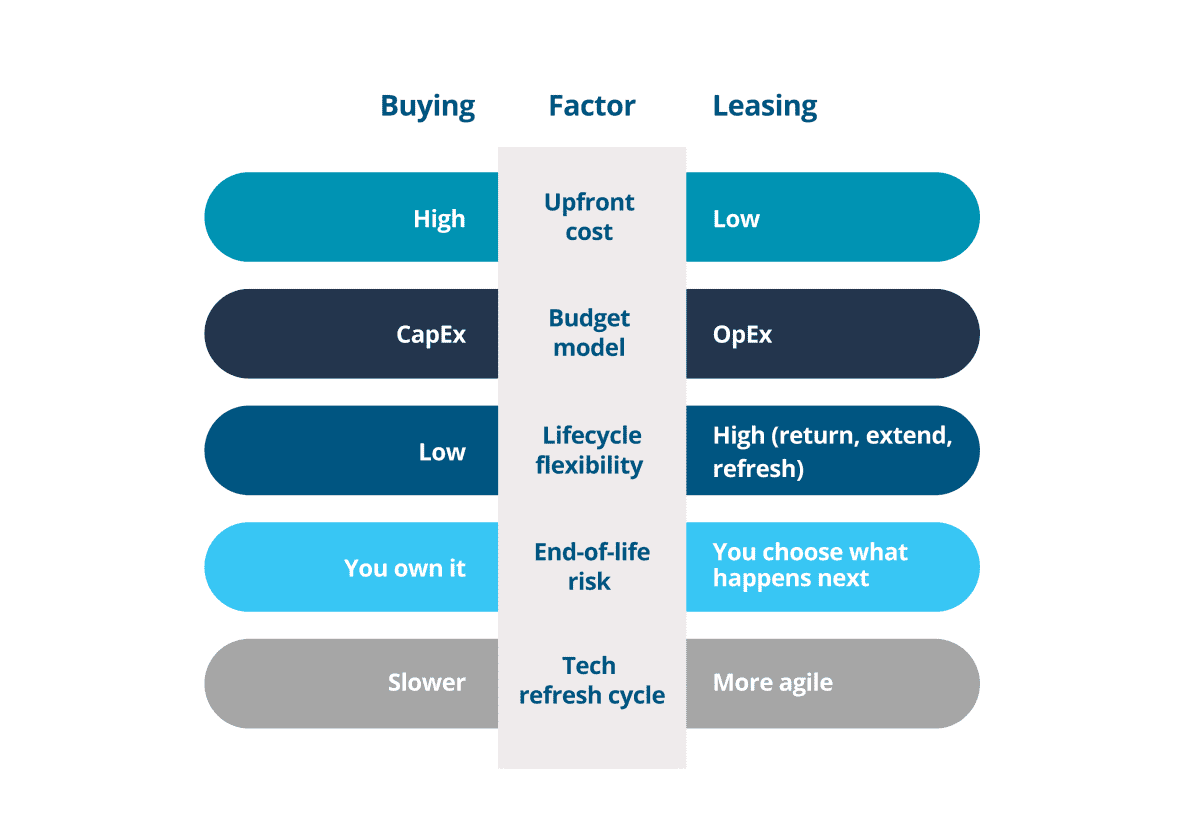
Shift that huge, one-off cost into a predictable, manageable monthly payment. That’s the simple magic of leasing. Instead of a massive Capital Expenditure (CapEx) hit, you move to a simple Operational Expenditure (OpEx) model. 

This means you’re not locking away a fortune in depreciating assets. You have the financial agility to invest in other things your organisation desperately needs, all while knowing your tech costs are fixed, with no nasty surprises. 

Perspective Makes Perfect 

For example, imagine trying to balance the budget at a school. We all know textbooks don’t come cheap. So, what if you could get a brand-new, AI-ready Surface device for a student for less than you’re already spending on books that are out of date the second you buy them? It’s a bit of a no-brainer. 

Our Surface leasing plans (partnering with CF Corporate) start from just £5.95 a week. When you see it like that, giving every worker access to top-tier technology doesn’t seem like a dream, it seems like a sensible, strategic decision. You could likely equip an employee with a new device for less than the weekly bill for coffee and biscuits in the staff room. 


Solving for X(MA): Adding an Expert to Your Equation 

At XMA, we have a proven theorem for making Public Sector IT work. We are on all the right public sector frameworks, like the Crown Commercial Service (CCS), so you know you’re in safe hands. XMA are also one of the UK’s only Surface Authorised Surface Providers (ASP). 

But what does being an ASP actually mean for your organisation? It means peace of mind, plain and simple. When a device inevitably gets dropped or damaged, it means: 

  • Your data stays safe. Forget shipping devices to unknown locations. Repairs happen in our own secure, in-house facilities under strict protocols that safeguard sensitive student and staff data.  
  • You get back to teaching, faster. Our efficient, return-to-base repair service minimises workplace disruption. Certified Microsoft technicians get devices diagnosed, fixed, and back in action quickly.  
  • No warranty headaches. We only use authentic Microsoft parts for repairs, so your device’s full warranty coverage is maintained.  
  • A single point of contact. We manage the entire process, from diagnosis to delivery, so you’re not juggling multiple contacts and chasing updates.  

XMA and Surface are a winning formula: our Device-Management-as-a-Service model, backed by our ASP status, takes the entire device lifecycle—from deployment to maintenance and end-of-life—off your plate. Pair that with a leasing plan that breathes life back into your budget, and you’re well prepared for the future. 

The 2025 deadline isn’t a problem without a solution. It’s a chance to stop using a flawed formula and find one that adds up to a better result for your employees and your budget. 

Ready to recalculate your organisation’s IT budget? Explore our Surface leasing options and let’s find the right formula for you. Discover more about our ASP status here and explore DMaaS here. Get in contact with us via enquiries@xma.co.uk or talking to your XMA Account Manager today. 

Share with your network
WhatsApp
X
LinkedIn

Android Desktop: Potential Use Cases and Benefits

This is the second in a series of blog posts exploring Android Desktop. Our Head of Pre-Sales, Scott Wright, will be looking at the current state of Android Desktop, following its improvement as release approaches, examining use cases, looking at essential apps & peripherals and more. 

Picture of Scott Wright

Scott Wright

Scott is XMA’s Head of Pre-Sales. An IT industry greybeard, he violated his own rule about being an early adopter when he bought the first Android phone at launch and hasn’t regretted that decision.

Most of this blog will be talking about the benefits of a mobile device with any sort of desktop interface, rather than Android Desktop specifically, so before we start that let’s talk for a moment about why the launch of Android Desktop is causing such a buzz. 

Desktop solutions for Android are currently available from several device vendors with Samsung’s DeX being the most established. Motorola Ready-For (also on Lenovo ThinkPhones), Huawei Desktop Mode and Xiaomi MIUI Desktop mode are also available. These solutions are vendor specific which raises concerns for many organisations, should the vendor cease supporting them then the organisation will be forced to change device in order to continue with their device strategy. With Android Desktop as a core part of the Android offering (and Apple promising to follow suit) not only is desktop mode legitimised a standard phone feature but organisations adopting a vendor specific solution like DeX have a fall-back plan that does not require device replacement, substantially reducing risk. As such, there is considerable interest in Android Desktop, even from organisations who are considering or who have adopted a vendor specific solution. 

Below I am going to expound on some of the possible benefits and give examples of the use cases that might realise those benefits. 

Benefits: Managed Device Reduction 

The most immediate benefit for many organisations will be a reduction in devices. Many organisations are issuing both a laptop and mobile to a large cohort of users with fairly light computing requirements. This is especially wasteful for front-line workers for whom the mobile is the primary device and the laptop is an occasional use device. Replacing the managed laptop with a laptop-shaped docking station (“lapdock”, more on these in a future blog post) reduces cost but also reduces the number of devices requiring licences and updates, eliminates a large number of devices as potential sources of data loss (a laptop left in a taxi, for example, cannot contain any data as it is merely a docking station) and more. Shared desktops can also be replaced with docking stations or docking monitors, reducing the number of managed devices.  

Benefits: Shared Desktops 

For users with a mobile device who also use shared desktops, for example many healthcare workers, solutions such as VDI, roaming profiles, follow-me desktop and similar are used to make moving between shared desktops as seamless as possible but typically have substantial cost and complexity associated with them. These solutions and the shared desktops themselves can be eliminated and replaced with docking stations or docking monitors while providing an even more seamless working experience, not only between shared desktops but also between desktop and mobile device, allowing healthcare professionals to transition seamlessly between patient interaction spaces and desk-based working. 

Benefits: Security Implications 

Anywhere that shared devices are in use presents a challenge for data security. Data must not be unintentionally accessible between users and this is especially important in settings where that data is highly sensitive, such as a clinical or law enforcement settings. With most Police officers being issued a mobile device, utilising docking monitors in place of shared desktops for docking stations prevents inadvertent data access between users via the shared device.  Using lapdocks rather than laptops as a car-working solution means that it is impossible for data to be stored locally, reducing the risk associated with device theft. 

This benefit is also useful in other contexts, for example many higher education institutions have a pool of shared devices which are made available to learners. The HE organisation must ensure not only that data does not inadvertently pass between users but also that malware which might be introduced by a user does not impact other users of that shared device. By offering a pool of shared lapdocks, rather than laptops, these concerns can be eliminated. This will, of course, require waiting for most mobile devices to offer a desktop mode – likely several years before most Android and Apple devices are running a suitable operating system version. 

Benefits: Attracting Younger Workers / Learners

Many of the young people entering work or higher education have limited Windows / MacOS experience. Their personal devices are mobiles or tablets and the bulk of their school IT experience is using Chromebooks or iPads. Several regions will shortly see the first cohort of learners leaving school who have had a Chromebook or iPad as their learning device for the entirety of their secondary education and over the coming years this will increasingly become standard.

Offering a mobile-centric working experience, even if only as an option, may allow business and HE organisations to make themselves more attractive to these young persons that they are seeking to attract.

So, in summary, while this solution may not be suitable for all users at this time, organisations may be able to realise a reduction in managed devices and their associated costs, increased user satisfaction and an improved security posture.

The next post will explore the current state of Android Desktop in Beta and the functionality offered. If you’re interested in exploring an Android desktop solution, contact us at enquiries@xma.co.uk.

Share with your network
WhatsApp
X
LinkedIn

Android Desktop: An emergency option for when your laptop is broken, or a paradigm shift in client devices?

This is the first in a series of blog posts exploring Android Desktop. Our Head of Pre-Sales, Scott Wright, will be looking at the current state of Android Desktop, following its improvement as release approaches, examining use cases, looking at essential apps & peripherals and more. 

Picture of Scott Wright

Scott Wright

Scott is XMA’s Head of Pre-Sales. An IT industry greybeard, he violated his own rule about being an early adopter when he bought the first Android phone at launch and hasn’t regretted that decision.

What is Android Desktop?  
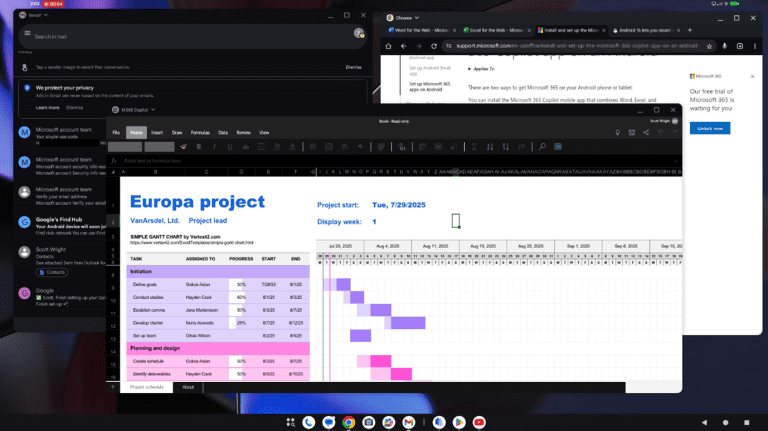
Android Desktop is a desktop-like experience for Android phones when connected to an external display, and typically also to a keyboard and mouse. It provides a larger display area, a taskbar, applications in moveable, resizable windows and so forth with the intent to make your phone a practical device to work on. It is currently available only on beta versions of Android 16 which are available on selected Pixel and other devices but will become a core Android feature. Apple is also working on an equivalent for iPhone but, as usual, they are keeping their cards close to the chest. More on that when there is news. 

A desktop mode for phones, when connected to suitable equipment. is not a new idea. Several phone manufacturers have offered their own takes on this, most notably Samsung with their DeX offering that launched in 2017. DeX was arguably a little ahead of its time, applications were not universally available with a web interface and phone hardware was significantly less powerful than today. There is also a concern with adopting vendor specific solutions, although Samsung, for example, are as far from a fly-by-night company as you can get. The availability of a vendor agnostic solution which is a core part of the Android operating system has put this back onto many organisations’ radars due to potential reductions in devices, benefits for frontline workers and more. 

How to Access Android Desktop 
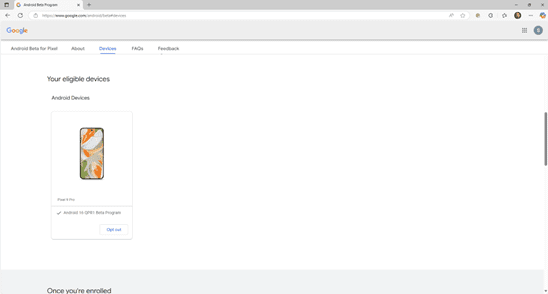
If you want to try this yourselves then you’ll need a Beta version of Android 16 (ideally the current version QPR1 Beta4 but at least Beta2) and a suitable device. A Pixel 6 or newer is supported and some other vendors do also offer Beta versions of Android to their users. Enrolling in the Beta program and updating your device is quick and easy with a Pixel and you can revert back but do be aware this will likely require a device wipe. For other vendors see their instructions and warnings, some are more involved and complex than others.  

All of the usual caveats around Beta programs do, of course, apply. There will be incomplete functionality, bugs, issues and more so do consider if you should do this to your device. I have a laptop, my personal phone and a spare work phone that just needs the SIM swapping over to be running again so I have lots of options if I hit a problem. Do also note, if this is a work-provided device, then you should seek permission before installing a Beta OS and may need your device profile changing to permit that and to permit access to the developer options (which you will need). 

If you are using a Pixel device then go to the “Your eligible devices” section at the link below, opt in and then perform a system update. I found this to be a very straightforward process. 

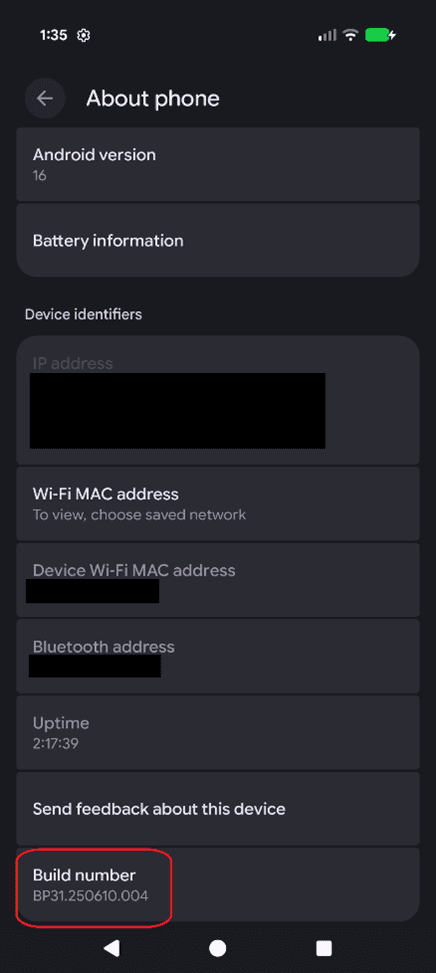
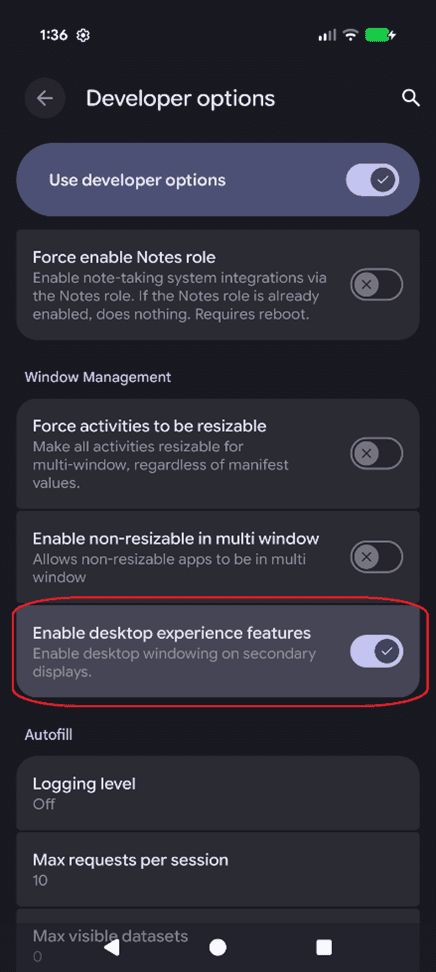
After installing Android 16 Beta then you will need to enable the developer options. To do this go into settings and navigate to About phone > Build number (bottom of the menu). Tap on the build number repeatedly until you either get a message telling you that developer options are enabled or until you are asked to unlock the device (pin, biometrics, etc). The developer options will now be available. It’s a very long menu so search for Enable desktop experience features and enable it.  

Now you can connect your Android device to suitable peripherals, most USB-C laptop docks and docking monitors will work to provide a display, keyboard and mouse to your Android device. 

More To Come 
There are lots of questions to be answered – What’s the best way of accessing M365 applicationsWhat specification of device is needed for a good experience? What are the essential peripherals, both for the desk and when travelling? What apps cannot be used successfully? Follow along with me as I explore what Android Desktop can and can’t do as I try to live with it as a work device. 

The PSTN and ISDN Switch-Off Is Happening. Your Business Needs a Plan.

The UK’s traditional phone network, the Public Switched Telephone Network (PSTN), which also includes Integrated Services Digital Network (ISDN) lines, is being permanently switched off. The final date for this is 31st January 2027. As of September 2023, it is no longer possible to buy new PSTN or ISDN services.

This is not a simple change. It will affect any device that uses a traditional phone line. This includes not just your office phones, but also other systems such as:

  • Fax machines
  • Alarm systems (intruder and fire)
  • Door entry systems
  • CCTV
  • EPOS (Electronic Point of Sale) terminals
  • Franking machines
  • Telecare and medical alert devices

If your business relies on any of these, you need to act now to avoid service disruption. One year ago, we told you about the initial changes. Now, let’s see if there have been any crucial updates.

Why is this happening?

The PSTN is old technology. It’s expensive to maintain and cannot deliver the speed or reliability required for modern business communications. The move to digital, IP-based services like Voice over Internet Protocol (VoIP) is a necessary technological step forward.

What does this mean for your business?

All voice and data services that currently use the PSTN or ISDN will need to be migrated to an IP-based alternative. This means you will be using your internet connection to make calls and transmit data. The benefits of moving to a digital system include:

  • Cost Savings: Lower monthly fees and reduced hardware costs are common.
  • Flexibility: Your staff can work from any location with an internet connection. It is also straightforward to add or remove users as your business needs change.
  • Improved Functionality: Modern VoIP systems offer advanced features like video conferencing, call routing and integration with other business software.
  • Business Continuity: In the event of an outage, calls can be automatically rerouted to other locations or mobile devices, ensuring you stay connected.

What you need to do

The 2027 deadline is final. To ensure a smooth transition, you should start planning now. XMA can help you by:

  1. Auditing Your Systems: We will identify all devices and services in your organisation that rely on the PSTN or ISDN. This includes not just the obvious, but also the easily overlooked systems like alarms and payment terminals.
  2. Assessing Your Connectivity: We will analyse your current internet connection to ensure it has the capacity and reliability to handle your voice and data traffic. We can recommend and implement any necessary upgrades.
  3. Migrating Your Services: We have partnered with RingCentral, a leading provider of cloud communications solutions, to offer a straightforward migration path to VoIP. We will manage the process for you, from planning to implementation, to ensure a seamless transition with minimal disruption to your business.

Don’t wait until the last minute. The move to all-IP is a significant change, and leaving it too late could result in a loss of service and impact your business operations.

Talk to your XMA Account Manager, or contact us today at enquiries@xma.co.uk to discuss your requirements and create a migration plan that is right for your business.

Why Compact Workstations Are the Future of Hybrid Work

The shift to hybrid and hot-desking models is permanent. For IT teams, this has fundamentally changed hardware requirements. The traditional, bulky desktop tower that once defined corporate IT is impractical for a workforce that needs to operate effectively from various locations, be it a central office, a home study, or a shared workspace. Today’s professionals require compact, powerful, and secure computing that adapts to their location, without compromising on performance. The challenge is to deliver this capability consistently and securely across a distributed workforce. 


The Challenge: Power and Flexibility Without the Bulk 

Many organisations face a difficult trade-off. Their teams need high-performance computing for demanding tasks like CAD, graphic design, and complex data analysis. Yet, the physical constraints of modern offices and home-working environments don’t accommodate large, power-hungry hardware. Bulky towers consume valuable desk space, generate excess heat, and are ill-suited to flexible desking arrangements. While laptops offer portability, they often cannot deliver the sustained, specialised performance of a dedicated workstation, creating a gap between user requirements and device capability. 


The Solution: Compact HP Workstations with AMD Processors 

This is where a new category of device provides a direct solution. HP has engineered workstations that deliver professional-grade performance within compact and mobile designs, specifically addressing the challenges of hybrid work. 

  • HP Z2 Mini G9: As the world’s most powerful mini workstation, this device packs high-end performance into a versatile chassis that is small enough to be mounted behind a monitor or under a desk. It can be configured with professional-grade NVIDIA RTX graphics, making it capable of handling demanding 3D workflows, and holds Independent Software Vendor (ISV) certifications for key applications like Autodesk and SolidWorks. This guarantees hardware stability and performance for the critical software your teams rely on, removing guesswork and instability. 
  • HP ZBook Power G11 A: For users who require workstation capability on the move, the ZBook provides the processing and graphics power to run demanding applications from any location. It’s not simply a powerful laptop, it is a mobile workstation. Configured with AMD Ryzen™ PRO processors and professional NVIDIA RTX™ Ada Generation Laptop GPUs, it delivers the sustained performance needed for video editing, 3D rendering, and data analysis without the throttling common in thinner, non-specialised devices. It removes the choice between mobility and performance, equipping remote and hybrid workers with a single, reliable device for all their professional needs. 


The AMD Ryzen™ PRO Advantage 

Integral to the performance and security of these workstations are the AMD Ryzen™ PRO Processors, built for modern professional environments. Feel secure with AMD Memory Guard, which encrypts system memory in real-time to protect against physical attacks if a device is lost or stolen. For IT teams overseeing a fleet of remote hardware, AMD PRO manageability simplifies deployment and maintenance. Easily perform out-of-band management, deploy images, and push security updates to devices anywhere. 


The Space, Power, and Security Trifecta 

The combination of HP’s compact engineering and AMD’s processor technology directly solves the three core challenges of modern IT provisioning: 

  • Space-Saving Flexibility: The small footprint of devices like the Z2 Mini frees up desk space, enabling cleaner, more flexible hot-desking and home office setups. 
  • Workstation-Class Power: Users can run professional applications for CAD, design, and data science without the performance throttling often found in non-specialised hardware, backed by ISV certifications for stability. 
  • Robust Security & Manageability: IT teams get devices with built-in, hardware-level security and the fleet management tools they can depend on to secure and maintain a distributed workforce. 


Why XMA? 

Choosing the right hardware is only the first step. XMA is the partner that helps organisations successfully integrate these solutions. We provide the practical services required to move from procurement to productivity. Our teams can assist with choosing and configuring the precise specifications your users need. We offer flexible leasing and finance options to make technology acquisition more predictable, alongside deployment support to get your new workstations imaged, asset-tagged, and delivered to users, wherever they are. We also manage the sustainable and secure disposal of your legacy equipment. 

Discover how HP compact workstations can equip your hybrid teams. Contact an XMA specialist today. 

Share with your network
WhatsApp
X
LinkedIn

Cutting Through the Red Tape: Your Simple Guide to TePAS 2 & LINK4

Let’s be honest, keeping up with technology in the public sector can be a minefield. You’re under constant pressure to upgrade, stay secure, and make every penny count. Whether you’re in healthcare, education, or local government, the demand for smarter, faster, and more reliable IT is relentless. 

That’s before we even start talking about procurement. Just when you know what you need, you hit the wall of frameworks, lots, and sector-specific rules. It’s enough to make anyone’s head spin. 

That’s where we, XMA, come in. We’re here to make it straightforward. We’ll help you use TePAS 2 and LINK4 to get the tech you need, without the usual headaches. 


TePAS 2: Your Go-To for Public Sector Tech 

Think of the Technology Products & Associated Services 2 (TePAS 2) framework (RM6098) from the Crown Commercial Service as a pre-approved catalogue for pretty much all your IT needs. 

Working with XMA on TePAS 2 means you can easily get your hands on: 

  • All the gear: From laptops for your team to the complex systems running in the background. 
  • The right software: Covering everything from security to everyday productivity tools, all properly licensed. 
  • Expert help: Need someone to manage your devices, support your users, or guide a big IT project? We’ve got you. 
  • Greener choices: We’ll help you find IT solutions that meet your environmental and social goals. 

The beauty of TePAS 2 is that it’s built to be flexible. It doesn’t matter if you’re outfitting a new school, modernising council services, or future-proofing a hospital’s IT – it’s designed to fit. 

And with XMA’s know-how, you won’t just buy stuff faster. You’ll make smarter choices that deliver real value for years to come. 


LINK4: Sharpening the Focus for Healthcare (and Beyond) 

While TePAS 2 covers a lot of ground, LINK4 (SBS10514 / NOE.0633) is laser-focused on the specific demands of healthcare and clinical environments. But don’t let that fool you – it’s still a great option for the wider public sector when the fit is right. 

LINK4 makes it simpler to buy: 

  • Specialist healthcare IT: The kind of hardware and equipment designed for patient care. 
  • Tailored support: Services that understand the unique pressures of clinical settings. 
  • Essential tech add-ons: All those peripherals and bits of kit that are vital for delivering healthcare. 

So, whether you’re upgrading devices for frontline hospital staff or improving how a local authority health team handles sensitive data, LINK4, endorsed by NHS Supply Chain, is a trusted route. 

And with XMA by your side, we’ll make sure you’re using the right framework for the right job, every time. 


Why Bother with Frameworks Anyway? 

Frameworks like TePAS 2 and LINK4 make life easier by: 

  • Keeping you compliant: They’re built around public procurement rules, so you don’t have to worry. 
  • Getting you better value: Competitive pricing and vetted suppliers are part of the deal. 
  • Saving you time: Less paperwork and faster processes mean your team can focus on what really matters. 
  • Opening doors to innovation: You get access to the latest tech from trusted suppliers like us. 


The XMA Difference: We Make Complex, Simple. 

At XMA, we don’t just want to sell you technology. We want to help you use it to make a real difference in the public sector. We’re about partnering with you to achieve results that are secure, sustainable, and ready for whatever comes next. 

Navigating TePAS 2 and LINK4 doesn’t have to be a nightmare. With XMA, it’s a clear path to getting things done. 

Ready to connect, secure, and simplify your tech journey? Let’s talk. 

Start a conversation with us at enquiries@xma.co.uk or visit our frameworks page to learn more. 

Share with your network
WhatsApp
X
LinkedIn

Fill in the Form to Download the Case Study

Fill in the Form to Download the Case Study

Fill in the Form to Download the Case Study

Skip to content
Monitoring by Hotjar Monitoring by Hotjar