Archive

Beyond Windows 10: A Strategic Opportunity for Compliance and Modernisation

The end of official support for Windows 10 marks a strategic turning point for UK organisations. It’s a clear opportunity to move your business from a reactive footing to a proactive one. The migration to Windows 11 is a business-critical decision that allows you to secure your operations, protect your data, and build a modern, resilient technology foundation. 


A Strategic Path to Modern Compliance and Governance 

For large enterprises and public sector bodies, achieving compliance is essential for operational continuity. Windows 11 is built with a modern security architecture designed to help you meet these goals. 

  • Hardware-Level Security: Windows 11’s requirement for TPM 2.0 (Trusted Platform Module) provides hardware-based encryption. This is a critical component for protecting sensitive data and aligning with stringent standards like Cyber Essentials Plus. 
  • Control Data Access: The operating system delivers robust identity protection, vital for implementing zero-trust principles. This gives you granular control over who accesses sensitive data, a key part of modern governance and risk management. 
  • Invest in a Modern Platform: Migrating to Windows 11 is an investment in a platform that receives continuous security innovation. This protects your organisation from emerging threats and demonstrates a clear commitment to security best practices. 


For the Growth-Focused Business Owner 

If you are a Small or Medium Business (SMB) owner, your focus is on reliability and growth, not IT problems. You need technology that works, protects you, and stays out of the way. The move to Windows 11 directly supports these needs. 

  • Protect Your Business: A cyber-attack can cause serious disruption. Windows 11’s improved security baseline provides a much stronger defence against ransomware and data theft, protecting your operations and your reputation. 
  • Focus on Your Business, Not IT: Running an unsupported OS, often on older hardware, can lead to system failures and lost productivity. A modern OS and hardware mean reliable performance. This reduces time spent on IT issues and allows your team to focus on serving your customers. 

The end of Windows 10 support is a catalyst for positive change. It’s the right time to assess your environment and develop a migration plan. XMA can help you manage this transition efficiently, ensuring you achieve a more secure and compliant organisation with minimal disruption. Contact us at enquiries@xma.co.uk or take our Quiz to see how XMA can help you maximise your journey to Windows 11

Copilot+ PCs for Local Government and Healthcare: A Strategic Investment in Security and Productivity

For Local Government and NHS organisations, Copilot+ PCs don’t have to be a simple hardware refresh. They offer a strategic investment in a more secure, productive, and inclusive way of delivering vital public services. It provides the tools to solve challenges around data security, mobile workforce efficiency, and community engagement.  


Enhanced Security & Data Privacy by Design 

Public sector organisations regularly interact with sensitive resident and patient data, making security and compliance paramount. Copilot+ PCs feature a Neural Processing Unit (NPU), a dedicated processor that handles AI tasks directly on the device. 

This is a critical distinction. For features like Recall, which allows users to find information they have previously seen on their screen, local processing means sensitive data does not need to be sent to the cloud. This significantly aids GDPR compliance, data governance compliance, and mitigates data transfer risks, a core requirement for any public body.  

Improved Productivity for a Mobile Workforce 

Staff across local government and the NHS, from social workers and housing officers to community nurses and clinicians, frequently work in the field where internet connectivity can be unreliable. Copilot+ PCs remove this dependency for many AI tasks. 

Scenario: A community nurse is conducting a home visit in an area with poor connectivity. With a Copilot+ PC, they can use the on-device AI to instantly analyse and summarise extensive patient notes and draft an updated care plan directly in their vehicle, entirely offline. This capability moves AI from a theoretical office-based tool to a practical, everyday asset for your entire team. 

This capability moves AI from a theoretical office-based tool to a practical, everyday asset for your entire team. 

Greater Accessibility & Inclusivity in Service Delivery 

Local councils and NHS trusts serve diverse communities, and technology must support staff in communicating effectively and inclusively. Copilot+ PCs introduce powerful, on-device accessibility features. 

Scenario: A housing officer or clinician is meeting a resident or patient for whom English is a second language. The new Live Captions feature provides real-time translation for any audio on the PC. The officer can have a clear conversation, with live, on-screen English subtitles translating the resident’s speech, ensuring nothing is lost in translation. This works offline and supports over 40 languages. 


Future-Proofing for the Next Generation of AI 

The Microsoft Windows 11 roadmap already includes over 45 features that will only be available on Copilot+ PCs. Investing in this hardware now ensures your organisation has the necessary foundation to adopt the next generation of AI tools safely and effectively. Tools that will become essential for efficient public service delivery. 

Make the right decision to secure the hardware required to meet future operational and compliance demands.  


Your Next Step: The Copilot+ PC Advisory 

The difference between owning AI-ready hardware and benefitting from it is having the right plan. To understand how these devices can deliver measurable value for your specific services, we offer a dedicated advisory service.

The Copilot+ PC Advisory is designed to help organisations understand the value of Copilot+ PCs in their organisations and discover use cases to unlock the power of Local AI. 

Chat with our public sector specialists today at enquiries@xma.co.uk to build your plan. 

What to Do with Your Old Headsets? The Swap, Save & Sustain Programme

In any business environment, IT peripherals are replaced frequently, and headsets are one of the most common items. This often leads to an overlooked challenge: a growing collection of old, non-functional, or obsolete headsets from various brands, taking up space in desk drawers and storage cupboards. 

These devices are electronic waste (e-waste), which is the fastest-growing waste stream globally. Simply disposing of them in general waste is not a responsible option, yet finding a simple, secure, and cost-effective recycling path is often difficult. 

XMA supports initiatives that provide a practical solution to these exact challenges. We are highlighting the “Swap, Save & Sustain” programme from EPOS, designed to help organisations responsibly recycle old technology while providing a clear financial benefit. 


How the EPOS Recycle Programme Works 

The programme is a straightforward process designed for any new or existing customer, particularly those managing a mixed estate of headsets from different manufacturers. 

Here is the step-by-step process: 

  1. Request Bins: Contact your XMA account manager. We will coordinate with EPOS to have headset recycling bins delivered to your offices. 
  1. Collect Old Devices: Fill the bins with your organisation’s old headsets. This programme accepts any brand and any type, whether they are wired or wireless Bluetooth® devices. 
  1. Arrange Collection: Once you have a minimum of 100 headsets, EPOS will arrange to collect the old units at your convenience. 
  1. Responsible Recycling: The collected headsets are then assessed to be properly reused or recycled, ensuring they are diverted from landfill. 


The Business Outcomes: Cost and Compliance 

This programme delivers two tangible business outcomes, addressing both financial and sustainability objectives. 

  1. Financial (Save) For recycling your old devices, you will receive a discount when you place a minimum order of 100 or more new EPOS headsets. This makes your next technology refresh more cost-effective.
  2. Sustainability (Sustain) This is a critical component for organisations focused on Environmental, Social, and Governance (ESG) targets. Upon completion of the recycling process, you will receive a certificate from EPOS.

This certificate formally recognises your commitment to sustainability and details the total weight of e-waste you have successfully diverted from landfill. This provides auditable proof that can be used directly in your organisation’s sustainability reporting. 


Why This Matters: The Data 

Choosing to recycle IT peripherals has a measurable positive impact. 

  • Reduces E-Waste: Certified recycling channels ensure that small IT accessories, which frequently end up in landfill, are treated responsibly. 
  • Conserves Materials: Headsets contain valuable resources like copper and plastics. Recycling reduces the demand for new virgin materials. 
  • Avoids Carbon: Estimates suggest that reusing a single corporate-grade headset can avoid up to 12kg of CO2 equivalent emissions by removing the need to manufacture a new device. 


Get Started 

The EPOS Swap, Save & Sustain programme provides a practical, financially sound method for managing the lifecycle of your old headsets and visibly demonstrating your commitment to sustainability. 

To take advantage of this programme, please get in touch with your XMA account manager or contact us directly at enquiries@xma.co.uk. 

Is Your Hardware Ready for the AI-Driven Workplace?

Artificial Intelligence (AI) is fundamentally changing how we work. As organisations adopt AI-powered tools to improve productivity, a critical question arises: can your current computers handle the demand, or are they becoming a blocker to innovation?

For years, the hardware replacement cycle has often been reactive: When a device fails, it gets replaced. However, the shift to AI requires a more strategic, proactive approach to your device strategy. This is where Copilot+ PCs, running on Windows 11 Pro, represent a necessary evolution.


What Makes a Copilot+ PC Different?

Copilot+ PCs are the first generation of computers built specifically for the era of AI. Their key differentiator is the inclusion of a Neural Processing Unit (NPU), a dedicated processor designed to run AI tasks efficiently directly on the device.

This new architecture provides critical business advantages:

  • Performance: These are the fastest Windows PCs ever built. The powerful, 40+ TOPS NPU frees up the main processor (CPU) and graphics card (GPU), resulting in better overall system speed and responsiveness. In benchmark tests, Copilot+ PCs perform up to 5X faster than 5-year-old Windows PCs1.
  • Security: Copilot+ PCs provide the most powerful Windows security by default. Rather than relying on a single feature, they integrate hardware-based protection, including Secured-core PC safeguards and the Microsoft Pluton security processor. This layered approach is estimated to block 70% of typical breach vectors2.
  • Efficiency: The NPU enables new AI capabilities to run with high efficiency. For a hybrid workforce, this translates to tangible benefits like all-day battery life, with devices offering up to 22 hours of local video playback or 15 hours of web browsing on a single charge3.


Addressing Key Business Challenges for Every Organisation

This new category of hardware is designed to solve distinct challenges for organisations of all sizes.

For the Enterprise IT Director: A Strategic Approach to Innovation and Risk

For large organisations, AI adoption introduces significant questions around security, compliance, and total cost of ownership. Copilot+ PCs allow you to build a refresh strategy that is both innovative and responsible.

  • Mitigate AI Data Risk: For specific features like the new Recall (preview) function, AI processing occurs locally on the device. All snapshots are securely encrypted and stored on the PC, helping you meet governance and compliance obligations. IT administrators retain granular policy control to disable or manage these features.
  • Future-Proof Your Investment: Adopting AI-ready hardware ensures your device estate is prepared for the applications of the next three to five years. This maximises the long-term value of your technology investments and aligns with a projected substantial ROI over three years.2
  • Strengthen Operational Resilience: Use the advanced, hardware-based security features of Windows 11 Pro, specifically Secured-core PC protection and Microsoft Pluton, to build a stronger defence against new AI-powered cyber threats.

For the Growth-Focused Business Owner: Productivity and Peace of Mind

For a small or medium-sized business, technology must be a reliable tool that supports growth, not a source of frustration. Copilot+ PCs provide access to capabilities that directly address your main concerns.

  • Increase Staff Productivity: Provide your team with faster PCs and new AI features that automate repetitive work. This delivers real-world results, with an expected time-saving of up to five hours per employee each week.2
  • Protect Your Business Data: The built-in, hardware-level security of Copilot+ PCs defends against common threats. This approach is validated by IT leaders, as 96% say that hardware-based protection provides a more secure environment.4
  • Control Your IT Costs: The fear of large, unexpected IT bills is a major concern. Our Device Management as a Service (DMaaS) model provides new Copilot+ PCs, plus all security and support, for a single, predictable monthly fee, removing the risk of surprise costs.


Build Your Strategy with an Expert Partner: XMA

New technology is only valuable if it can be implemented effectively and if your team can use it from day one.

Moving to Copilot+ PCs doesn’t have to be a complex or disruptive process. XMA provides the practical support and technical expertise to help you build a clear, costed, and compliant strategy for your upgrade to Copilot+.

Is your organisation ready for the next wave of AI-driven productivity?

Contact us today at enquiries@xma.co.uk to arrange a Copilot+ PC Readiness Assessment, and we’ll provide a clear, data-driven plan for your migration.


1. Based on Cinebench 24 Multi-Core benchmark. Learn More

2. New Tech: The Projected Total Economic Impact™ of Microsoft Copilot+ PCs. Microsoft-commissioned study by Forrester Consulting, July  2025. Projected benefits for a single composite organization that has US$1 billion annual revenue and 2,000 employees with 80% using Copilot+ PCs. In comparison to a mixed environment of conventional Windows 11 and Windows 10 PCs.

3. Battery life varies significantly by device and with settings, usage and other factors. See Copilot+ PCs claims.

4. Understanding Employee Productivity and Satisfaction Benefits of Next-Generation AI PCs as You Plan Your Next Refresh, IDC in partnership with Microsoft, August 2024.

Android Desktop: Where Is It At Today?

This is the third in a series of blog posts exploring Android Desktop. Our Head of Pre-Sales, Scott Wright, will be looking at the current state of Android Desktop, following its improvement as release approaches, examining use cases, looking at essential apps & peripherals and more. 

Picture of Scott Wright

Scott Wright

Scott is XMA’s Head of Pre-Sales. An IT industry greybeard, as well as an Android fanboy he is also a military history & technology nerd so would love one of the unobtainable Samsung Tactical Editions.

Android Desktop: Where is it at today? 

Today I’m going to talk about the current state of Android Desktop and some of the key productivity applications. Despite being in a surprisingly complete state there is still definitely work to be done on Android Desktop and a lot of apps will need feature improvements to deliver in this significantly changed use case. 

A big update has just dropped on 10th Oct which brings Desktop Experience to regular (non-Beta) Android. If you’ve got a device that has had its Android 16 update you can now enable Desktop Experience via developer options without needing to enrol in the Beta program. There seems to be improvements in this version which are not in the current Beta version so I will be switching to that and re-writing this post.  


So where is Android Desktop itself at? 

The core functionality is here – apps in movable, resizable windows, a taskbar, etc. Android has always been quite good at interface scaling and many apps have a tablet mode that makes them work at least adequately well on a monitor. There are, however, a whole variety of niggles that will need attention (and do remember that this is a pre-release version of the software): 

  • You can’t unlock the device via mouse and keyboard, you have to unlock via the phone 
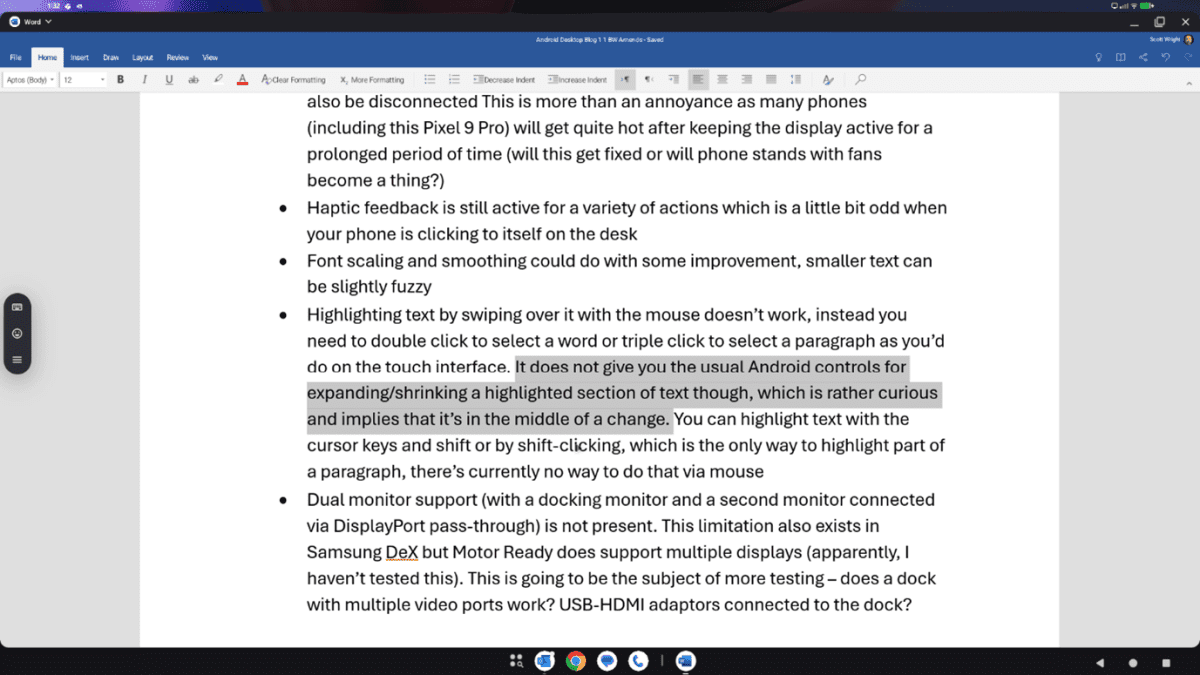
  • The phone screen has to be kept on. If you hit the power button to turn off the display (as you might do when listening to music, for example) the monitor will also be disconnected This is more than an annoyance as many phones (including this Pixel 9 Pro) will get quite hot after keeping the display active for a prolonged period of time (will this get fixed or will phone stands with fans become a thing?) 
  • Font scaling and smoothing could do with some improvement, smaller text can be slightly fuzzy  
  • Dual monitor support (with a docking monitor and a second monitor connected via DisplayPort pass-through) is not present. This limitation also exists in Samsung DeX (multi-monitor support is just out) but Motor Ready does support multiple displays (apparently, I haven’t tested this). This is going to be the subject of more testing – does a dock with multiple video ports work? USB-HDMI adaptors connected to the dock? 

What about the M365 suite?

Top of most organisations’ list of apps is the M365 suite and support for these will be key to acceptance of Android Desktop as a laptop alternative.

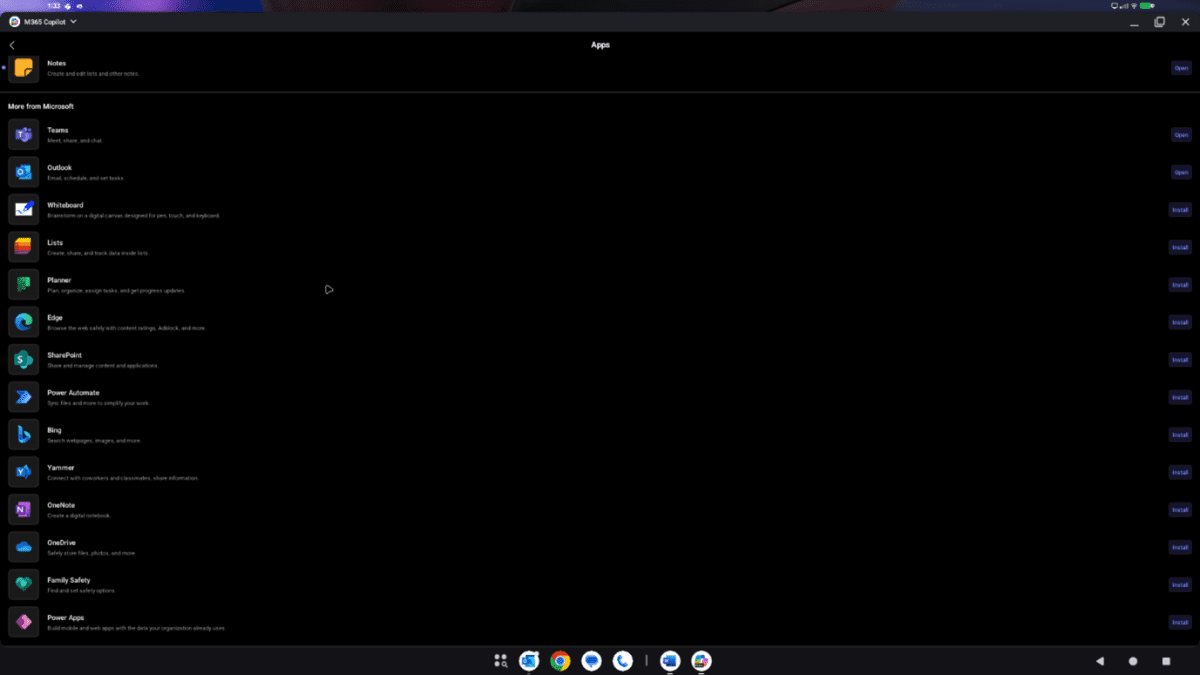
Outlook, Teams, Word, Excel, PowerPoint, Yammer, Bookings and more are available as Android apps with the M365 Copilot app being a hub for all of these.

The email side of Outlook works quite well, not quite as slick as desktop version but perfectly functional. The calendar doesn’t work as well – in particular the list of shared calendars needs to be better optimised to take advantage of the additional display real estate.

Teams works well for chat with my only niggle being that you can’t hover over someone with the red status dot to see if they are on a call or just busy, something I do frequently in Windows (big difference between someone having something in their calendar at the moment and someone actually being in a call). There is a substantial issue with Teams for conferencing though – it will not use USB devices connected to the docking station such as cameras, speakers, microphones, etc. This is new functionality that Microsoft will need to implement, currently there isn’t even a devices page in the settings menu to allow you to try and configure external audio and video devices.

Word, Excel and PowerPoint all work quite well and have the core functionality (this blog post was written on Word for Android). There are some missing elements of functionality that might be an issue for some users, for example you cannot embed a file into a Word document, but the core functionality is good and works well (this is something that you can evaluate without using Android Desktop).

Can’t we just use the M365 web apps?

Yes and no. The web apps refuse to work on Chrome for Phones. Chromium for Desktop does work on Android phones and provides a variety of browser functionality that Chrome for Phones does not, including support for extensions. Some of the read only web apps work on Chromium but when you try to switch to write mode you are directed to the Android application where there is one and don’t get to try using the full web app. I will be speaking to Microsoft regarding workarounds for testing this and, if I can share them, their plans for improving support for Android Desktop.

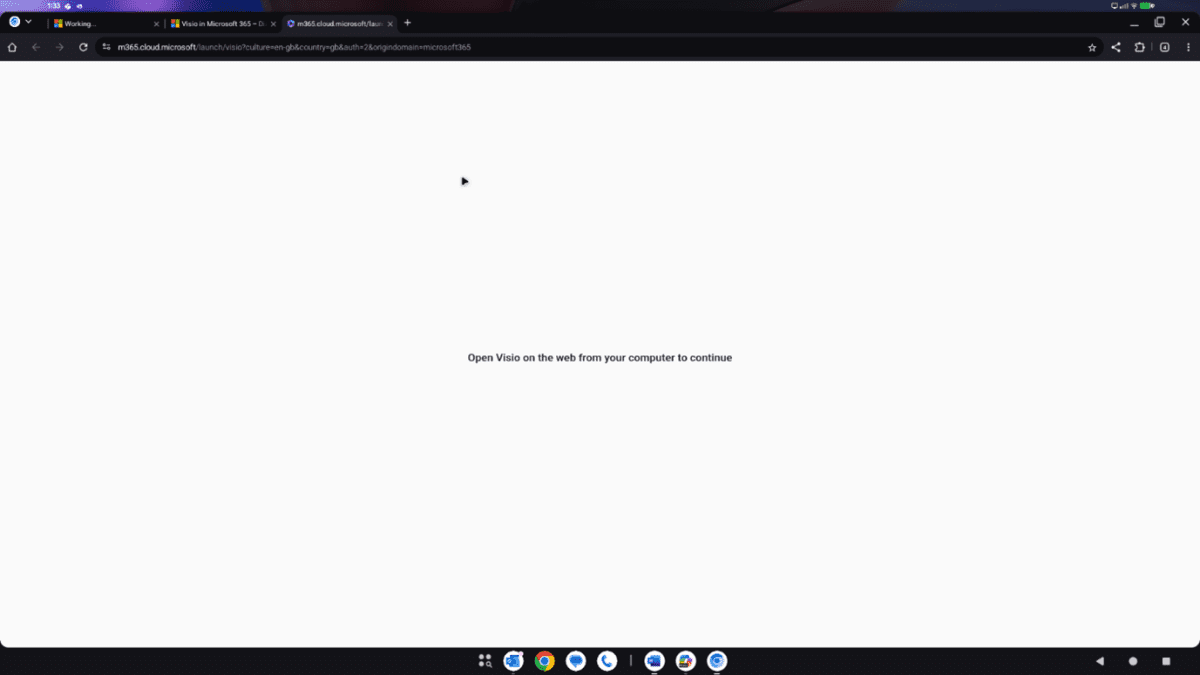
For some apps, for example Visio which does not have an Android app, it simply doesn’t work, telling you to go and use a real device. This isn’t helped by office.com redirecting you to the M365 Copilot application (which does not have a Visio app).

In summary then, there are definitely some gaps at the moment. Some of these are for Google to fix, some for Microsoft and others. The ability to use two monitors (Samsung and Motorola are ahead of the game here) and for the Teams app to use external video and audio devices would be top of my personal list – without those it just isn’t a serious desktop/laptop replacement.

As I edit this summary one more time I am yet again irritated by the inability to click-drag to highlight text so that’s got to be added to my list!

Navigating Dell’s New PC Lineup: How to Choose the Right Device for Your Business

Choosing the right devices for your organisation is a critical decision. The wrong choice leads to lost productivity and frustrated users, while the right device can be a catalyst for efficiency and growth. However, navigating the vast and often complex landscape of PC models, sub-brands, and specifications can be a challenge for even the most experienced IT teams. 

Dell Technologies has directly addressed this challenge. Based on extensive customer feedback, they have simplified their entire client solutions portfolio. The familiar names like Latitude, OptiPlex, Precision, and XPS are being streamlined into a new, more intuitive framework. 

We believe this is a positive step that brings much-needed clarity to device procurement. Here’s what you need to know about the new lineup and how XMA can help you select, deploy, and manage the right devices for your specific needs. 


The New Framework: Simple, Clear, and Purpose-Built 

While the new branding simplifies the purpose of each product line, the specific technical specifications (like the exact processor model, memory amount, or storage capacity) will still be configurable. The new system provides a clear framework, allowing you to understand the level of performance and features to expect from each category and tier.


Dell 

This category, designed for play, school, and work, consolidates the former Inspiron and XPS product lines. It’s aimed at users who need versatile devices for a wide range of general computing tasks. 

  • Premium (formerly XPS): You can expect the highest-end specifications in this tier, including the latest generation Intel Core Ultra or AMD Ryzen processors, dedicated graphics options, high-resolution displays (often with OLED options), and premium build materials like CNC-machined aluminium. These are designed for ultimate performance and design in a consumer-focused device. 
  • Plus (formerly Inspiron Plus): A step up from the base models, these devices offer more powerful processor options and often include discrete graphics cards, making them suitable for light content creation and more demanding multitasking. 
  • Base (formerly Inspiron): These are the standard, all-around devices suitable for everyday tasks like web browsing, video streaming, and using office applications. They provide excellent value and reliable performance for general use. 


Dell Pro 

This is the core business line, built for professional-grade productivity. It consolidates the former Latitude, OptiPlex, and Vostro series, offering a range of options optimised for corporate environments. The key differentiators here are manageability, security, and durability. The product tiers are clearly defined to match different roles within an organisation. 

  • Premium (formerly Latitude 9000 & 7000 series): This tier offers the ultimate in design and mobility for business users. Expect ultra-light laptops and compact desktops with the latest Intel or AMD processors, robust security features, and premium materials for maximum durability on the move. 
  • Plus (formerly Latitude 5000 series & OptiPlex Plus): This is the most scalable performance tier, designed for the majority of knowledge workers. These devices offer a wide range of configuration options, allowing you to balance performance and cost effectively across a large user base. 
  • Base (formerly Latitude 3000 series & Vostro): This tier provides a baseline of business-grade durability, manageability, and security. These devices are ideal for task-based work or as standard-issue machines where core business functionality is the priority. 
  • Essential (Dell Pro only): This tier is business-ready with essential security and manageability features, making it a cost-effective entry point for organisations needing reliable, commercially-sound devices. 

Across all tiers, the new model identifiers will clearly indicate the CPU vendor (0 for Intel, 5 for AMD, 7 for Qualcomm) and the form factor, such as the screen size for a laptop or Tower, Slim, and Micro for desktops. 


Dell Pro Max 

This workstation-class category is designed for maximum performance, replacing the Precision brand. These devices are engineered for specialists in fields like design, engineering, and data science who use resource-heavy applications. 

Expected Components: 

  • Processors: You will find the most powerful CPUs from Intel (Core Ultra 9, Xeon) and AMD (Ryzen Threadripper) in this category. 
  • Graphics: The key differentiator is the inclusion of professional-grade dedicated GPUs, such as NVIDIA’s RTX Ada Generation or AMD’s Radeon PRO series. These are certified for stability and performance with professional software from vendors like Autodesk and Adobe. 
  • Memory & Storage: These machines are configured with large amounts of high-speed RAM (often with ECC memory options for error correction) and fast NVMe storage to handle large datasets and complex files without bottlenecks. 
  • Tiers: Like the Dell Pro line, the Premium, Plus, and Base tiers will indicate the level of performance and features, allowing you to match the machine’s power to the specific demands of the user’s software. 


How XMA Helps You Build the Right Device Strategy 

Understanding the new lineup is the first step. The next is applying that knowledge to your organisation’s unique environment. This is where XMA’s expertise as a Pragmatic Expert becomes a critical asset. 

  • Expert Guidance: Our specialists have a deep, practical understanding of these new Dell devices and, more importantly, how they perform in real-world business and public sector environments. We work with you to analyse your user personas and their specific workloads, ensuring you invest in the right level of performance for each role, avoiding both underpowered and over-specified devices. 
  • Public Sector Compliance: For public sector bodies, procurement is rightly governed by strict rules. XMA is an approved supplier on key government frameworks, including the Crown Commercial Service (CCS). We provide secure and compliant IT solutions that demonstrate clear value-for-money and meet the stringent requirements of government, healthcare, and education organisations. 
  • Device Management as a Service (DMaaS): Procuring the device is just the beginning. The real challenge lies in deploying, managing, securing, and refreshing your entire device fleet. XMA’s DMaaS takes this operational burden off your IT team. We handle the full lifecycle of your devices, from configuration and deployment to ongoing management and eventual secure disposal. This provides you with predictable costs and frees up your internal IT resources to focus on strategic projects that drive your organisation forward. 

Dell’s new, simplified portfolio is a welcome change that brings clarity to the market. By partnering with XMA, you can be confident that you are not only choosing the right devices but also implementing a comprehensive strategy for managing them effectively and securely.

If you’re interested in Dell’s new lineup, contact us at enquiries@xma.co.uk to get started.

A Tale of Two Users: How the Samsung Galaxy Tab S11 Works for Sarah the Consultant and Gary the IT Manager

In any modern UK organisation, technology is a tango for two: the user who demands performance and flexibility, and the IT department that requires security and control. It’s a difficult balance to strike. A device that is powerful but unmanageable creates security risks, while a locked-down device can obstruct productivity. 

Let’s follow a typical workday for Sarah, a Senior Consultant, and Gary, her IT Operations Manager, to see how the new Samsung Galaxy Tab S11 Series is designed to meet their very different, but equally important, needs. 


Sarah’s Perspective: A Day of Uninterrupted Productivity 

For Sarah, her work device is the primary tool for her job. She needs it to be a seamless extension of her workflow, whether she’s in the office, on a train, or at a client site. 

8:15 AM: The Commute 
Sarah’s day starts on a crowded train into London. The Galaxy Tab S11 Ultra is ideal for this. It is the thinnest and lightest Galaxy Tab to date, so it doesn’t add bulk to her bag. The Armour Aluminium chassis and IP68 dust and water resistance give her confidence that it can handle the occasional knock or splash of a daily commute. The bright Dynamic AMOLED 2X display lets her clearly review client documents, even with the morning glare from the window. 

9:30 AM: The Client Workshop 
In her first client workshop, Sarah’s focus needs to be on the people in the room, not on taking notes. Using Transcript Assist, her Tab S11 creates automatic meeting minutes, freeing her to lead the discussion. When she needs to highlight a key point on the presentation, the redesigned hexagonal S Pen provides a comfortable, precise way to make annotations directly onto the screen. 

11:00 AM: Deep Work at the Desk 
Back at a hot desk, Sarah needs to switch from presenting to producing. She connects the Tab S11 to an external monitor, and Samsung DeX mode provides a full, PC-like desktop experience. She can have multiple windows open (a spreadsheet, a report, and her email) and drag and drop content between them. The MediaTek Dimensity 9400+ processor provides the performance to run these applications without any slowdown. 

3:00 PM: Afternoon Collaboration 
A large project file needs to be sent to a colleague across the office. Sarah uses Quick Share to transfer the file wirelessly to their device in seconds. After a full day of use, the Tab S11 Ultra’s large 11,600 mAh battery still has plenty of charge, so she isn’t looking for a power outlet before heading home. 


Gary’s Perspective: A Fleet Under Control 

While Sarah is working, Gary is responsible for the security and management of all 500 tablets like hers. For him, a device’s value is measured by its security, manageability, and total cost of ownership. 

Deployment and Onboarding 
When the company decided on the Tab S11, Gary’s first thought was about deployment. Using Knox Suite, the process was simple. Knox Mobile Enrolment allowed his team to configure all the devices with the company’s security policies and required applications before the employees even opened the boxes. This reduced setup time from hours per device to minutes. 

Security and Compliance 
For Gary, security is the highest priority. The Galaxy Tab S11 Series is built on the government-trusted Samsung Knox security platform, which gives him peace of mind. 

  • Hardware-Level Protection: Knox Vault is a physically isolated, hardware-based security system. It protects the company’s most sensitive data (like passwords and digital certificates) from attack by operating independently of the main processor and OS. 
  • Access Control: A fingerprint scanner ensures that only Sarah can access her device. Through Knox Manage, Gary can remotely lock or wipe the tablet if it’s ever lost or stolen, protecting corporate data. 

Fleet Management and Support 
Gary’s goal is to prevent IT problems, not just fix them. The Knox platform provides the tools he needs for proactive management. 

  • Controlled Updates: With Knox E-FOTA, Gary’s team can test and schedule OS updates across the entire fleet, ensuring that a patch doesn’t cause issues with critical business applications. 
  • Proactive Monitoring: Knox Asset Intelligence gives him a dashboard view of the entire fleet’s health. He can identify devices with degrading battery performance or storage issues and address them before they impact Sarah’s workday. 
  • Reduced TCO: The tablet’s 5G model supports both a physical SIM and an eSIM. Gary can provision a corporate data plan on the eSIM, allowing employees to use the physical slot for a personal SIM. This allows one device to serve both work and personal roles, reducing the number of devices his team needs to support. 


A Strategic Asset for Both Sarah and Gary 

The Samsung Galaxy Tab S11 Series successfully serves two different but critical roles. For Sarah, it is a powerful, portable tool that adapts to her varied workday. For Gary, it is a secure and efficient platform that he can deploy, manage, and protect at scale. 

This turns a simple tablet purchase into a strategic asset designed for the operational realities of the modern UK workplace. 

To learn more about the Samsung Galaxy Tab S11 Series and to arrange a demonstration, contact your XMA account manager or email enquiries@xma.co.uk today. 
Don’t Let Legacy Applications Block Your Windows 11 Migration

The October 14, 2025, end-of-support date for Windows 10 is compelling organisations to plan their migration to Windows 11. The move is a critical step towards stronger security and improved productivity. However, one of the most common and significant concerns delaying these upgrades is the uncertainty around legacy applications.

For many organisations, business-critical software (such as older accounting platforms, bespoke CRM systems, or other line-of-business applications) is the operational backbone. The fear that this essential software will not work after an operating system upgrade is a primary reason for delaying the transition, creating a roadblock to modernisation.

The Compatibility Challenge

While Microsoft data shows that 99.7% of applications are compatible with Windows 11, the remaining fraction often includes the custom-built or legacy systems that are most integral to an organisation’s operations. Delaying an OS upgrade to protect these applications creates long-term risk. Without purchasing Extended Security Updates (ESU), organisations will no longer receive security updates, leaving them vulnerable to security risks. Read more about this here: The Hidden Risks and Rising Costs of Relying on Windows 10 Extended Security Updates (ESU) | XMA

A major worry for any business is whether essential software will work after an upgrade. Simply hoping for the best is not a viable strategy. A structured approach is required to test and validate these applications to ensure they do not hinder your migration to Windows 11.

How XMA Mitigates Application Risk

At XMA, we address the challenge of legacy applications head-on. Our services are designed to help you find proactive solutions that mitigate issues with legacy applications, ensuring they do not stand in the way of a secure and seamless migration.

Our approach includes:

  • Windows 11 Application Analysis: We accelerate your application analysis by effectively consolidating and standardising your application estate, ensuring a consistent and secure service delivery. We rationalise your software landscape by focusing on proactive management, license consolidation, and service efficiency. By utilising crowd-sourced application compatibility data, enhanced by a Confidence Score, we help you make informed decisions with greater confidence.
  • Secure Legacy Applications: Containerise your applications to securely run legacy applications on your modern device estate. Containers provide a secure way to run legacy applications by blocking inbound traffic and reducing potential vulnerabilities, helping you achieve Cyber Essentials Plus. Run any application without modification on Any OS. Anywhere.
  • Application Lifecycle Management: Obtain low touch deployment of applications and updates to Windows (and macOS) Apps through a powerful automation engine. Gain a unified, dynamic, adaptive, and contextual workspace for organisations and users. Automatically keep all applications updated and patched in real time, and cut application packaging and testing time by as much as 90%.

Legacy applications are a valid concern, but they should not be a barrier to modernising your IT estate. By taking a proactive and structured approach, you can ensure your essential software continues to support your operations on a secure, modern platform.

Contact an XMA consultant today at enquiries@xma.co.uk to build a migration plan that addresses your specific application compatibility needs.

Share with your network
WhatsApp
X
LinkedIn

Simplifying Your Endpoint Strategy: A Guide to Chromebooks for UK Businesses

Managing endpoints across an entire organisation is a primary function of any IT department. For many, it’s a continuous cycle of patching vulnerabilities, deploying software, and managing high device costs. This is particularly true for businesses supporting a mix of office-based, remote, and frontline workers who all have different needs. A modern device strategy must be secure, cost-effective, and reduce the operational strain on IT. 

This is where ASUS Chromebooks present a strong business case. By operating on Google’s ChromeOS, these devices are built from the ground up for a cloud-first world, offering a direct answer to many traditional endpoint challenges. 


Security and Management by Default 

Instead of relying on third-party security software, ChromeOS has security built into its core. Every application runs in its own isolated ‘sandbox’, meaning threats are contained and cannot impact the wider system. With verified boot and automatic updates that run in the background, devices are always running the latest, most secure version of the OS without user intervention or IT downtime. 

For your IT team, management is handled through the cloud-based Google Admin Console. This allows for zero-touch enrolment, where devices are configured automatically out of the box, and provides your team with the tools to enforce policies and deploy applications to the entire fleet remotely. For organisations that need deeper controls, Chromebook Plus Enterprise unlocks advanced security and management capabilities. 


A Device for Every Role 

Of course, the hardware needs to be right for the user. In our new guide, we detail the specifications of the latest ASUS Chromebook business range to help you match the right device to the right role. 

The guide covers the full spectrum: from the durable and cost-effective ASUS Chromebook Flip CX1 for frontline tasks, to the highly portable CM30 Detachable for mobile workers, and the powerful ExpertBook CX54 Chromebook Plus Enterprise for executives who need premium performance. 


Beyond the Device: Full Lifecycle Management from XMA 

Procuring the hardware is just the first step. To get the full value from your investment, you need a plan for deployment, in-life support, and eventual retirement. Our guide also outlines how XMA’s services complete the picture. We provide: 

  • Device Management as a Service (DMaaS): We handle the logistics and management of your Chromebook fleet, freeing up your IT team. 
  • Flexible Leasing: Acquire the hardware you need without the upfront capital expenditure. 
  • Support and Break-Fix: Minimise downtime with rapid, reliable repair and replacement services. 

To get a detailed breakdown of the ASUS Chromebook range and understand how a managed service from XMA can reduce your total cost of ownership, download our guide today. 

When It Comes To Windows 10 End-of-Support: Don’t Replace, Refresh Your Device Strategy

When It Comes To Windows 10 End-of-Support: Don’t Replace, Refresh Your Device Strategy

The final day of support for Windows 10, October 14, 2025, is now just weeks away. For many organisations, the initial reaction is to focus on the operating system upgrade itself. However, the move to Windows 11 presents a more fundamental challenge that an OS update alone cannot solve: hardware compatibility.

A significant portion of existing device estates simply do not meet the hardware requirements for Windows 11. This reality is forcing a difficult and often unplanned conversation about a large-scale device replacement. For many, this will feel like a reactive and expensive problem.

But it doesn’t have to be. This deadline should not trigger a panic-buy. Instead, it should be the catalyst for a more strategic, data-driven approach to your entire device estate. It’s time to move from a reactive replacement cycle to a SMART Device Refresh.

The Cost of Inaction and Unplanned Refresh Cycles

Organisations still running on Windows 10 after the deadline will be required to purchase Extended Security Updates (ESUs) for every non-compliant device to avoid exposure to cyber threats. This is a significant financial drain with no return on investment. The cost escalates dramatically, doubling in the second year and doubling again in the third, creating a recurring budget item spent only to maintain an obsolete OS.

Furthermore, many organisations are already caught in a cycle of reacting to device failures and budget availability rather than making informed, data-driven refresh decisions. This approach often leads to overspending on devices that are not suited to user needs, while leaving other areas with inadequate technology that hinders productivity and impacts employee morale.

A Strategic Approach: The XMA SMART Device Refresh

XMA’s SMART Device Refresh service provides a structured, data-driven plan to navigate the Windows 11 transition and optimise your entire device estate for the long term. We help you balance performance, user experience, and cost-efficiency.

Our approach is built on providing actionable insights to make smarter investment decisions. We help you avoid overspending and extend device lifecycles where appropriate, without compromising on security.

How We Help:

  1. Insightful Hardware Assessment: Our first step is a fast-track assessment of your entire hardware estate. We identify which devices are compatible with Windows 11, which ones are not, and which can be redeployed to other roles extending their useful life. This gives you a clear, data-driven baseline for your migration plan, as well as a more sustainable approach to your IT assets.
  2. Data-Driven Procurement: For devices that require replacement, we provide a streamlined procurement service. Our advice is based on a deep understanding of user needs, ensuring you invest in hardware that is powerful enough for the job but affordable enough for your budget. For example, we use insights on application usage to ensure a designer gets the right GPU and a data analyst gets the right CPU, avoiding unnecessary expense while improving productivity.
  3. Flexible Procurement and Lifecycle Management: We understand the pressure on capital budgets. We offer flexible procurement options through public sector frameworks, including financing and as-a-service models that can shift expenditure from CapEx to a predictable operational cost. For a complete solution, our Device Management as a Service (DMaaS) can handle the entire device lifecycle, from procurement and deployment to ongoing support and secure disposal, reducing the burden on your internal IT team.

The Windows 10 end-of-support deadline is a chance to break the reactive cycle of device management and implement a cost-effective, long-term plan that aligns with your organisation’s goals.

Don’t pay the price for delay. Contact XMA today at enquiries@xma.co.uk to build a SMART device refresh strategy for your transition to Windows 11.

Share with your network
WhatsApp
X
LinkedIn

Fill in the Form to Download the Case Study

Fill in the Form to Download the Case Study

Fill in the Form to Download the Case Study

Skip to content
Monitoring by Hotjar Monitoring by Hotjar