5 considerations for moving to an All-flash data centre
Simplifying All-flash with HPE Nimble
The path to an all-flash data centre and cloud may be complicated, but it doesn’t have to be disruptive. Like many other organisations, you may be planning to move to all flash as your primary storage technology because of the many advantages over traditional storage.
But there are many obstacles related to application performance, availability, manageability, scalability, investment protection, and disaster recovery that need to be considered first. With a few simple recommendations, your organisation can avoid the most common missteps and make the transition painless.
Download this FREE check list and find out how to overcome the obstacles related to the all flash data centre.
It Isn’t Easy Being Green – But Hyperconvergence Can Help
Everyone seems to be looking for ways to be more “green” these days – hybrid cars, reusable grocery bags, etc. And those in IT are no exception. Traditional IT environments consume an incredible amount of energy resources, such as power and cooling. The key for organisations focused on moving towards a greener data centre is to emphasise efficiency in energy consumption and efficiency in IT processes and systems. In other words, green IT needs to align to efficient IT.
The road to a greener data centre is paved both by small, incremental changes as well as monumental technology shifts. Advancements in software often naturally lead to more energy efficient data centres. For example, hard drives are now built to consume less power than in the past, new server features help reduce superfluous cooling costs, and data optimization techniques, such as inline and at inception deduplication and compression, lead to efficiencies in processing, storage, and backup.
Hyperconvergence represents a major technology development capable of transforming the data centre into a lean, green, efficiency machine. By converging all IT below the hypervisor, hyperconverged infrastructure immediately makes the data centre more efficient and environmentally sound. The data centre goes from as many as 12 disparate IT components to a single solution, so there is no longer a need to utilise storage space, power resources, or cooling functions on these IT components.
In fact, an IDC whitepaper found 75% of respondents realised an average of a 65% improvement in utilisation of storage resources as a result of hyperconverged infrastructure. In addition, nearly half of surveyed customers realised a 47% reduction in cost of data centre power and cooling expenses.
Though revolutionary, hyperconverged infrastructure is not a rip-and-replace technology as it can be introduced into existing environments as part of normal refresh cycles. For example, a hyperconverged solution can first be deployed in place of traditional data storage as a first step to modernising a data centre, and can later replace additional IT components over time as needs arise. This approach offers an opportunity to simplify the existing infrastructure and the complicated process of updating that infrastructure. Once standardised on a hyperconverged solution like HPE SimpliVitypowered by Intel®, IT teams would only have a single product to refresh instead of a variety of separate IT components – which helps explain why 26% of customers in that same IDC study cited the need for fewer tech refresh cycles.
Hyperconvergence has always been focused on simplifying and consolidating the data centre. It’s no surprise that organisations looking to reduce their environmental footprint have discovered significant “green” opportunity in hyperconvergence. The benefits in space utilisation and operational efficiency make it more than worthwhile to implement a hyperconverged solution and transform your data centre into a lean, green efficiency machine.
Top 5 causes of downtime across the infrastructure stack
When access to your data lags, your business lags. Understand how to apply machine learning in your data center to predict and prevent the problems that cause downtime.
This research by Nimble Storage, a Hewlett Packard Enterprise Company, outlines the top five causes of application delays. The report analyses more than 12,000 anonymised cases of downtime and slow performance. Read this report and find out:
Top 5 causes of downtime and poor performance across the infrastructure stack
How machine learning and predictive analytics can prevent issues
Steps you can take to boost performance and availability
Download the free report by completing the fields below
Beating customer SLA’s
HPE InfoSight took infrastructure management out of the equation for Rent-a-Center, and freed up staff time to execute instead of managing storage. Hear from their Director of Technical Operations on how they transformed.
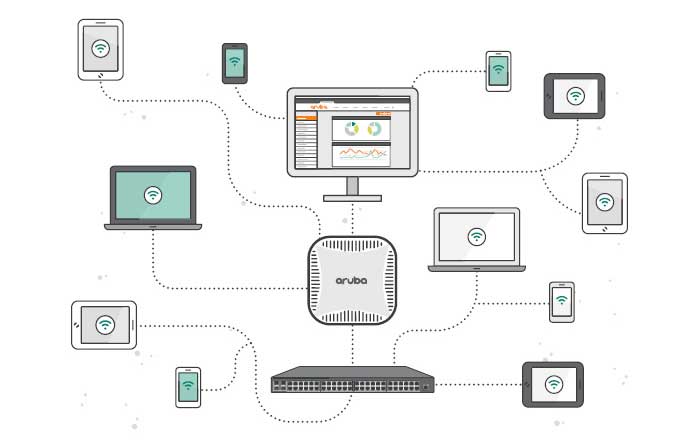
The mobile optimised network for small and mid-sized businesses
Explore how an integrated network, built around 802.11ac, can provide SMBs with a higher-performing, secure network for today’s business environment, and how simple – and profitable – setting up such a network really is.
Download your FREE eBook by Aruba by completing the form below.
7 steps to securing healthcare IoT infrastructure
A smart strategy and the right investments can help organisations to stay ahead of cybersecurity threats
With health care experiencing accelerated adoption of the Internet of Things (IoT), demand is skyrocketing for connected medical, operational and personal “things.” Not coincidentally, attacks on health care organisations are also rising, with numerous high-profile breaches having been reported this past year.
Although many IoT devices offer extraordinary benefits for improving patient outcomes, staff effectiveness and operational cost savings, they also bring with them new security risks. Instead of just targeting employees with sophisticated email phishing schemes, hackers now can exploit vulnerabilities in any type of connected device, right down to your light bulbs.
That’s why the latest cybersecurity best practices call for a multilayered IoT security strategy to mitigate threats and reduce risks. These seven steps can help organisations to develop a comprehensive cybersecurity game plan while ensuring that they won’t become the next headline.
Step 1. Know what’s on your network
Understand how to secure the network that supports IoT infrastructure begins with knowing what’s running on it. Assuming it’s a great network, people will want to connect devices to it. Otherwise, what’s the point?
Further, it’s no longer just information technology (IT) staff who are connecting devices via wired ports or wireless systems. Practically every hospital staff member is skilled enough to connect a device. In other words, no matter how hard an IT team tries to establish guidelines and procedures, someone will always connect something unexpected.
This makes modern network access control (NAC) solutions the first line of defense, the best of which offer granular centralised, role-based management and network segmentation. Such solutions enable policies to be set regarding which devices or things can, and cannot, access a network, as well as what data or applications they can access and who has the ability to manage or maintain these devices.
Such solutions monitor connections 24/7 and automatically quarantine anything that doesn’t fit. Simultaneously, an alert about a quarantined device goes to the individual assigned.
Quickly alerting IT is a vital capability, as it ensures that a human can swiftly permit the right people to gain access in support of the primary mission: meeting patient needs. For example, an IT team can determine whether a quarantine alert is simply a biomedical technician attempting to connect a new patient device or a suspicious activity that merits further investigation.
Step 2. Know the role of each user, device and thing
Controlling IoT access to a network requires controlling both the devices and the humans who connect them. To determine what type of access to give a person or an IoT device, it’s not as important to know what each one is as it is to understand what they do. In other words, it requires understanding the business aspect of why a person or device is seeking network access.
This may seem like a no-brainer, but it needs to be emphasized because a significant number of health care IT and facilities professionals are hired from outside the field. It’s important for organisations that fall under this category to work with their business counterparts to understand the role each connected user or device plays.
For example, IoT-enabled, smart hand-washing stations track clinician compliance with organizational hygiene policies. The data these stations collect is critical to tracing and mitigating infection sources before they become a hazard to patients or put an organization at risk.
On the staff safety side, an increasing number of building security systems include a smartphone-enabled duress app. This empowers clinicians to request assistance with a single touch.
Clearly, each of these IoT connection types requires the right role to ensure smooth, seamless and always-on network access.
Step 3. Infuse real-time intelligence to detect subtle changes
Security experts agree. No matter how well wired and wireless network are secured, threats eventually will find their way in. In fact, recent reports show that more than two-thirds of breaches actually involve internal actors rather than external forces.
That’s why the most advanced defenses now include sophisticated analytics and artificial intelligence (AI)-based machine learning. Such solutions spot changes in user or device behavior that often indicates that an invader has evaded perimeter defenses, whether originating from inside or out.
So, if a smart hand-washing station tries to masquerade as a duress app, an AI-infused access control solution can detect this behavior faster than humanly possible and immediately deny network access while notifying both the appropriate IT staffer and facilities manager.
An even more advanced solution provides clear, understandable feedback to anyone attempting to use the compromised statio, such as sending a text message to a station’s potential user to redirect the person to an operational unit.
Step 4. Insist that your vendors improve device security
Historically, medical and facilities device vendors have focused on engineering their products to address health care and building needs with less, or no, regard for the security implications. Consequently, most are still well below IT networking standards, such as supporting the ability to utilize and store encryption keys on the device.
This is where you, the IoT-enabled device purchaser, comes in. By insisting that vendors place networking best-practice security protocols on their development road maps prior to making the investment, it will challenge them to improve their solutions to earn more business.
In some cases, health care organisations may even be able to share with prospective vendors why they’ve selected a competing product.
The sooner users start insisting that IoT device manufacturers comply with security expectations, the faster we’ll see solutions to match.
Step 5. Change default credentials and passwords
Despite the fact that most high-profile IoT-related breaches to date have resulted from failing to change default credentials, it’s surprising how often we still encounter organisations that permit devices to connect via manufacturer-supplied user names and passwords.
Although many vendors now embed options that are more unique than classic “admin” and “password” defaults, know that all factory settings are documented — to enable users to receive help remediating a device — and, therefore, are easily found on the internet.
However, this doesn’t require creating a unique user name and password for every single infusion pump or door lock. Instead, assign need role-based credentials that follow today’s recommendations for character combinations and length. This allows one set of credentials for all infusion pumps or other medical device types.
Additionally, only employees with the correct role, based on their login credentials and the device’s role, should be permitted to access device settings, all of which are then monitored by the sophisticated access control solutions already addressed.
Step 6. Remember, cybersecurity is really about people
No matter what technologies are adopted for securing IoT, people remain the most important priority. All of the sophisticated systems in the world won’t protect a network if someone places the credentials for a device on the unit itself or hangs a list of passwords on the wall in his or her office.
Most of the time, inadequate practices result from insufficient understanding. This makes training on IoT device security policies critical, as well as requiring regular review or recertification, for all staff members across all departments. Strict enforcement of security protocols is also key.
When training, one of the most important tips to give employees is to create prompts for passwords based on something they know, but others will not, and record only the prompt where it’s accessible. For example, the prompt “fishing trip” could relate to the password “B$gH0rnMTo9^2o^16.”
Once employees have created their lists of prompts and associated passwords, make sure they lock lists containing passwords in a drawer and never, ever, discuss them — either at or outside of work. Of course, they can keep their prompt lists handy for efficiency.
Step 7: Reassess and revise
Regardless of how thorough an IT department is at creating a comprehensive IoT security strategy, it should never be considered “complete.” Instead, the most secure organisations are those that continue to evolve their practices as new tools and recommendations emerge.
This doesn’t mean becoming a cybersecurity guru. Instead, savvy professionals leverage trusted resources to learn about the latest best practices and options. Simultaneously, they regularly scan their organisations for ways to improve.
Source: Aruba, a Hewlett Packard Enterprise company.
How to meet your environmental targets successfully
Are you looking to go greener with your IT efforts?
Whilst universities have been at the forefront of understanding the challenges of sustainability, Higher Education remains one of the UK’s largest non-commercial consumers of energy, therefore concerns about sustainability need to be addressed.
An increasing number of universities are focusing on carbon emissions and footprint and putting this as a main priority, with targets to reduce emissions set by the Higher Education Funding Council for England (HEFCE).
The HEFCE is committed to reducing carbon emission levels by 43% (against a 2005 baseline) by 2020 and requires all the higher education institutions (HEIs) it funds, to have a carbon management plan that contains carbon reduction targets, meaning it’s paramount to monitor performance to create a sustainable campus.
To help the sector reduce their carbon emissions, HEFCE are providing:
Recoverable grants through the Revolving Green Fund (RGF) for projects that reduce institutions’ emissions
Good practice guidance on producing carbon reduction strategies, targets and associated carbon management plans
A report to estimate carbon dioxide emission baselines for each HEI that they fund.
However, many institutions have also adopted the SMART strategy when setting targets:
Specific – each target should address one issue
Measurable – targets should be expressed as a quantity
Achievable – targets should be reasonable for everyone involved
Realistic – targets should be challenging but practical, they can be reviewed once accomplished
Time-bound – target must have a deadline
Although, there are no financial penalties for failing to meet the 2020 targets, institutions are required to publicly report their progress towards carbon reduction targets – which is hoped will encourage them. It’s also predicted that a university’s record on sustainability will become increasingly important for students deciding where to study.
What is conclusive, is that sustainability must become deeply embedded in an institution’s policies and practices, the easiest way to make a difference and become more sustainable is through innovative and pioneering new technologies.
XMA sit on a number of frameworks that can help you meet your needs. Our team of tech specialists can find opportunities for you to save time and money in your efforts to provide cleaner, greener technology in your institution.
XMA named HP Premier MPS Partner
We are thrilled to have achieved HP Premier MPS Partner Status. This is an industry wide trading status, and a symbol that we are recognised as an established print IT reseller and a key partner of HP.
Achieving this status is testament to our ability to provide strategic guidance in managing print environments and providing services and software solutions that can help reduce costs, improve security and free up your time.
We operate a technology-based, results oriented approach to managing your print environment, built on the premise that printing and document management are essential parts of your IT architecture.
What could you achieve with MPS?
Lower printing costs by implementing a targeted print strategy for improving processes and increasing efficiencies.
Reduced need for IT support for your printing environment, so your IT staff can spend more time on strategic projects.
Manage and deploy devices and supplies from multiple vendors in a more convenient and effective manner.
Ensure that your imaging and printing devices are being used in the best ways for your employees and your organisation.
Increase employee productivity by reducing device downtime.
Because we recognise the importance of incremental and continuous improvement, you will be better able to respond to changes in your business as they arise.
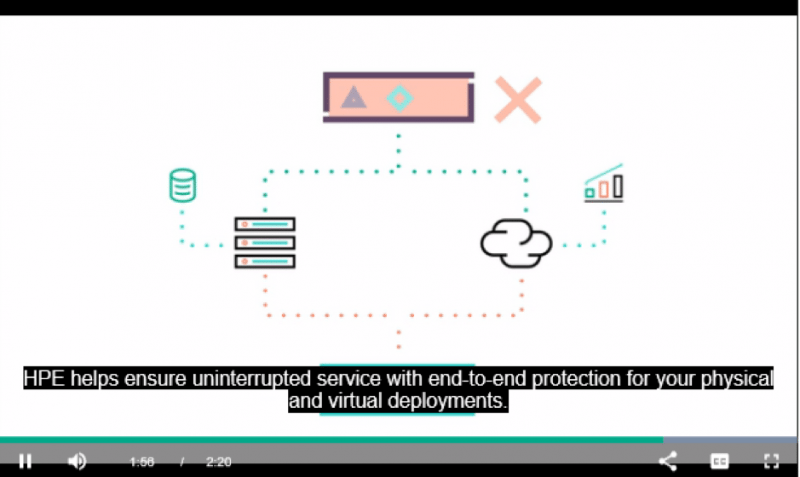
Ensure Infrastructure Resiliency from Your Data Center to Cloud
Looking to reduce risk and ensure infrastructure availability and resiliency? HPE will help you determine a risk mitigation strategy for your Hybrid IT environment. Your enterprise’s greatest threat may already be present in your data center.
Southbourne Junior School
Discovering Chromebook has transformed learning and teaching at pioneering primary school
Southbourne Junior School has introduced over 140 Chromebooks to their learners and teachers encouraging collaboration both inside and outside of the classroom.
When Neil Hall took over as Head of IT at Southbourne Junior School, days were spent wheeling around a laptop trolley from classroom to classroom. As any teacher will know, equipment failings can be one of the most time-consuming and frustrating factors within education.
The school’s IT support resource spent two hours a week on-site and was in high demand. The rest of the time staff were forced to work around IT problems which meant devices were often either abandoned altogether or used to a fraction of their full capabilities. Even when everything was in full working order, IT time in the classroom was minimal. A timetabled activity for an hour a week, IT lessons focused on teaching general office skills such as word processing, spreadsheets and presentations. The internet was used for research and teachers lost confidence in utilising IT within other subject areas.
With the support from Headteacher, Luke Hanna, Neil began researching what other schools were doing. It was on a visit to another school that they witnessed a group of pupils utilising Chromebooks that they decided to research them further.
Having contacted Google for guidance, the school was directed to XMA. Following the success of the pioneering allLearn programme which was already a market leader with iPad, XMA were about to launch allLearn with Chromebook. This was the start of a long-term, collaborative partnership with XMA providing guidance and support on Southbourne Junior School’s mobile device deployment. Through this partnership, Southbourne Junior School has currently deployed over 140 Chromebooks to their learners.
XMA worked with the school to explore their specific requirements.
Some of the main features of Chromebook result in hidden cost savings. With Chromebook web based operating system, regular updates are delivered automatically, saving precious IT resource time manually installing patches. User data and settings are stored in Google Cloud, which means devices can be easily shared. Data is backed up in the event of a device being lost and they don’t need to be imaged after each academic year.
Google’s Online Management Console, included for each Chromebook, allows teachers to react instantly, whether it be introducing or changing firewalls and filters or deploying Apps to devices. Google Apps for Education allow users to work collaboratively on the same documents at the same time from multiple locations. School staff have also found it much easier to manage multiple user groups and updates can be made centrally.
Since introducing Chromebooks, use of IT across the curriculum has increased significantly.
Due to their relative ease of use, teachers have embraced them quickly and are using them in lessons across the curriculum. Further to this, Chromebooks are helping to facilitate communication between the school and parents. Pupils create their own web pages to store homework and information, which can be seen by parents as well as teachers in the classroom.
Southbourne Junior School plans to become an IT specialist school. They will be one of the first schools in the UK to have three of their existing teaching staff accredited as Google Educators.
Children leaving Southbourne Junior School will be equipped with basic knowledge and understanding of the very latest technology, placing them at an advantage for further education and their future career. A high percentage of the jobs that our children will be doing in the future don’t currently exist and one way to skill up children for these roles is to give them access to the very latest, cutting edge technology and encourage them to use this technology productively to aid learning.
XMA remain on hand to help, support and advise. Through two in-house educational experts, Dr. Steve Bunce and David Ryan, both educators themselves – XMA offers first- hand knowledge of how technology can enhance the learning environment and support both staff and learners in the pedagogical application of Chromebook in the classroom.
Dorothy Goodman
XMA in Partnership with outstanding specialist school
Making a difference to learning
Dorothy Goodman School is an Outstanding (Ofsted 2016) Special School serving pupils from 3-19 and supporting parents and guardians. It caters for pupils with a wide range of special educational needs. In recognition of the diversity of their pupils, the School tailors their curriculum to meet the needs of each individual pupil. This is supported by the School’s extensive equipment and facilities, such as Soft Play Room, Hydrotherapy Pool and Sensory Room, which are all used to support and educate pupils.
The School awarded XMA the contract for the design, supply, delivery, installation, testing, commissioning and ongoing support of the ICT infrastructure. XMA worked closely with Dorothy Goodman School and SEND Specialists, iansyst, to deliver state-of-the-art devices, systems and support.
Exceptional ICT for an exception student body
Pupils and staff use ICT to enable rich communication and expression. “For example, in one class, two pupils with profound communication and physical needs were able to confidently express their choices and engage in meaningful communication with the adults.” Ofsted Report 2016
Sensory rooms and sensory spaces use light and sound or even darkness to enable children with various abilities, including Profound and Multiple Learning Difficulties to develop skills such as switching and cause and effect to colour or hand eye coordination skills, additionally, it supports learners with Autistic Spectrum Disorders to relax or be engaged in their environment. Music linked to light has found to be supportive for either calming pupils or raising their attention levels.
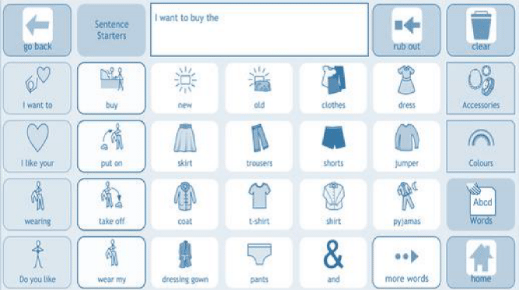
The most common device for pupils is iPad, typically with a ‘voice box’ to ‘speak’ for pupils. From this, many pupils run an application called Grid Player, made by Smart Box. Grid Player is an Alternative and Augmentative Communication (AAC) App that helps people who cannot speak or who have unclear speech to communicate. Pupils create sentences on their iPad that speak aloud.
Pupils with motor disabilities are able to utilise Grid Player and other Smart Box applications using Eye Gaze, which mounts on iPad or Windows tablet.
Pupil controls Grid Player using Eye Gaze technology
The range of input devices is as diverse as the pupil population. These include a huge variety of switches (USB, Wi-Fi or Bluetooth), joysticks, trackballs and special keyboards. The goal always being to provide the best possible interface for pupils to express themselves and control their environment.
To create books, flash cards, worksheets and accessible documents, teachers and pupils use Communicate InPrint.
Google’s speech to text enables other pupils to create documents using speech within Google’s GSuite for Education.
In short, together with the School and XMA’s SEND specialist partner iansyst, the School is able to rapidly draw upon thousands of IT solutions for the needs of each and every child.
ICT challenges and resolutions
The School faces many daily challenges that arise from the variety of needs within an All-through
Special School. They were looking for a partner who can provide flexibility in the delivery of service and one with the expertise to respond quickly to their many needs. We demonstrate this below through some examples of the challenges we have resolved together during our six-year partnership:
The School’ split network made it difficult for information to be accessed and teachers had to navigate around this issue by carrying dongles across all sites to access the network and complete their work.
XMA resolved this problem through clear communication, detailed planning and a thorough execution.
By working with the School’s previous on-site engineer, XMA was able to analyse the issue and build a secure configuration for the ICT systems. This allowed us to join the networks into one unified collaboration platform. Our solution enabled teachers to have easy and instant access to the network regardless of the site and without the provision of dongles, which is better for data access and security. This meant that all educators were able to work more efficiently to create and deliver engaging lessons.
With difficulty logging in across different sites for pupils and teachers due to different systems,
XMA consolidated all usernames and passwords across all sites on one domain, which allowed for a more streamlined and secure logging in process.
The School site spreads across five different locations, two main sites – the upper school and a lower school – with three inclusive satellite bases located on the sites of local mainstream schools.
The School’s XMA Technician Tom is involved in liaising with all existing stakeholders, across all 5 sites and those of the mainstream schools. This means that Tom has to be organised in documenting and reporting his conversations and agreements so that he can relay accurate information and advice for all interested parties. He is responsible for coordinating the relevant departments at XMA and updating the Service Desk system for the purposes of resiliency and escalation.






 Monitoring by Hotjar